

Explained
How to Detect Shadow AI in Your Organization
Shadow AI breaches average $4.63M. Here is how to detect shadow AI using DNS logs, OAuth audits, and your endpoint inventory, step by step.
Discover how DLP integration and MDM integration work together to protect SMB data. Explore processes and best practices.
In today’s remote workforce, SMBs lose $4.35M per breach on average (IBM 2024)—often due to unsecured endpoints. As an IT admin, you need to:
In today’s distributed workforce, combining MDM integration with robust data loss prevention (DLP) strategies is no longer optional. DLP integration embeds protection directly into your MDM platform, letting you enforce encryption, monitor data flows, and block risky transfers—all from one dashboard.
Data Loss Prevention (DLP) refers to the technology and policies that prevent unauthorized access, sharing, or leakage of sensitive information—such as:
Core Functions of DLP:
| Function | What It Does |
|---|---|
| Content Inspection | Scans files, emails, clipboard, and uploads for sensitive patterns (e.g., SSNs) |
| Contextual Analysis | Looks at device compliance, user role, network, or app to enforce access rules |
| Automated Response | Blocks or encrypts files, alerts IT, or quarantines risky data transfers |
In traditional setups, DLP tools run as separate agents or appliances. But for SMBs, that model introduces cost, complexity, and deployment delays.
DLP integration means embedding data protection policies directly into your MDM workflows. Rather than deploying and managing a separate DLP stack, you extend your MDM platform—like Trio—to control both devices and data from a unified dashboard. Every enrolled device, whether company-owned or BYOD, inherits DLP policies automatically—making it easier to stay compliant and reduce risk at scale.
A well-rounded Data Loss Prevention (DLP) strategy isn’t just about technology—it relies on a foundation of key principles that ensure effectiveness, scalability, and resilience.
Author once, apply everywhere—across platforms, users, and groups. No more policy drift or tool fragmentation.
Block file uploads, external sharing, USB transfers, or unapproved app usage as it happens.
See DLP violations, enforcement stats, and compliance trends alongside device health metrics—in one pane of glass. For SMBs that lack a large security operations center (SOC), these capabilities translate to streamlined workflows and reduced operational costs. You implement DLP integration alongside your existing MDM tasks, like pushing certificates or configuring VPNs, so you don’t need to allocate additional headcount to manage yet another tool.
A user in Finance tries uploading a salary spreadsheet to their personal Dropbox. Trio’s DLP instantly blocks the action, logs the incident, and alerts IT—all without disrupting authorized workflows.
With Trio:
Enterprise DLP vs. Integrated DLP: A No-Brainer for SMBs
| Criteria | Enterprise DLP Suite | Trio’s Integrated DLP |
|---|---|---|
| Deployment Time | Weeks or months (agents, gateways, training) | ✅ Live in under 1 hour |
| Cost | $10,000+/year in licenses and services | ✅ Included in your Trio MDM subscription |
| Ease of Use | Requires dedicated SOC/security team | ✅ Built for lean IT teams |
| Visibility | Fragmented across systems | ✅ Unified with device & app data |
| SMB Relevance | Overkill for small teams | ✅ 90% of features, 10% of the cost |
| Trio Feature | What It Solves | Example Use Case |
|---|---|---|
| Pre-Built Compliance Templates | Quick-start for HIPAA, GDPR, PCI-DSS compliance | Blocks external sharing of patient data by healthcare staff |
| Real-Time Data Movement Blocking | Stops leaks to unmanaged drives, apps, or email | Prevents upload of credit card spreadsheets to Gmail or Google Drive |
| Context-Aware Access Control | Uses role, location, and device posture to allow/deny data actions | Only compliant, encrypted devices can download contracts |
| Identity-Integrated Policies | Syncs with Azure AD, Okta for role-based access controls | Marketing team restricted from exporting customer databases |
| Self-Healing Device Policies | Automatically re-applies encryption, screen lock, or policy when removed | Re-locks a device when user disables policy manually |
| Centralized Logs & Reports | Makes audit prep and compliance monitoring easy | View monthly report of top 5 DLP violations by department |
| Remote Wipe & Auto-Encryption | Secures lost or stolen devices instantly | Remotely wipes lost iPhone with employee salary data |
“Before Trio, we had no way to stop users from moving sensitive files to personal drives. Now, our DLP rules run automatically—zero incidents in 6 months.”
— IT Director, 50-employee FinTech
“Trio replaced our MDM and patchwork DLP. Unified, easy, and no security hire needed.”
— Ops Manager, Healthcare SaaS
Modern SMBs operate across a distributed environment—remote offices, field workers, BYOD setups, and multiple operating systems. This diversity introduces massive data risk if DLP and device management aren't integrated.
Trio eliminates this gap by ensuring the DLP rules apply at the device level, in real-time. Whether a device is on your network or roaming, DLP enforcement travels with it. 
Healthcare: Ensure PHI is only accessed from encrypted, policy-compliant devices. Auto-block messaging apps like WhatsApp that can leak data. Finance: Restrict USB and cloud uploads for spreadsheets with account numbers. Ensure trading systems aren’t accessed from rooted or jailbroken devices. Education: Block students from copying research data or downloading assignments to personal drives. Retail: Wipe lost/stolen point-of-sale tablets and prevent sales reports from being shared via personal email. These vertical-specific protections show that Trio isn’t just secure—it’s adaptable to how your industry operates.
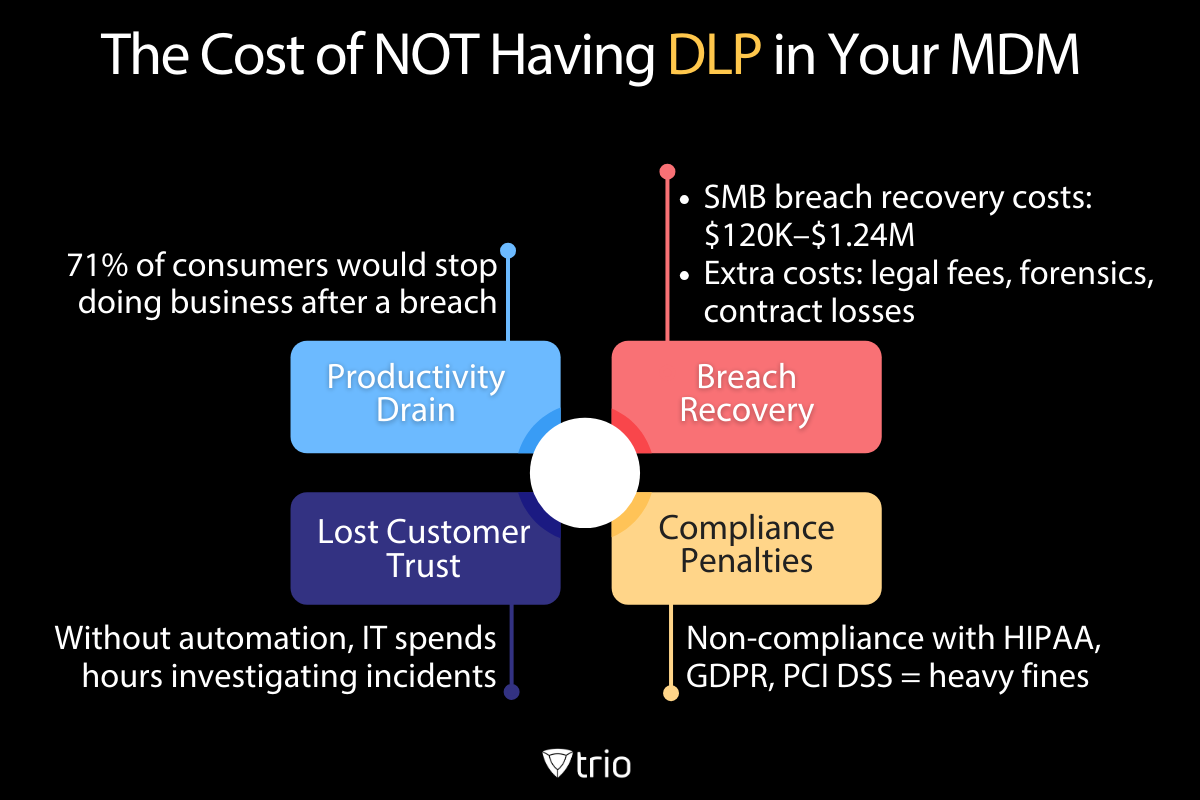
Choosing not to implement a DLP strategy—especially one integrated into your MDM—comes with hidden and visible costs:
Bottom line: Waiting is costly. Trio helps you act today.
Pro Tip: Trio alerts users when a policy is triggered, reducing IT tickets and improving compliance.
If you're part of the 85% of SMBs that don’t yet have a formal DLP program due to cost or complexity, Trio is built for you. ✅ Setup in 1 day ✅ Works with Azure AD, Okta ✅ No agents or extra hardware ✅ Includes free compliance checklist If you’re ready to see how easy it can be to enforce enterprise-grade data protection on all your endpoints, now’s the time to act. Book a free demo and start your free trial.
Looking for a clear, actionable, and complete checklist to implement DLP in your organization? Download the free guide below to get started.
| Scenario | Legacy DLP Tool | Trio DLP |
|---|---|---|
| Setup + Training Time | 4–6 weeks, dedicated resources | ✅ 1 hour, self-service setup |
| USB Policy Violation Alerting | Requires custom rule coding | ✅ Block or encrypt instantly |
| Monthly Reporting | Manual log stitching | ✅ Auto-generated reports in dashboard |
| BYOD Device Management | Separate MDM and DLP agents | ✅ Integrated—DLP follows device policies |
Data protection doesn’t have to come with enterprise bloat or security complexity. With Trio’s MDM-native DLP, you can:
The threats are real. But the solution doesn’t have to be complicated. Trio gives SMBs a scalable, integrated way to protect sensitive data—without burning the budget or overloading IT. It’s time to unify device and data protection—and do it with ease.
Every organization today needs a solution to automate time-consuming tasks and strengthen security. Without the right tools, manual processes drain resources and leave gaps in protection. Trio MDM is designed to solve this problem, automating key tasks, boosting security, and ensuring compliance with ease.
Every organization today needs a solution to automate time-consuming tasks and strengthen security. Without the right tools, manual processes drain resources and leave gaps in protection. Trio MDM is designed to solve this problem, automating key tasks, boosting security, and ensuring compliance with ease.





Have questions? We've got answers. This section covers some of the most commonly asked questions related to this topic.
Related
The related industry news, interviews, technologies, and resources.
Shadow AI breaches average $4.63M. Here is how to detect shadow AI using DNS logs, OAuth audits, and your endpoint inventory, step by step.
Declarative device management is Apple's answer to MDM polling delays and unreliable compliance data — here's how it works and how to start using it.
An APNS certificate is what lets your MDM platform send commands to iPhones, iPads, and Macs — here's how to create, renew, and protect it.
Device location history works differently on Android, iPhone, and MDM platforms. Here's what each one actually stores and how to access it.
Unlike full-device VPN, per-app VPN tunnels only the apps you choose — and without MDM enforcement, users can bypass it entirely on unmanaged devices.
A remote wipe on a Mac is only possible if the right tools are in place first — here is how MDM, Find My, and native macOS each handle device erasure.
Compare SOC 2 Type 1 and Type 2 audits. Discover key differences, audit scope, duration, and how to choose for compliance needs.
Compare managed and unmanaged devices - definitions, security differences, control levels, and how to choose the right approach for IT.