


MFA solution
Multi factor authentication (MFA) with phishing resistant sign in
trio.so adds passkeys, security keys, push with number matching and authenticator codes to every sign in, with policies that decide who needs what. Test a policy in monitor only mode, then switch it on, in the same console that manages your people and devices.



 trio.soHarbor & PineIdentity & Access ›Authentication ›Policies
Authentication Policies
Control the ordered chain of methods a session must satisfy to access protected applications and sensitive actions.
Passwords alone don't stop account takeover
Stolen passwords still work
A reused or phished password is enough to get in when nothing else is asked for at sign in.
Codes can be phished too
SMS and one time codes help, but a convincing fake login page can still collect them. Phishing resistant methods close that gap.
Rollouts stall
Turning MFA on for everyone at once risks locking people out, so it stays optional and half the company never enrolls.
How it works
How MFA works in trio.so
Pick the methods you trust, decide who has to enroll in what, and write the policies that ask for them. Every sign in is logged.
- Choose your methodsTurn on the methods you want people to use: passkeys, FIDO2 security keys, FastPass, Trio Verify push and codes, authenticator apps, and email or SMS codes. Each one is labeled by assurance level, from phishing resistant to weak.
- Set enrollment rulesMark each method as required, optional or off, and give people a grace period from one hour to 90 days to enroll. Recovery codes and temporary access codes can be allowed or required.
- Write sign in policiesAuthentication policies set the chain of methods a sign in must pass, for the groups and apps you choose, with exclusions where you need them. Edit a draft while the live version keeps working, then publish.
- Watch every sign inThe activity log records every challenge with the person, the method and the result. Export it to CSV whenever you need to show what happened.
Coverage
See who is protected and who isn't
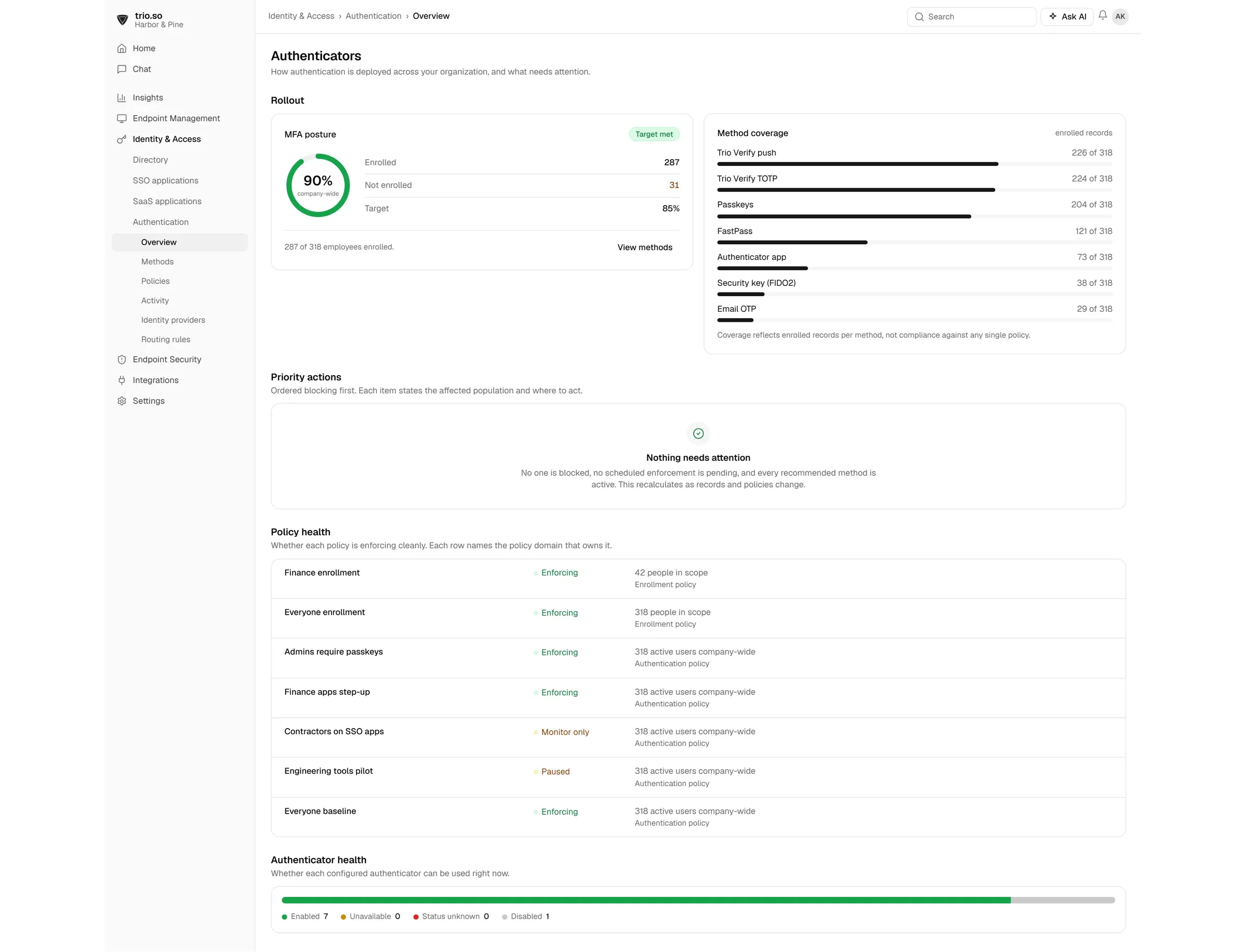
The overview shows how many people have enrolled in each method, how your policies are doing and what to fix next.
- Method coverageSee enrollment for every method, so weak methods don't quietly become the default.
- Policy healthEach policy shows whether it passed validation and how many people and apps it covers.
- Priority actionsA short list of what to do next, such as people still missing a required method.
Reauthentication
Ask for MFA again when something changes
A sign in shouldn't be trusted forever. Set how often people verify again, and which changes trigger a new check.
- New device or new browserAsk for MFA again when someone signs in from a device or browser trio.so hasn't seen for them before.
- IP address changeAsk again when a request comes from a different IP address than the one the session was trusted under.
- Device falls out of complianceAsk again when the device's compliance posture changes, so a laptop that just failed a check doesn't keep a trusted session.
- How often to askChoose every sign in, every hour, every 8 or 24 hours, every 7 days, or only when context changes. Sessions an admin revokes always end.
Push
Push approvals with number matching
Trio Verify push lets people approve a sign in from their phone, with the checks that stop accidental or tricked approvals.
- Number matchingPeople type the number shown on the sign in screen, so an approval can't be tapped by accident. Use it always, for high risk sign ins only, or never.
- Biometric before approvalRequire the phone's screen lock or biometrics before a request can be approved on the device.
- Easy enrollmentEnroll with a QR code, a self service link or an email setup link, and move an account to a new phone with device to device transfer.
Try trio.so MFA free
Start a free trial, turn on passkeys and push, and test your first policy in monitor only mode. No credit card needed.
Recovery
Recovery without weakening security
Lost phones and new laptops happen every week. trio.so gives people and admins safe ways back in, so nobody has to switch MFA off to get someone working.
Temporary access codes
Admins issue a one time code that expires after 30 minutes and can be revoked.
Recovery codes
One time backup codes, allowed or required by your enrollment policy.
Admin MFA reset
Reset someone's methods when they replace a phone or lose a key.
Self service enrollment
People add and manage their own methods in the user portal.
Monitor only mode
See what a policy would have done before it blocks anyone.
Activity export
Export sign in events to CSV for reviews and audits.
Features
More MFA features
The controls IT teams ask for once MFA is running.
Passkeys
Phishing resistant sign in with the device people already carry.
FIDO2 security keys
Hardware keys for admins and other high risk accounts.
FastPass
Another phishing resistant option from trio.so.
Authenticator apps
Codes from any standard TOTP authenticator app.
Email and SMS codes
Fallback methods, clearly labeled as weaker, for people who need them.
Assurance levels
Every method is labeled phishing resistant, strong or weak.
Why trio.so
MFA in the same console as your people and devices
Separate MFA tools see the login. trio.so also sees the person's groups, apps and devices, so policies, offboarding and compliance checks all work from one place.
One record per person
MFA methods, sign in activity, apps and devices sit together on one record.
Pricing you can read
Plans start at $5 per device. MFA and single sign on are included in the Zero Trust plan.
Rated 4.8 on G2
IT teams rate trio.so 4.8 out of 5 on G2, with support from real people 24 hours a day, Monday to Friday.