


SSO solution
Single sign on (SSO) for every app your team uses
trio.so connects your apps with SAML or OIDC, brings people in from Microsoft Entra ID, Google Workspace or Okta, and protects every sign in with MFA. When someone leaves, you turn off their access once, in the same console that manages their laptop and phone.



 trio.soHarbor & PineIdentity & Access ›SSO applications ›Applications
Applications
Applications people sign in to through trio.so, and the health of each connection.


Too many logins, too little control
A password for every app
People juggle dozens of logins, reuse the same password everywhere, and call the helpdesk every time they forget one.
Offboarding misses an app
Someone leaves, IT turns off their email, and their Salesforce, Figma and GitHub accounts stay open for weeks because nobody knew they had them.
People and devices live apart
The directory knows who someone is. The device tool knows what they carry. Neither tells you both, so every access review starts with two exports.
How it works
How single sign on works in trio.so
Connect where your people already live, add the apps they use, and let groups decide who gets what. trio.so keeps the sign in, the record and the device in one place.
- Connect your directorySync people and groups from Microsoft Entra ID or Google Workspace, or let Okta, OneLogin, Entra ID or PingOne push them in with SCIM. JumpCloud and BambooHR connect too, so new hires appear without anyone retyping them.
- Add your appsPick an app from the catalog and connect it with SAML 2.0 or OpenID Connect, or add a bookmark for apps that support neither. trio.so tracks each signing certificate and flags it before it expires.
- Assign by groupGive apps to groups instead of people. Dynamic groups follow a rule you write and refresh every few minutes, so access follows the org chart without tickets.
- See every accountOne list shows every person with their status, groups and MFA enrollment. Act on many people at once, and export to CSV or Excel when it's time for an access review.
Federation
Keep the identity provider you already trust
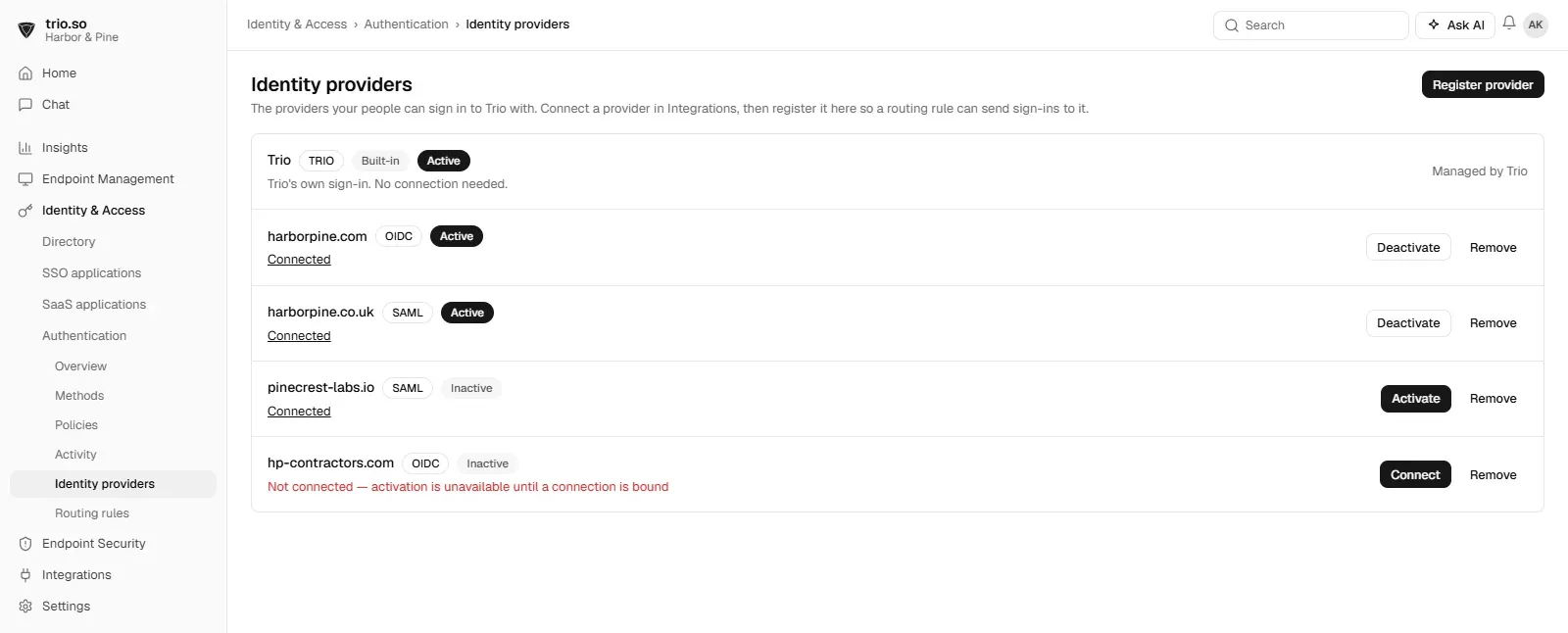
Already on Okta or Entra ID? Register it in trio.so with OIDC or SAML, and each person is sent to the right place to sign in, based on their email domain.
- OIDC and SAML providersAdd the identity providers you already run. People keep the sign in they know, and trio.so still manages their apps, groups, MFA and devices.
- Routing by email domainRouting rules send each email domain to its provider, so a subsidiary on Google and head office on Entra ID can share one console.
- Change providers without starting overBecause apps and groups live in trio.so, moving people to a different identity provider means changing a rule, not rebuilding every app connection.
Offboarding
Offboard people in one step
When someone leaves or loses a laptop, open their record and act in seconds, in the same console that manages their devices.
- Deactivate the accountDeactivate a person and they can no longer sign in to any app connected through trio.so.
- Force sign outEnd their active sessions right away, so the next app they open asks them to sign in again.
- Reset MFA or require a new passwordNew phone, lost security key or a leaked password: reset their MFA or require a password change at their next sign in.
MFA
MFA built in, from passkeys to push
Choose which sign in methods people can use and where each one applies. Phishing resistant options are built in.
- Phishing resistant methodsPasskeys, FIDO2 security keys and FastPass resist phishing, so a fake login page gets nothing it can use.
- Push, codes and backupsTrio Verify push and codes, any authenticator app, email or SMS codes, plus recovery codes and temporary access codes for bad days.
- Policies you can test firstEnrollment and sign in policies decide who must use what. Run a sign in policy in monitor only mode to see its effect before you enforce it.
Try SSO with your own apps, free
Start a free trial, connect your directory and add your first app. No credit card needed.
Features
More SSO features
Small things that save the helpdesk a call.
App catalog
Start from a catalog template instead of a blank SAML form.
Bookmark apps
Put apps without SAML or OIDC on the same app list anyway.
Certificate warnings
See which signing certificates are about to expire before sign in breaks.
Sign on audit log
Every sign in through trio.so, in one searchable log.
Sign in activity per person
A chart of each person's sign ins over the last weeks.
Bulk actions
Deactivate, export or resend invites for many people at once.
Why trio.so
Identity and devices in one console
Standalone SSO tools stop at the login. trio.so puts people, apps, MFA and devices on one record, so onboarding, offboarding and access reviews happen in one place.
One record per person
Apps, groups, MFA methods, sign in activity and devices sit together, so nothing slips between tools.
Pricing you can read
Plans start at $5 per device. Single sign on and MFA are included in the Zero Trust plan.
Rated 4.8 on G2
IT teams rate trio.so 4.8 out of 5 on G2, with support from real people 24 hours a day, Monday to Friday.