



Explained
HIPAA Technical Safeguards Explained for IT Teams
HIPAA technical safeguards are the 5 standards in 45 CFR 164.312. What each one requires, required vs addressable, and the device settings that meet it.
Unlock efficient network management with our DHCP server best practices to ensure high availability and security.
Navigating the complexities of Dynamic Host Configuration Protocol (DHCP) server management is crucial for maintaining a robust, efficient, and secure network. Implementing DHCP server best practices is key to optimizing network performance. This blog will guide you through the fundamental steps and considerations for configuring a DHCP server, effective DHCP management, choosing the best server settings, maintaining your DHCP server effectively, and configuring optimal lease times for your network environment.
A DHCP server, standing for Dynamic Host Configuration Protocol, is instrumental in effective DHCP management, automatically assigning IP addresses and essential network configuration details to devices on a network. This automatic provisioning streamlines network management, eliminating the need for manual IP address assignment, which can be time-consuming and prone to errors. In configuring DHCP servers, it's essential to understand the broader context of server management, which includes keeping software up-to-date and secure, or understanding how protocols like LDAP work. Configuring a DHCP server is essential for efficient network management, ensuring that all devices connect smoothly and securely. Here’s how to do it effectively:
By following these steps, you can ensure that your DHCP server is well-configured, providing reliable IP address allocation while maintaining network security and efficiency. 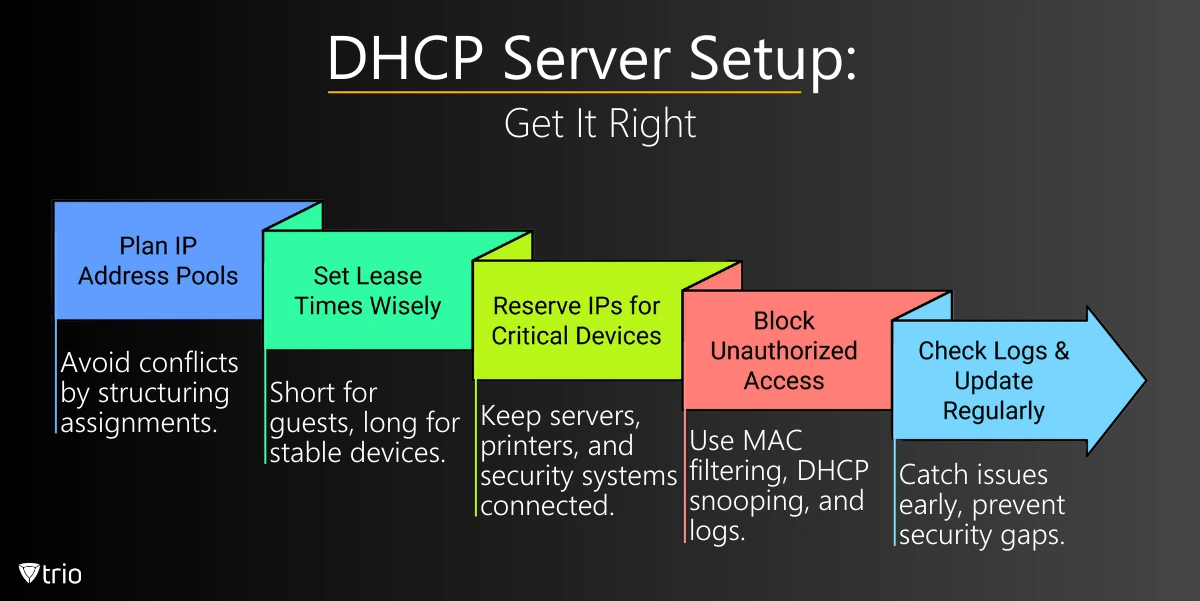
When it comes to managing and configuring DHCP servers, understanding the differences between DHCP for IPv4 and IPv6 is crucial for modern network administration. While both versions aim to simplify IP address allocation, their operational nuances highlight the evolution of Internet technology and the need for advanced network strategies. IPv4, established as the backbone of the internet for decades, utilizes DHCP to dynamically assign the limited 32-bit IP addresses available. This mechanism has been essential in efficiently managing IP resources within networks, especially with the DHCP server lease time best practices, resulting in optimal address utilization. However, the exponential growth of internet-connected devices has stretched the IPv4 scheme to its limits, leading to a pressing need for more addresses. Enter IPv6, with its vast 128-bit address space, promising virtually unlimited IP addresses to accommodate the burgeoning Internet of Things (IoT) landscape. DHCPv6, the counterpart to DHCP for IPv4, addresses the scalability issue and introduces several improvements and features designed to enhance network management and security. When comparing IPv4 vs. IPv6 allocation strategies, note that IPv6 allocation strategies often leverage stateless address autoconfiguration (SLAAC) for device self-configuration, alongside or instead of traditional DHCP. However, DHCPv6 isn't just a direct translation of DHCPv4 into a larger address space; it's an opportunity to implement more sophisticated network policies, including privileged access management. Effective Allocation Strategies consider the unique benefits and challenges of each protocol, ensuring a balanced and forward-looking network infrastructure capable of supporting an ever-more connected world. 
Maintaining your DHCP server is crucial for ensuring network stability and reliability. Regular maintenance tasks include monitoring the server's performance, auditing the IP address allocations, and ensuring the DHCP server software is up to date with the latest security patches and updates. Moreover, implementing privileged access management would safeguard DHCP configurations, ensuring only authorized adjustments are made. It's also important to regularly review the DHCP server logs for any unusual activity or errors that could indicate potential issues. These logs can provide valuable insights into DHCP operations, helping to quickly identify and resolve any problems, such as IP address conflicts or unauthorized access attempts. Additionally, backing up your DHCP server configuration regularly can prevent data loss and facilitate quick recovery in case of hardware failure or other disasters. This backup should include not just the DHCP database but also the server's configuration settings and any custom scripts or policies in use. Furthermore, managing the scope of your DHCP server efficiently is vital. This involves adjusting the lease duration based on network needs to balance between minimizing unnecessary traffic and ensuring IP addresses are available for new devices. For networks with high turnover or a large number of transient devices, shorter lease times can help maintain a pool of available addresses. Conversely, for stable environments with devices that remain on the network long-term, longer lease times can reduce DHCP traffic and server load. Proactively managing these aspects of your DHCP server ensures it operates smoothly, supports network growth, and adapts to changing business requirements, keeping your network secure and efficiently managed.
DHCP server lease time best practice involves striking a balance between network flexibility and stability. The DHCP lease time is the duration for which an IP address is assigned to a device before it needs to be renewed or released. A shorter lease time can be advantageous for networks with a high degree of mobility or temporary devices, as it ensures that IP addresses are recycled more frequently, reducing the likelihood of IP address exhaustion. For instance, a guest Wi-Fi network might benefit from a lease time of just a few hours, ensuring that IP addresses are readily available for new connections. Conversely, longer lease times can indeed have a positive impact on network traffic by reducing the frequency of IP address renewals. This is particularly advantageous in environments characterized by stable device configurations, such as office workstations. By extending the lease time to several days or even a week, organizations can effectively minimize the DHCP server's workload and mitigate the risk of network interruptions resulting from frequent lease renewal processes. However, it's imperative to conduct a thorough assessment of your network's specific needs and dynamics before determining the optimal DHCP lease time. Factors such as the number of devices, their mobility, and the overall network utilization must be carefully considered to ensure efficient and reliable network operations. Furthermore, adherence to industry best practices and recommended guidelines can serve as invaluable resources when devising an effective DHCP management strategy. In addition to DHCP lease time optimization, organizations should also prioritize effective Windows Server user management as part of their broader network management initiatives. User accounts and access rights play a crucial role in ensuring data security, regulatory compliance, and overall network integrity. Implementing robust user management practices, such as role-based access control (RBAC), password policies, and account auditing mechanisms, can help organizations maintain a secure and well-organized Windows Server environment. Furthermore, leveraging advanced features and tools available within Windows Server, such as Active Directory (AD) and Group Policy, can streamline user provisioning, authentication, and authorization processes while enhancing overall network efficiency and security. By employing a comprehensive approach to Windows Server user management alongside DHCP lease time optimization, organizations can effectively address key operational challenges and maintain a resilient and secure network infrastructure. 
How many DHCP servers you should have depends on various factors, including the size of your network, the number of clients, and your network's redundancy and reliability requirements. Here's a more detailed look at these considerations:
From setting optimal lease times to choosing the right server for your needs, adhering to DHCP server best practices plays a pivotal role in network management. As networks evolve and the transition towards IPv6 becomes more pronounced, staying informed and flexible in your DHCP management strategies ensures your network remains reliable, secure, and efficient. For those looking to dive deeper into DHCP configurations and optimizations, exploring detailed guides on DHCP management and IPv6 allocation strategies can provide valuable insights and practical tips for network administrators. In the context of Bring Your Own Device (BYOD) policies, combining Mobile Device Management (MDM) with DHCP servers becomes very important. DHCP can work together with MDM to automatically set up network options for each device based on its own rules. This ensures that each device, whether it's personally owned or company-issued, receives appropriate network configurations, aligning with the company's security protocols. Trio is a cutting-edge MDM solution that integrates with DHCP seamlessly, enhancing network configurations for both IPv4 and IPv6 environments. With Trio, streamline your device management and ensure every device complies with your network policies effortlessly. Try Trio's free demo today and revolutionize your network management strategy.
Every organization today needs a solution to automate time-consuming tasks and strengthen security. Without the right tools, manual processes drain resources and leave gaps in protection. trio.so is designed to solve this problem, automating key tasks, boosting security, and ensuring compliance with ease.
Every organization today needs a solution to automate time-consuming tasks and strengthen security. Without the right tools, manual processes drain resources and leave gaps in protection. trio.so is designed to solve this problem, automating key tasks, boosting security, and ensuring compliance with ease.





Have questions? We've got answers. This section covers some of the most commonly asked questions related to this topic.
Related
The related industry news, interviews, technologies, and resources.
HIPAA technical safeguards are the 5 standards in 45 CFR 164.312. What each one requires, required vs addressable, and the device settings that meet it.

Shadow AI breaches average $4.63M. Here is how to detect shadow AI using DNS logs, OAuth audits, and your endpoint inventory, step by step.

Declarative device management is Apple's answer to MDM polling delays and unreliable compliance data — here's how it works and how to start using it.

An APNS certificate is what lets your MDM platform send commands to iPhones, iPads, and Macs — here's how to create, renew, and protect it.

Device location history works differently on Android, iPhone, and MDM platforms. Here's what each one actually stores and how to access it.

Unlike full-device VPN, per-app VPN tunnels only the apps you choose — and without MDM enforcement, users can bypass it entirely on unmanaged devices.

A remote wipe on a Mac is only possible if the right tools are in place first — here is how MDM, Find My, and native macOS each handle device erasure.

Compare SOC 2 Type 1 and Type 2 audits. Discover key differences, audit scope, duration, and how to choose for compliance needs.