




Explained
How to Detect Shadow AI in Your Organization
Shadow AI breaches average $4.63M. Here is how to detect shadow AI using DNS logs, OAuth audits, and your endpoint inventory, step by step.
HIPAA technical safeguards are the 5 standards in 45 CFR 164.312. What each one requires, required vs addressable, and the device settings that meet it.
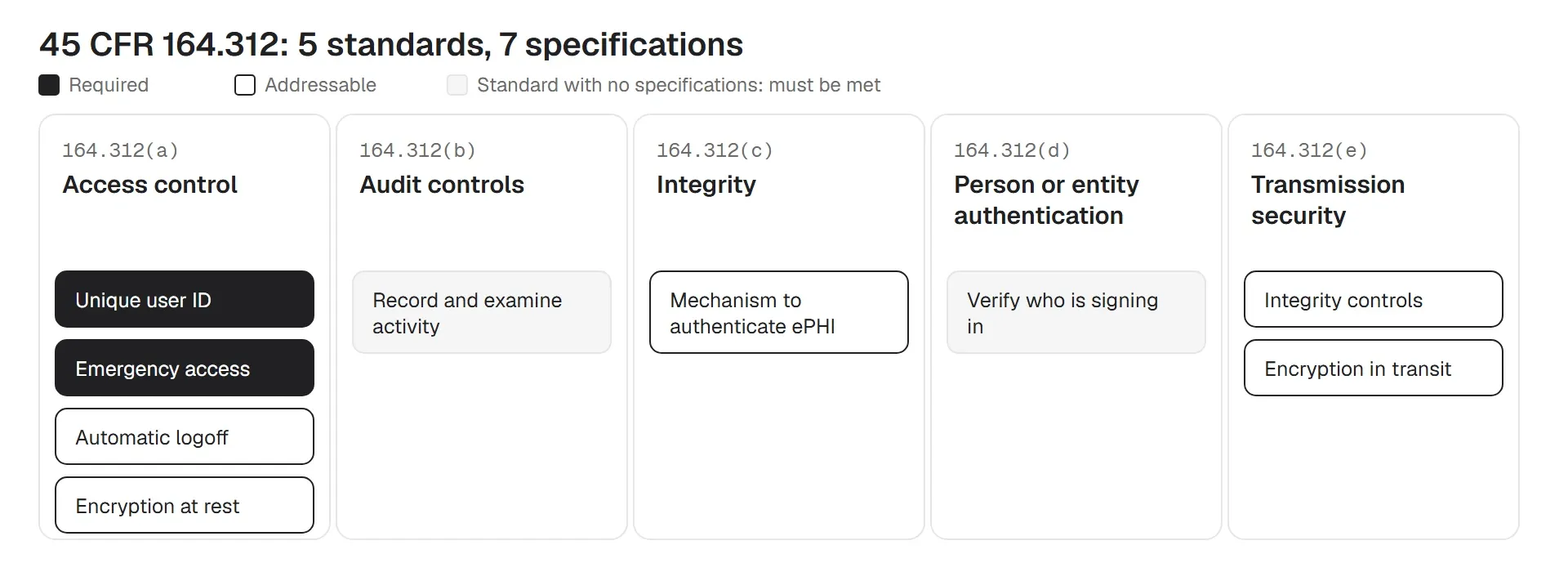
HIPAA technical safeguards are the technology controls the HIPAA Security Rule requires to protect electronic protected health information (ePHI). They are set out in 45 CFR 164.312 as five standards: access control, audit controls, integrity, person or entity authentication, and transmission security.
Each standard has more specific requirements under it, called implementation specifications. There are seven. Two are required: unique user identification and an emergency access procedure. The other five are "addressable": you assess each one, then either do it or write down why you used something else instead.
This guide is for the IT admins and MSPs who have to turn the rule into settings. For each standard it covers what the text says, what to configure on servers, laptops and phones, and what an auditor will ask to see.
In short
The Security Rule splits its safeguards into three groups: administrative (164.308), physical (164.310) and technical (164.312). Technical safeguards are the controls built into the technology itself: who can sign in, what gets logged, and how data is protected when stored and when sent.
The rule covers providers, health plans and clearinghouses (covered entities) and the vendors that handle patient data for them (business associates). If an MSP manages devices that hold ePHI, it is covered too.
Your EHR vendor does part of this for you. In a cloud EHR, the vendor runs much of the logging, integrity and backup inside the application. That vendor is a business associate. Get its business associate agreement, ask which safeguards it covers, and keep its answer with your risk analysis. Everything outside the EHR, starting with the devices people use to reach it, is still yours.
| Cite | Standard | Implementation specifications | What it usually means in practice |
|---|---|---|---|
| (a)(1) | Access control | Unique user identification (R) Emergency access procedure (R) Automatic logoff (A) Encryption and decryption (A) | Named accounts, a break-glass account, screen lock, full-disk encryption |
| (b) | Audit controls | None: the standard must be met | Logging in the EHR, email, file storage and device management, plus a review routine |
| (c)(1) | Integrity | Mechanism to authenticate ePHI (A) | A way to prove records weren't changed: permissions, version history, hashes, backups that can't be edited |
| (d) | Person or entity authentication | None: the standard must be met | Passwords or passcodes with lockout, MFA on remote and admin access |
| (e)(1) | Transmission security | Integrity controls (A) Encryption (A) | TLS, VPN, managed Wi-Fi with certificates, encrypted email |
R means required and A means addressable. The rule is technology-neutral on purpose: it names outcomes, not products. That is why two clinics can meet the same standard with different tools.
The standard: allow access to ePHI "only to those persons or software programs that have been granted access rights". It has four specifications.
Every person who touches ePHI gets their own account, so every action can be traced to one person. Shared logins at nurse stations, labs and front desks are the most common way clinics break this. Staff share a login because signing in and out of a shared workstation is slow.
Fix the speed problem and the sharing usually stops. Fast user switching, tap-badge sign-in and a short screen lock on shared machines all help. If a system can't support named accounts, note it in your risk analysis with the compensating controls you use.
Enforcement example. In September 2026, Ambry Genetics agreed to pay $700,000 after a phishing attack affecting 225,370 people. One of the potential violations identified by HHS's Office for Civil Rights (OCR), which enforces HIPAA, was not assigning unique user IDs in systems that held ePHI.
A written, tested way to reach ePHI when normal access fails: an outage, a locked-out admin, a disaster. In practice this is usually an emergency admin account, often called a break-glass account, whose password stays sealed until it is needed. Keep it sealed, alert on every use, and review each use afterwards. Test it once a year, because a break-glass password nobody can find is not a procedure.
End or lock a session after "a predetermined time of inactivity". HIPAA does not set the number of minutes, so you choose it based on risk. Use a short timeout on shared workstations in clinical areas and a longer one in private offices. Write both numbers and the reason in your policy.
Expect pushback from clinicians who lose work to screen locks. A lock that resumes the session with a quick sign-in is usually accepted. A full logoff that closes the EHR usually isn't.
Encrypt ePHI at rest: laptops, desktops, phones, tablets, removable drives and servers. On endpoints this means BitLocker on Windows, FileVault on macOS, and a passcode on iOS and Android so built-in encryption is active. Store the recovery keys centrally, away from the devices. See our guide to full-disk encryption for the setup.
Enforcement example. HHS has settled several cases over stolen unencrypted laptops. In 2020, Lifespan Health System paid $1,040,000 after the theft of an unencrypted laptop holding ePHI on 20,431 people. OCR found Lifespan had decided encryption was reasonable and appropriate, and then didn't encrypt its laptops.
The standard: put in place "hardware, software, and/or procedural mechanisms that record and examine activity" in systems that contain or use ePHI. It has no specifications, so it must be met as written.
Note the two verbs: record and examine. Turning logging on is half the job. The other half is reviewing the logs, which a separate HIPAA rule (164.308(a)(1)(ii)(D)) requires you to do regularly.
Small teams often stall on how much of the EHR log to review. Start with alerts for the high-risk events: access to staff or VIP records, bulk exports, and sign-ins at odd hours. Then sample the rest.
Enforcement example. Montefiore Medical Center paid $4.75 million in February 2024. An employee had stolen and sold data on 12,517 patients, and it went unnoticed for about two years. OCR's potential violations included not having audit controls that record and examine activity.
The standard: protect ePHI "from improper alteration or destruction". The addressable specification asks for a mechanism to confirm that ePHI hasn't been changed or destroyed without authorization.
Ransomware is the most common real-world test of this safeguard. In practice it means:
The standard: verify that a person or entity seeking access to ePHI "is the one claimed". It has no specifications. "Entity" covers systems too, such as an app calling an API or a device joining your network.
Does HIPAA require MFA? The current rule does not mention it. But a password alone is hard to defend after a phishing breach, and MFA is one of the essential goals in HHS's voluntary cybersecurity performance goals for healthcare. The January 2025 proposed rule would make it mandatory. Put it first on email, remote access, the EHR and admin consoles. Our guide to multi-factor authentication covers the options.
Where phones aren't allowed on the clinical floor, app-based MFA fails. Hardware security keys or badge-based sign-in work there. On devices, enforce passcode length, complexity and lockout after failed attempts, so a lost phone can't simply be guessed open.
Enforcement example. Providence Medical Institute was fined $240,000 in October 2024 after three ransomware attacks, including for access control failures. OCR's notice records that staff at an acquired practice were sharing generic logins with administrator rights.
The standard: guard against unauthorized access to ePHI "being transmitted over an electronic communications network". It has two addressable specifications: integrity controls, which detect changes in transit, and encryption.
Five of the seven specifications are addressable. The word is often misread as "optional". Under 164.306(d)(3), you must assess whether the specification is reasonable and appropriate for you. If it is, you implement it. If it isn't, you document why and implement an equivalent alternative if one is reasonable.
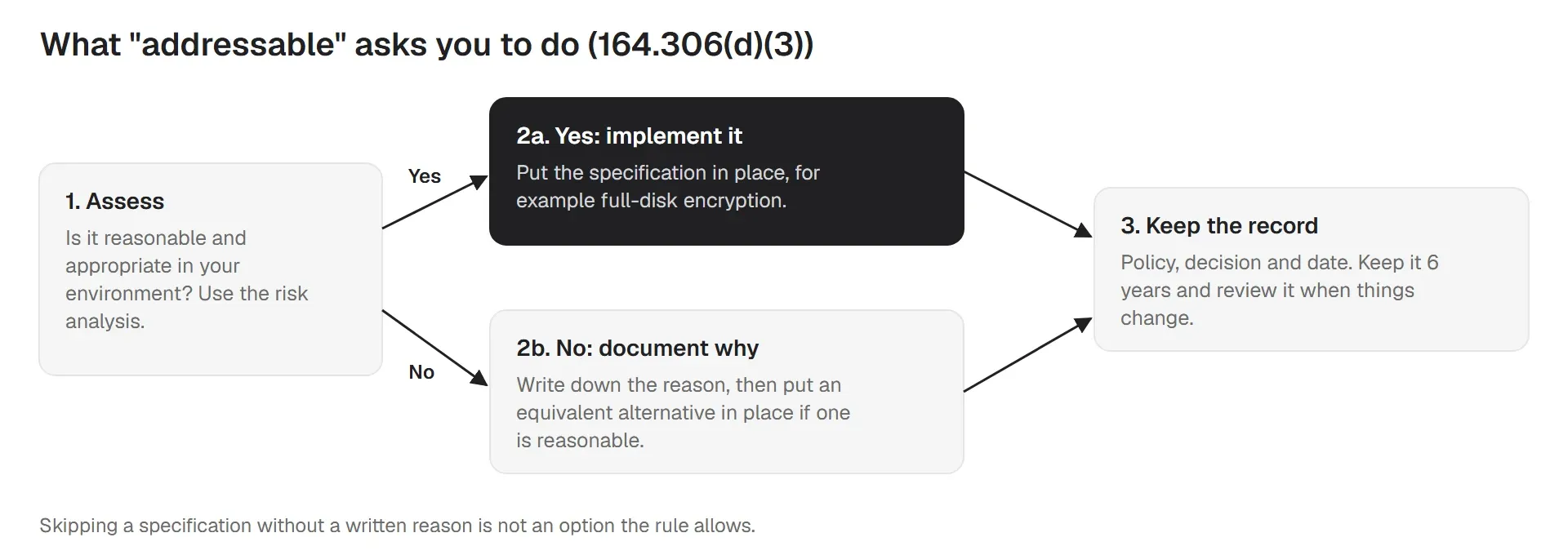
In practice, few organizations can defend not encrypting laptops or not locking idle screens. The tools are built into every major operating system, and auditors know it. Treat "addressable" as "required unless you can write a convincing reason". Keep that reason with your risk analysis.
Not strictly. Encryption at rest and in transit are both addressable. But encryption decides what happens when a device goes missing, and that makes it close to mandatory in practice.
HHS guidance on unsecured PHI says that ePHI encrypted to NIST standards is not "unsecured", as long as the key wasn't also compromised. In practice, BitLocker, FileVault and a phone passcode meet this for devices, and TLS or a modern VPN meets it in transit. The NIST references are SP 800-111 for stored data and SP 800-52, 800-77 or 800-113 for data in transit. A lost laptop with properly managed full-disk encryption is generally not a reportable breach. The same laptop unencrypted usually is, with letters to every patient on it, a report to HHS and, if more than 500 residents of a state are affected, the media.
Two details matter. The recovery key must not travel with the device: store it in your management console or directory, not on a sticky note in the laptop bag. And you need proof the device was encrypted when it was lost, which means encryption status reports, not a policy that says encryption is on.
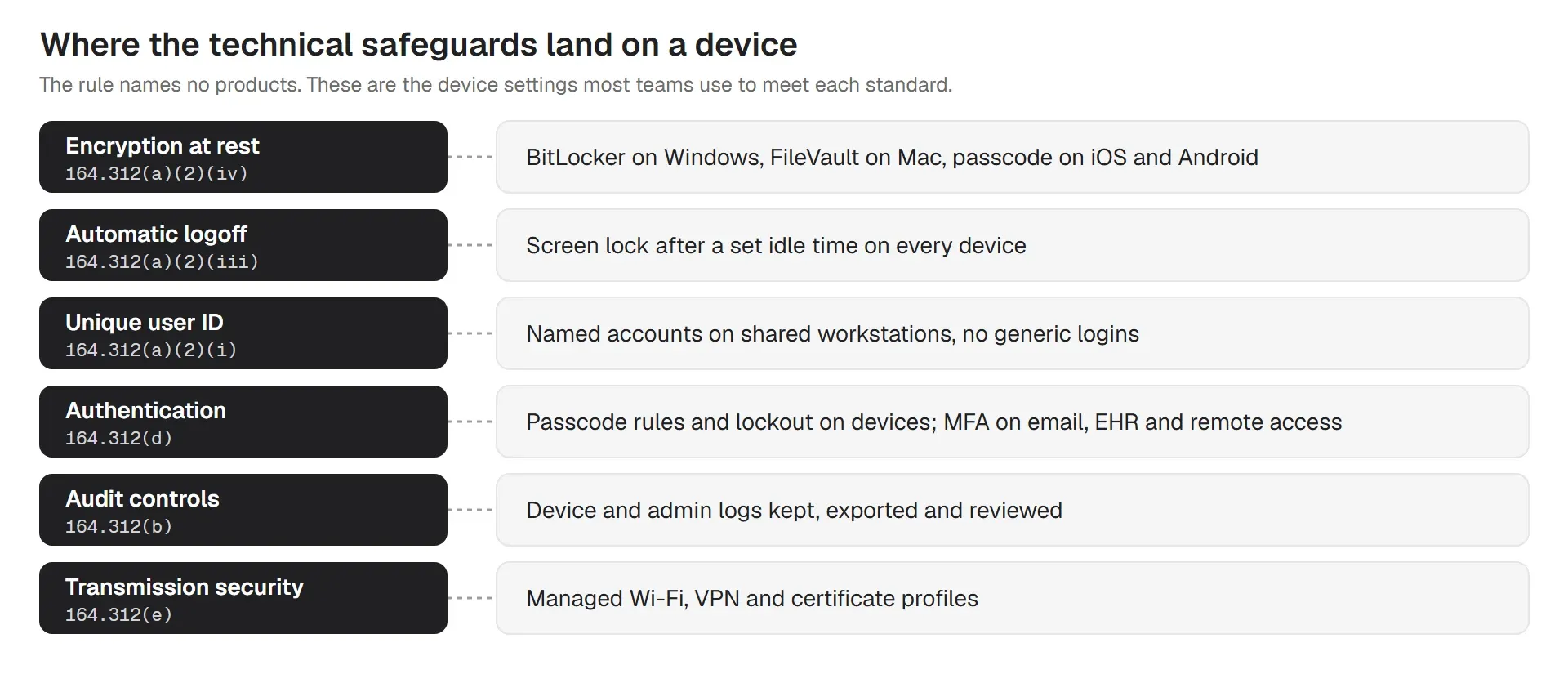
Most of the technical safeguards end up as settings on endpoints. A laptop that leaves the building with ePHI on it tests access control, authentication and encryption at once. The rule names no products, but the settings are the same everywhere:
| Platform | Encryption at rest | Automatic logoff | Authentication |
|---|---|---|---|
| Windows | BitLocker, keys escrowed centrally | Screen lock after idle time; account lockout | Named accounts; Windows Hello or MFA for remote access |
| macOS | FileVault, recovery key escrowed | Screen saver lock and password on wake | Named accounts; MFA for remote and admin access |
| iOS and iPadOS | On when a passcode is set | Auto-lock with a passcode | Passcode rules; managed apps for ePHI |
| Android | On by default with a screen lock | Screen timeout with a lock | Passcode rules; work profile on personal phones |
| Linux | LUKS, set at install | Screen lock in the desktop policy | Named accounts; SSH keys, no shared root |
Personal devices (BYOD) are allowed if your policy says what they need and you can show they have it. Many practices keep ePHI off personal phones entirely. Others require a passcode, a work profile or managed apps, and an agreement that lets IT remove work data. Write the choice down in your BYOD policy. Our post on PHI on mobile devices covers the details.
Lost and stolen devices need a written procedure: lock it, locate it if you can, wipe it if it won't come back, then check encryption status and decide whether it is a breach. An encryption status report from your device management tool makes that last step quick.
When OCR investigates, it asks for documents, not a demo. Policies say what you planned. Reports and logs show the controls actually ran. Keep your policies and the records of required activities (risk analysis, log reviews, addressable decisions) for six years from when they were created or last in effect (164.316(b)(2)). Many teams keep supporting reports for the same period.
| Safeguard | Evidence to keep |
|---|---|
| Unique user ID | User list from each ePHI system with no shared or generic accounts, or documented exceptions |
| Emergency access | Written procedure; last test date; review of each break-glass use |
| Automatic logoff | Policy with timeouts; device report showing the screen lock setting applied |
| Encryption at rest | Encryption status report for every device, dated; key escrow records |
| Audit controls | Logging configuration; review records with reviewer and date |
| Integrity | Permission model; backup and restore test results; anti-malware coverage |
| Authentication | Password and passcode policy; MFA enrollment report for remote and admin access |
| Transmission security | TLS configuration; VPN and Wi-Fi settings; secure email setup |
| Addressable decisions | For each addressable item: implemented, or the written reason and the alternative |
Generate device reports on a schedule, not on request. A screenshot proves one moment. Twelve dated monthly reports prove a control was in place all year.
All of these items, with an owner, a frequency and the evidence column, are in our HIPAA compliance checklist. Look for the items in the Access, Devices, Network and Audit sections.
Status: proposed, not law. HHS published the proposed rule on January 6, 2025. HHS's published rulemaking schedule now targets a final rule in July 2027. The date has already slipped once. As of October 2026 there is no final rule, and the text of 164.312 is unchanged.
If finalized as proposed, it would remove the required vs addressable split and rewrite 164.312 into ten standards. For IT, the biggest changes:
Most of these are already good practice, and some are already in OCR's corrective action plans. If you are setting up controls now, use the proposed rule as a guide. Encryption, MFA, account lockout and separate admin accounts are the cheap wins, and you won't have to redo them if the rule is finalized.
The three groups overlap, and the same device policy often touches all of them:
| Group | What it covers | Device example |
|---|---|---|
| Administrative (164.308) | Risk analysis, policies, training, access approval, incident response, contingency planning | Who approves access to a laptop and what happens when someone leaves |
| Physical (164.310) | Facilities, workstation use and security, device and media disposal and reuse | Where a workstation sits, and wiping a drive before reuse |
| Technical (164.312) | Access control, audit controls, integrity, authentication, transmission security | Encryption, screen lock, sign-in and logs on the laptop itself |
The HIPAA guide for small businesses walks through all three for smaller practices. The minimum necessary standard explains how much access each role should get.
More HIPAA guides for IT teams
Does a device management tool make you HIPAA compliant? No. Policies, risk analysis, training and your EHR's own controls stay with you. What trio.so does is enforce many of the device settings above, and show encryption status for each device:
Learn more about compliance automation and device management for healthcare.
14-day free trial. No credit card required.
Sources. Last reviewed October 2026. This article is general guidance, not legal advice.
Every organization today needs a solution to automate time-consuming tasks and strengthen security. Without the right tools, manual processes drain resources and leave gaps in protection. trio.so is designed to solve this problem, automating key tasks, boosting security, and ensuring compliance with ease.
Every organization today needs a solution to automate time-consuming tasks and strengthen security. Without the right tools, manual processes drain resources and leave gaps in protection. trio.so is designed to solve this problem, automating key tasks, boosting security, and ensuring compliance with ease.





Have questions? We've got answers. This section covers some of the most commonly asked questions related to this topic.
Related
The related industry news, interviews, technologies, and resources.
Shadow AI breaches average $4.63M. Here is how to detect shadow AI using DNS logs, OAuth audits, and your endpoint inventory, step by step.

Declarative device management is Apple's answer to MDM polling delays and unreliable compliance data — here's how it works and how to start using it.

An APNS certificate is what lets your MDM platform send commands to iPhones, iPads, and Macs — here's how to create, renew, and protect it.

Device location history works differently on Android, iPhone, and MDM platforms. Here's what each one actually stores and how to access it.

Unlike full-device VPN, per-app VPN tunnels only the apps you choose — and without MDM enforcement, users can bypass it entirely on unmanaged devices.

A remote wipe on a Mac is only possible if the right tools are in place first — here is how MDM, Find My, and native macOS each handle device erasure.

Compare SOC 2 Type 1 and Type 2 audits. Discover key differences, audit scope, duration, and how to choose for compliance needs.

Compare managed and unmanaged devices - definitions, security differences, control levels, and how to choose the right approach for IT.