




How-Tos
How to Run a PowerShell Script on Multiple Computers
To run powershell script on multiple computers reliably, you need to know which method breaks on offline machines, workgroups, and Mac endpoints.
How to do a HIPAA risk assessment in 8 steps: scope, inventory, threats, scoring and the risk management plan. Free Excel worksheet with 21 starter risks.
A HIPAA risk assessment is the written review of every risk to the electronic patient data (ePHI) you hold: where it lives, what could go wrong, how likely that is, how bad it would be, and what you will do about it. The HIPAA Security Rule calls it a risk analysis and lists it as required under 45 CFR 164.308(a)(1)(ii)(A).
This guide walks through it in eight steps, the way an IT admin or MSP would actually run it. It comes with a free Excel worksheet: an asset inventory, a vendor list, a risk register with 21 starter risks, a scoring key, and a dashboard that updates as you go.
In short
The rule's wording is short. You must "conduct an accurate and thorough assessment of the potential risks and vulnerabilities to the confidentiality, integrity, and availability" of the ePHI you hold. The next line requires risk management: security measures that bring those risks down "to a reasonable and appropriate level".
Risk analysis or risk assessment? The rule says risk analysis. Most people say risk assessment. NIST SP 800-66 uses "analysis" for the legal requirement and "assessment" for the process you use to meet it. They mean the same piece of work.
HIPAA doesn't set a method or a format for the analysis. When you choose security measures, 164.306(b) asks you to weigh your size, complexity and capabilities, your technology, the cost, and "the probability and criticality of potential risks". HHS reads probability as likelihood and criticality as impact, which is why almost every method scores those two things.
Who needs one: every covered entity and every business associate, whatever the size. A three-person practice needs one. So does the MSP that manages its laptops, if it can access the ePHI.
It is not a gap assessment. A gap assessment checks whether specific controls are in place. HHS's Office for Civil Rights (OCR), which enforces HIPAA, has said that may not satisfy the risk analysis requirement, because it doesn't assess the risks to all of your ePHI. Our HIPAA compliance checklist is a gap tool. This worksheet is the risk analysis. You need both.
These steps follow the nine elements in HHS's risk analysis guidance and NIST's method, in the order an IT team can work through them. Each step points to a tab in the worksheet.
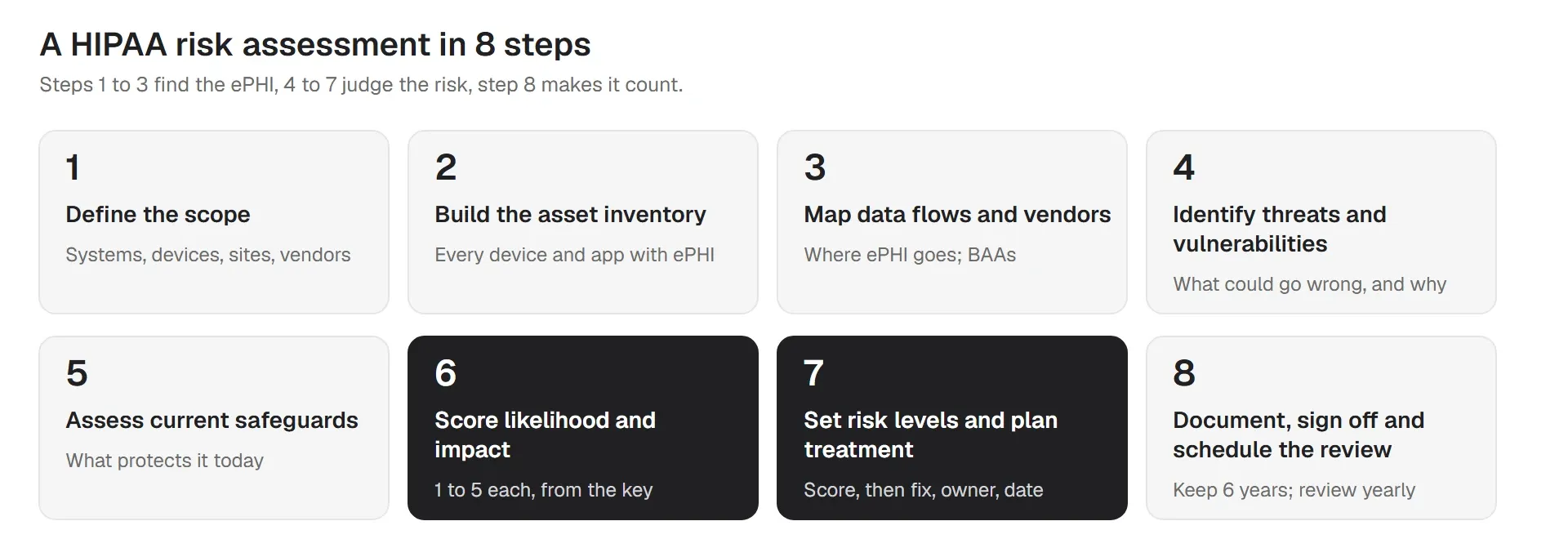
List every place ePHI is created, received, stored or sent. Start with the obvious systems (EHR or practice management software, email, file storage, billing), including any on-premises server, and then go wider: imaging PCs, laptops, phones, tablets, scanners, copiers, backup drives, home offices, and every vendor that touches the data. Write the scope down in the Scope tab, including what is out of scope and why.
The most common scope mistake is stopping at the EHR. OCR has rejected risk analyses that covered only the certified EHR (the one many practices complete for Medicare incentive programs) because they missed the rest of the ePHI.
Record every device and system in scope: what it is, who uses it, where it is, whether it is company-owned or personal, and how it is protected today. Is it encrypted? Does it lock? Is it patched? Can you lock or wipe it if it is lost? The Asset inventory tab has a column for each.
Mark anything you don't know as "Unknown", not "Yes". Unknowns are findings. If you manage devices with a device management tool, export the inventory from there instead of typing it. See our guide to IT asset management.
Trace how ePHI moves: from the front desk laptop to the EHR, from the EHR to the billing company, from the scanner to a cloud folder. Every vendor on that path is a business associate and needs a signed business associate agreement (BAA). The Vendors tab tracks the BAA and what each vendor covers. Our guide to third-party risk management goes further.
For each asset or group, write down what could go wrong (the threat) and the weakness that would let it happen (the vulnerability). A lost laptop is a threat. No encryption is the vulnerability that turns it into a breach. HHS groups threats as natural, human (intentional or not) and environmental. The worksheet adds technical failure and third parties.
Don't stop at what you can imagine. Use your incident history, recent OCR cases, and vulnerability scan results. A questionnaire alone can't find technical weaknesses, which is why NIST recommends pairing it with vulnerability scanning. If you don't run scans yourself, ask your MSP or use a low-cost scanner, and ask your EHR vendor for its latest security assessment.
Record what protects each asset today, and whether you can prove it works. "Laptops are encrypted" is a claim. A dated encryption report for every laptop is evidence. HHS asks you to check that measures "are configured and used properly", not only that they exist.
Give each risk a likelihood from 1 (rare) to 5 (almost certain) and an impact from 1 (negligible) to 5 (severe). Use the definitions in the Scoring key tab every time, so this year's scores can be compared with next year's. Score as a team. IT knows the likelihood, and clinical and business owners know the impact.
Multiply the two scores. The worksheet turns the result into a level: Low (1 to 4), Medium (5 to 9), High (10 to 16) or Critical (20 to 25). For each risk, choose a treatment: mitigate, transfer (for example, cyber insurance for the cost of an incident), accept with a written reason, or avoid by stopping the activity.
Each planned fix gets an owner and a due date. Then score the risk again as if the fix were done. That second score is the residual risk, and the gap between the two shows leadership what the work buys. This list of fixes is your risk management plan, which 164.308(a)(1)(ii)(B) requires. See our risk management plan template for the format.
Write a short report with five headings: scope, method, findings, the plan, and approval. The filled-in Scope tab and the register can serve as most of it. Have your security official sign it (HIPAA requires you to name one person responsible for security, under 164.308(a)(2)), along with a leader. Keep the report, the worksheet and the evidence for six years from when they were created or last in effect (164.316(b)(2)). Set the next review date before you close the file.
Take the most common risk in small practices: a laptop with ePHI on it is lost or stolen.
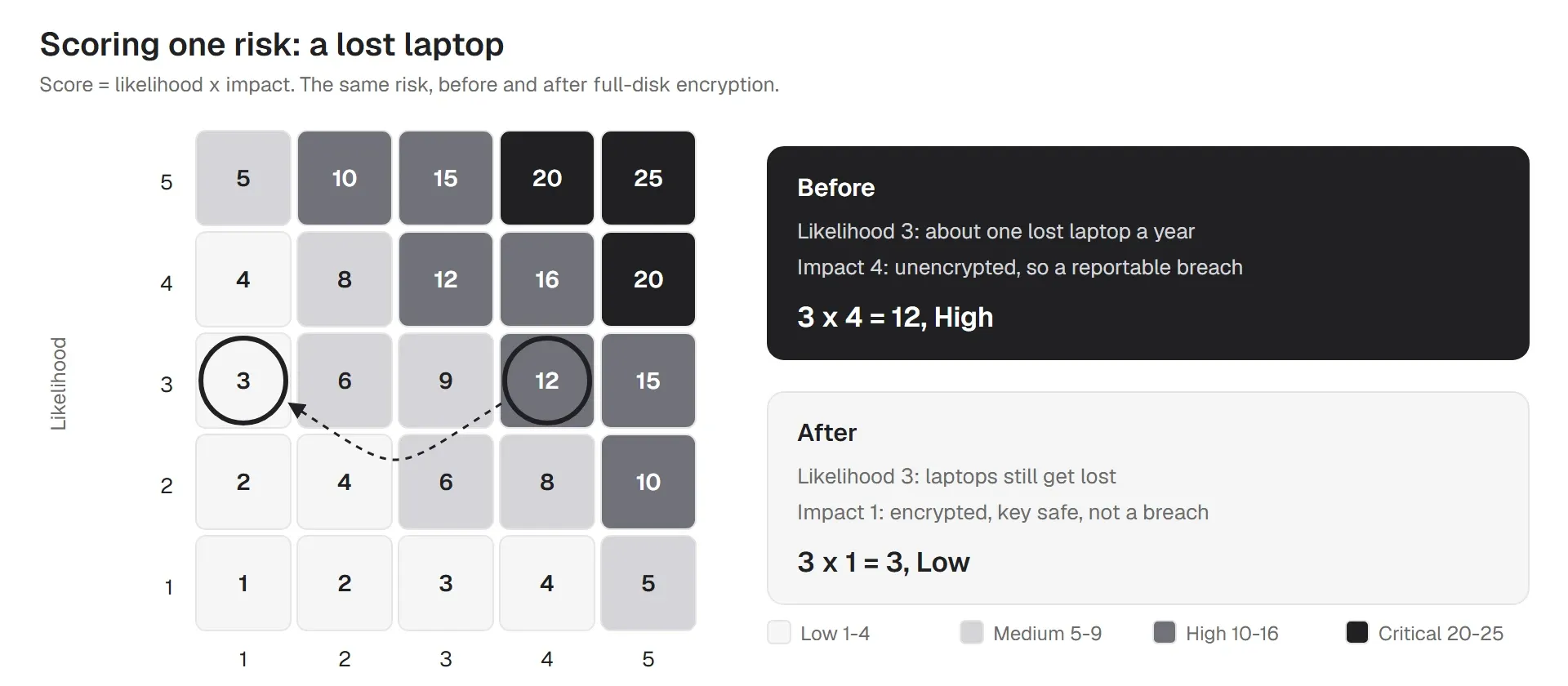
That is the whole method. Every row in the register works the same way. The scales the worksheet uses:
| Likelihood | Meaning |
|---|---|
| 1 Rare | Not expected in the next 3 years; strong controls in place |
| 2 Unlikely | Could happen once in 2 to 3 years |
| 3 Possible | Could happen about once a year |
| 4 Likely | Expected several times a year, or has happened here before |
| 5 Almost certain | Happening now or expected monthly |
| Impact | Meaning |
|---|---|
| 1 Negligible | No ePHI exposed; minutes of downtime |
| 2 Minor | A few records at risk; a few hours of downtime; no patient harm |
| 3 Moderate | Under 500 people affected; a day of downtime; a breach report to HHS likely |
| 4 Major | 500 or more people affected; days of downtime; media notice and an OCR investigation likely |
| 5 Severe | Large breach, long outage or risk to patient safety |
The EHR vendor runs much of the security inside the application. The devices people use to reach it are yours. That is where small practices and clinics most often have unscored risks:
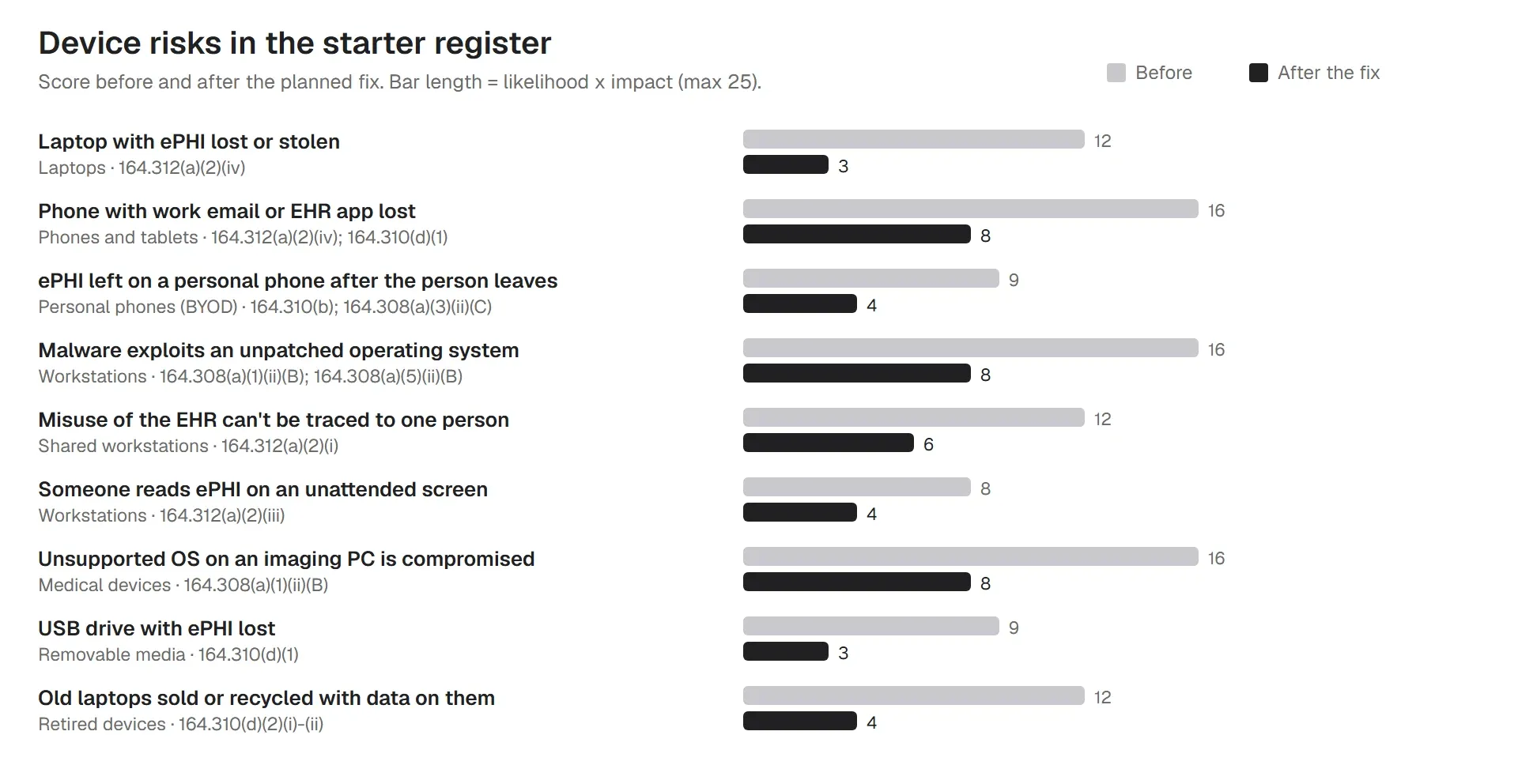
All of these are in the worksheet's starter register, mapped to the matching item in the HIPAA checklist. Our guide to HIPAA technical safeguards covers the settings that fix them, and PHI on mobile devices covers phones in detail.
OCR's audit of 2016 and 2017 is still the clearest picture. Only 14% of covered entities and 17% of business associates substantially met the risk analysis requirement. On risk management, 94% of covered entities and 88% of business associates failed. The common problems it listed:
Recent cases repeat the pattern. In July 2026, OSF HealthCare agreed to pay $552,250 after a ransomware attack. In September 2026, Ambry Genetics agreed to pay $700,000 after a phishing attack. In both, the potential violations included not conducting an accurate and thorough risk analysis. OCR has also run a dedicated Risk Analysis Initiative since 2024, focused on this one requirement. Our post on HIPAA fines and penalties covers the amounts.
The HHS Security Risk Assessment Tool (version 3.7) is free and walks you through a questionnaire. For a small practice it is a reasonable way to start. Know its limits:
Many teams use both: the SRA Tool to check they asked every question, and a register like this worksheet to track devices, scores, owners and fixes over time.
The current rule sets no interval. HHS's guidance says the process "should be ongoing" and gives examples from yearly to every three years. In practice, review it at least once a year, and again after any of these:
A yearly review doesn't mean starting from zero. Update the inventory, re-score what changed, close finished fixes and add new risks. The worksheet's Review log records each pass.
Status: proposed, not law. HHS published the proposed rule on January 6, 2025. Its rulemaking schedule now targets a final rule in July 2027. As of October 2026, nothing below is required.
For risk analysis, it would require:
The worksheet is already built this way: inventory first, vendors next, a register with levels, and a review log. If the rule is finalized, you won't have to start over.
If OCR investigates, expect it to ask for the risk analysis and the risk management plan. Keep these together, dated and signed:
| Document | Owner | Rule |
|---|---|---|
| Risk analysis report (this assessment) | Security official | 164.308(a)(1)(ii)(A) |
| Risk register and management plan | Security official | 164.308(a)(1)(ii)(B) |
| Asset inventory export | IT | 164.308(a)(1)(ii)(A) |
| Security policies and procedures | Security official | 164.316(a) |
| Business associate agreements | Practice manager | 164.308(b)(1) |
| Encryption and patch reports for devices | IT | 164.312(a)(2)(iv); 164.308(a)(5)(ii)(B) |
| Log review records | IT | 164.308(a)(1)(ii)(D) |
| Training records | HR | 164.308(a)(5) |
Keep each for six years from when it was created or last in effect. The worksheet's Review log tab calculates the keep-until date for you.
Doing it yourself with this worksheet or the SRA Tool costs staff time: often a few days for a small practice, mostly spent building the inventory. Outside assessors charge by size and scope, from a few thousand dollars for a small office to much more for a hospital. Paying for one doesn't move the responsibility. The assessment must reflect your environment, and someone inside has to own the fixes.
For MSPs: clients often assume their IT provider does the risk assessment. You can run it, but the client owns the decisions: which risks to accept, what to spend, and who signs. Agree that split in writing, and keep each client's worksheet separate.
More HIPAA guides for IT teams
Does a device management tool do your risk assessment for you? No. Scope, scoring and decisions are yours. What trio.so gives you is the device data the assessment depends on, and the controls that bring device risks down:
Learn more about compliance automation and device management for healthcare.
14-day free trial. No credit card required.
Sources. Last reviewed October 2026. This article is general guidance, not legal advice.
Every organization today needs a solution to automate time-consuming tasks and strengthen security. Without the right tools, manual processes drain resources and leave gaps in protection. trio.so is designed to solve this problem, automating key tasks, boosting security, and ensuring compliance with ease.
Every organization today needs a solution to automate time-consuming tasks and strengthen security. Without the right tools, manual processes drain resources and leave gaps in protection. trio.so is designed to solve this problem, automating key tasks, boosting security, and ensuring compliance with ease.





Have questions? We've got answers. This section covers some of the most commonly asked questions related to this topic.
Related
The related industry news, interviews, technologies, and resources.
To run powershell script on multiple computers reliably, you need to know which method breaks on offline machines, workgroups, and Mac endpoints.
You can stop employees from installing software on Windows using GPO, AppLocker, or MDM. Here's how each method works and which fits your setup.
If you want to know how to block websites on iPhone, this guide covers Screen Time, DNS filtering, and MDM — including where each method breaks down.
If you're learning how to block an app on iPhone for a managed fleet, start here: supervised enrollment is the gate to real MDM enforcement.
Learn how to choose the right MDM solution with 9 essential criteria. Complete guide for evaluating features, security, and vendor capabilities.
Learn how to execute scripts remotely with security in mind. Methods, best practices, and scaling strategies for IT operations.
Complete guide to pushing Android remote updates with MDM. Learn methods for app, system, and policy updates across managed devices.
Explore all methods to remotely lock Windows PCs - from built-in Windows features to MDM solutions and enterprise management tools.