



Explained
A Guide to Choosing Low-Cost Remote Access Software
Discover low-cost remote access software to empower IT admins to efficiently manage & support remote devices, boost productivity, and reduce downtime.
What IT infrastructure security covers, the layers to protect from network to endpoints and cloud, the main threats, and a best-practice checklist.

Content writer, trio.so
IT infrastructure security is the protection of the systems a business runs on, from buildings and networks to servers, endpoints, identities, applications, data and cloud services, against attack, misuse and failure. In practice it means securing each of those layers with its own controls: locked server rooms, segmented networks with firewalls, patched and encrypted devices, strong sign-in with multi-factor authentication, hardened applications, backed-up and encrypted data, and well-configured cloud accounts. No single product covers all of it, so the work is to know what you have, find the weak spots in each layer, and fix the riskiest first.
If you are an IT manager or owner trying to work out what to secure first, the layer table and the checklist below give you the order; the rest of the post explains each layer and how to assess your risks.
IT infrastructure is everything technology a business depends on: hardware, software, networks, data and the services that run in the cloud. Infrastructure security covers all of it together. That makes it broader than network security, which covers only the connections between systems, and broader than endpoint security, which covers only the devices people use.
The goals are the classic three: confidentiality (only the right people see data), integrity (data and systems are not changed without permission) and availability (systems keep running when people need them). A ransomware attack hits all three at once, which is why it is the threat most infrastructure security plans are built around.
| Layer | Main threats | Key controls |
|---|---|---|
| Physical | Theft, unauthorized access, fire, power loss | Locked rooms and racks, access logs, cameras, UPS and environmental monitoring |
| Network | Intrusion, lateral movement, eavesdropping, denial of service | Firewalls, segmentation, secure Wi-Fi, VPN or zero trust access, monitoring |
| Endpoints | Malware, unpatched vulnerabilities, lost or stolen devices | Patching, encryption, endpoint protection, standard user accounts, device management |
| Identity and access | Phishing, stolen passwords, excessive permissions | MFA, single sign-on, least privilege, access reviews, separate admin accounts |
| Applications | Vulnerable software, misconfiguration, insecure integrations | Updates, secure configuration, an approved software list, security testing |
| Data | Theft, leaks, ransomware, accidental deletion | Encryption, backups with an offline or immutable copy, data loss prevention, classification |
| Cloud | Misconfigured storage and accounts, exposed keys | Secure configuration baselines, MFA on admin accounts, logging, the provider's security tools |
Servers, network equipment and backups need physical protection: locked rooms or racks, a record of who goes in, and protection from power cuts, heat and water. Small offices often keep network equipment in an open cupboard; a lock and a UPS are cheap fixes. Laptops and phones are part of the physical layer too, because they leave the building every day.
Network infrastructure security controls what can talk to what. The basics are a firewall at the internet edge that allows only the traffic you need, network segmentation so that guests, staff devices, servers and building systems sit on separate networks, and secure Wi-Fi. Remote access should go through a VPN or a zero trust access service with MFA, never through ports opened straight to the internet. Monitoring the firewall and DNS logs shows unusual traffic early. See network segmentation and Wi-Fi authentication methods.
Laptops, desktops, phones and tablets are where most attacks start, through a phishing link, a malicious download or an unpatched browser. Endpoint security means keeping operating systems and apps patched, encrypting every device, running endpoint protection, making everyday users standard users rather than administrators, and being able to lock or wipe a lost device. Blocking USB storage on devices that handle sensitive data closes another common gap; see how to disable USB ports.
Stolen credentials are one of the most common ways into a network. Turn on multi-factor authentication for every account, starting with email, remote access and admin accounts. Use single sign-on so there are fewer passwords to steal, give each person only the access their job needs, and review admin rights regularly. The least privilege access model explains how.
Every application is a possible way in, from the web server to the PDF reader. Keep applications updated, remove software nobody uses, configure them securely (no default passwords, no unnecessary features), and keep a list of approved software. For applications you build, include security testing in the development process.
Data is what attackers usually want. Encrypt it on devices and in transit, limit who can reach sensitive data, and back it up following the 3-2-1 rule: three copies, on two kinds of storage, with one copy offsite and preferably offline or immutable so ransomware cannot reach it. Test that you can restore, not only that the backup ran.
In the cloud, the provider secures the underlying infrastructure and you secure how you use it: accounts, configuration and data. Most cloud incidents come from misconfiguration, such as storage left open to the internet or access keys published by mistake. Protect cloud admin accounts with MFA, follow the provider's security baselines, turn on logging, and review configurations regularly.
This checklist follows the basics in CISA's cybersecurity best practices and its Cross-Sector Cybersecurity Performance Goals. Use it to find the gaps in your own environment:
For a framework to organize this work, the NIST Cybersecurity Framework groups it into six functions: govern, identify, protect, detect, respond and recover. Server security best practices goes deeper on the server layer.
Small teams rarely need all of these as separate products. Start with the controls that stop the most common attacks, MFA, patching, encryption and backups, and add tools as the environment grows.
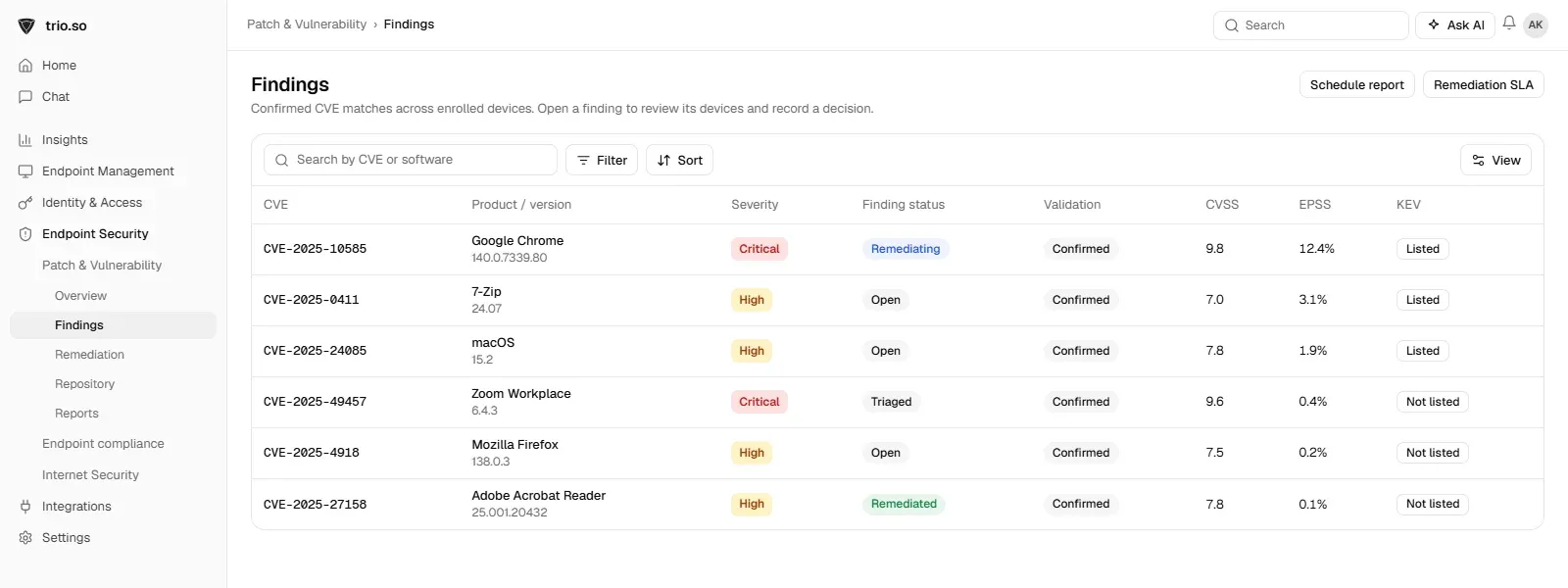
The endpoint layer is the one that changes every day, because every device needs its updates. trio.so finds missing patches on enrolled devices and shows each finding with its CVE severity, CVSS and EPSS scores and whether it is on the KEV list, patches the operating system and third-party apps, and shows which devices are encrypted. See patch management.
IT infrastructure security is a set of controls across the physical, network, endpoint, identity, application, data and cloud layers. Start with an inventory, assess where the real risks are, fix the ones attackers are actually exploiting, and keep checking. Most incidents start with a basic gap, such as a missing patch, a password without MFA or a backup that was never tested, so close those first.
Related reading: vulnerability management, server security best practices and network segmentation.
trio.so finds missing patches with CVE severity on every device and patches the OS and third-party apps from one console.
Every organization today needs a solution to automate time-consuming tasks and strengthen security. Without the right tools, manual processes drain resources and leave gaps in protection. trio.so is designed to solve this problem, automating key tasks, boosting security, and ensuring compliance with ease.
Every organization today needs a solution to automate time-consuming tasks and strengthen security. Without the right tools, manual processes drain resources and leave gaps in protection. trio.so is designed to solve this problem, automating key tasks, boosting security, and ensuring compliance with ease.





Have questions? We've got answers. This section covers some of the most commonly asked questions related to this topic.
Related
The related industry news, interviews, technologies, and resources.
Discover low-cost remote access software to empower IT admins to efficiently manage & support remote devices, boost productivity, and reduce downtime.
Wondering how to balance your IT workforce? IT staffing ratios provide the framework to ensure quality and productivity in your operations.
Looking to enhance school device management? Get insights to simplify oversight, boost security, and inspire digital learning.

Zero trust vs least privilege isn't a choice between two rivals — one is a broad architecture, the other a principle that lives inside it.
Simplify device deployment with zero-touch automation. MDM streamlines setup, saving your IT team time and resources. Learn how.
Enhance system security with virtual memory pagefile encryption. Learn about best practices and how a simple solution can help simplify your IT management.
Turn on BitLocker with Group Policy: policy path, TPM and PIN, recovery key backup to AD, and the fix for "require that a recovery password be specified".
Discover how active directory bridging integrates multiple platforms into one AD environment, enhancing security, scalability, and management efficiency.
14 day free trial. No credit card required.
trio.so for MSPs: one console, separate clients