



Explained
A Guide to Understanding Cloud Misconfiguration
Discover the risks of cloud misconfigurations, learn common mistakes to avoid, and explore best practices for securing your cloud infrastructure.
What cloud asset management is, what counts as a cloud asset, how to keep the inventory current, and how it differs from IT asset management software.

Content writer, trio.so
Cloud asset management is the practice of keeping a current inventory of everything you run in the cloud (accounts, virtual machines, storage, databases, SaaS apps), with an owner and a cost attached to each item. The term has a second meaning: IT asset management software that runs in the cloud instead of on your own servers. This post covers the first meaning in depth and the second briefly.
If you were just asked for an inventory with owners and costs, for an audit or a budget review, start with the practices below. The last two sections cover the software choice and the laptops and phones that reach your cloud services.
It answers four questions about your cloud: what exists, who owns it, what it costs and what state it is in. The inventory is the product. Everything else, from cost reports to security reviews, reads from it.
It is sometimes called asset management in cloud computing. The work is the same: find resources, label them, watch them change, and retire them when nobody needs them. A spreadsheet is enough to start with. It stops being enough when resources are created by scripts and auto scaling faster than anyone can type them in.
A cloud asset is anything you pay for or depend on that lives with a cloud provider or a SaaS vendor. In practice that means:
Providers use the word broadly. AWS Config treats a security group as a resource alongside an EC2 instance, and Google Cloud Asset Inventory also records the access policies set on resources. Your inventory should include these too, because a bucket with the wrong policy matters more than a bucket that exists.
An inventory is accurate the day you build it and wrong a month later. Four things cause most of the drift:
A process that finds resources by itself and a rule that every resource gets an owner fix most of it.
Use the inventory services your providers already offer, and run them on every account. AWS Config records resource configurations and can aggregate the data from multiple accounts and Regions into one view. Azure Resource Graph lets you query resources across subscriptions with a Kusto based query language, and Google Cloud Asset Inventory exports asset metadata to BigQuery or Cloud Storage. Google keeps change history for up to 35 days, and Azure Resource Graph shows the last 14 days of configuration changes, so export what you need to keep longer.
A tag is a key and a value attached to a resource. AWS recommends a consistent tagging strategy so you can filter resources and monitor cost and usage, and it names business categories such as cost center, application name and owner as typical tags. Pick a short required set like the one below, write it down, and check for gaps on a schedule. Use a team mailbox as the owner value so the tag survives a departure. Do not put sensitive information in tags.
| Tag key | Example value | What it answers |
|---|---|---|
| owner | a team mailbox, not a person | Who do we ask before changing or deleting this? |
| team | platform, marketing, finance | Which budget does it belong to? |
| environment | production, staging, test | How careful do we need to be? |
| cost-center | the code finance uses | Where does the bill go? |
| expires | a date, for test resources | When do we review it for removal? |
Tags only help with cost if the billing side uses them. On AWS, cost allocation tags must be activated in the Billing and Cost Management console before they appear in Cost Explorer or in the cost allocation report, and a new tag can take up to 24 hours to show up. Send each team a monthly view of its own spend. Owners clean up faster when they can see the number.
Give each resource a state: requested, in use, scheduled for removal, removed. Test environments get an expiry date when they are created. When a resource has no traffic and no owner, flag it, wait a set period, then delete it. The last step is the one most teams skip, and it is where most of the avoidable spend sits.
An inventory tells you a storage bucket exists. A configuration check tells you whether it is open to the internet. AWS Config rules evaluate resources against conditions you set and flag the ones that do not match. For the common mistakes and how to catch them, see cloud misconfiguration, and for protecting what runs on the resources, cloud workload security, cloud native security and cloud data protection.
Once a quarter, compare the inventory with the bills and with the people. Does every line item map to a resource? Does every owner still work here? Departures matter: a resource owned by someone who left last year has no owner at all.
These three get confused with cloud asset management because they all read from the same inventory.
If you have to pick a starting point, build the inventory and the owner tags first. The other three work badly without them.
Inventory gaps are cheapest to fix during a migration, when every workload is already being listed. If a move is planned, our guide to cloud migration strategies covers the options, and the inventory above should be the first deliverable.
The other meaning of the term is IT asset management (ITAM) software that is hosted in the cloud. Searches like "cloud IT asset management" and "cloud based asset management software" usually mean this. It tracks company assets such as laptops, licenses and contracts through their life, and a hosted product means no server for you to run.
How to choose one:
Our posts on IT asset management and cloud asset management tools go through the process and example tools in more detail.
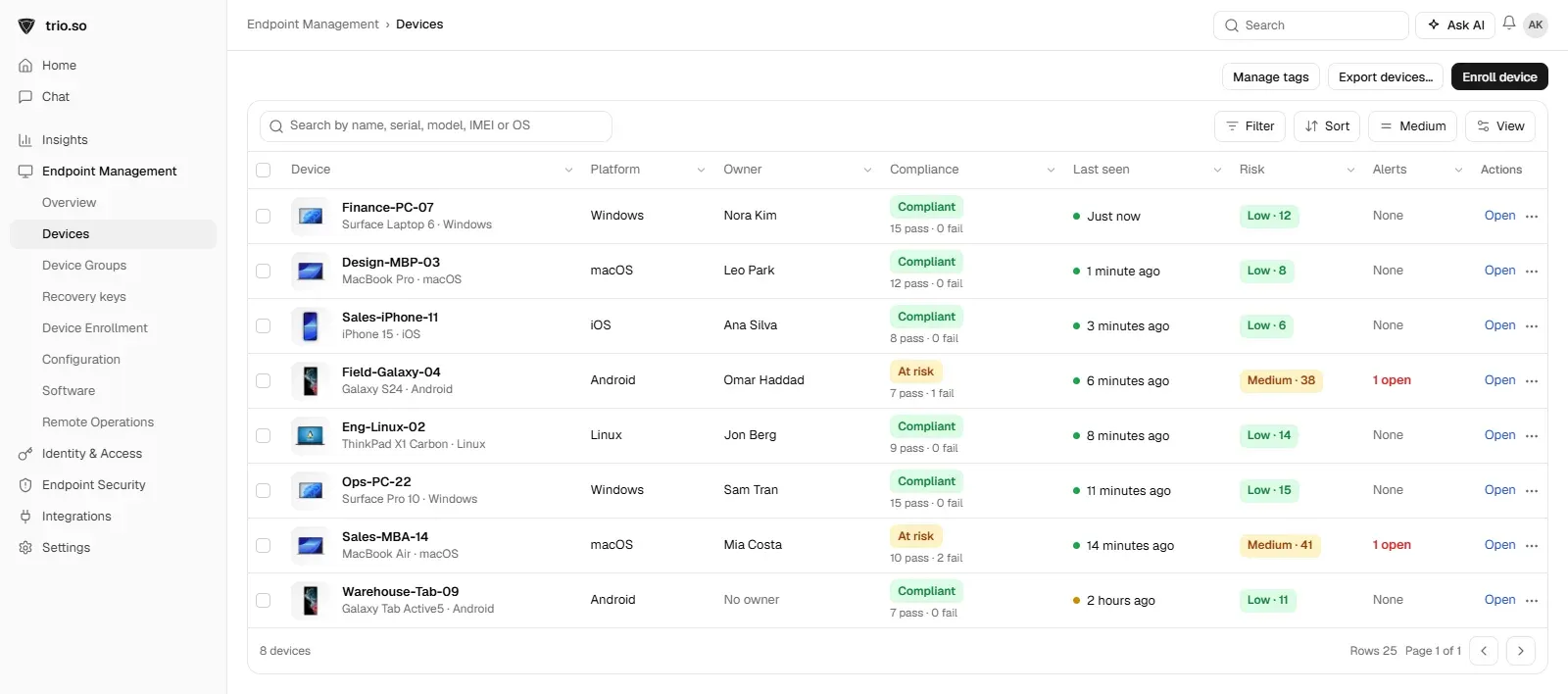
Cloud assets are only half the picture, because people reach those services from laptops, phones and servers. trio.so keeps an inventory of every managed device on Windows, macOS, Linux, iOS and Android, with its owner, serial number and installed apps. It does not inventory cloud resources such as instances, storage or SaaS accounts. Plans start at $5 per device. See device inventory management.
Related reading: cloud asset management tools, IT asset management, cloud misconfiguration and cloud migration strategies.
trio.so keeps an inventory of every managed laptop, phone and server, with its owner, serial number and installed apps.
trio.so brings device management, patching and security policies for Windows, macOS, Linux, iOS/iPadOS and Android into one console. Enroll a device and see it in the console within minutes.
trio.so brings device management, patching and security policies for Windows, macOS, Linux, iOS/iPadOS and Android into one console. Enroll a device and see it in the console within minutes.





Have questions? We've got answers. This section covers some of the most commonly asked questions related to this topic.
Related
The related industry news, interviews, technologies, and resources.
Discover the risks of cloud misconfigurations, learn common mistakes to avoid, and explore best practices for securing your cloud infrastructure.

Discover cloud migration strategies and tools for enhancing security and operational efficiency for businesses.
Do you have the right security measures in place for your cloud? Strengthen your cloud workload security with our guide to avoid critical pitfalls.
Learn essential strategies for robust cloud data protection, exploring tools, best practices, and policies that safeguard sensitive information.
Discover essential cloud asset management tools to optimize your cloud infrastructure, reduce costs, and enhance security.

How secure is your cloud environment? Discover key risks and how cloud-native security solutions can protect your infrastructure and data.
14-day free trial. No credit card required.
trio.so for MSPs: one console, separate clients