



Templates
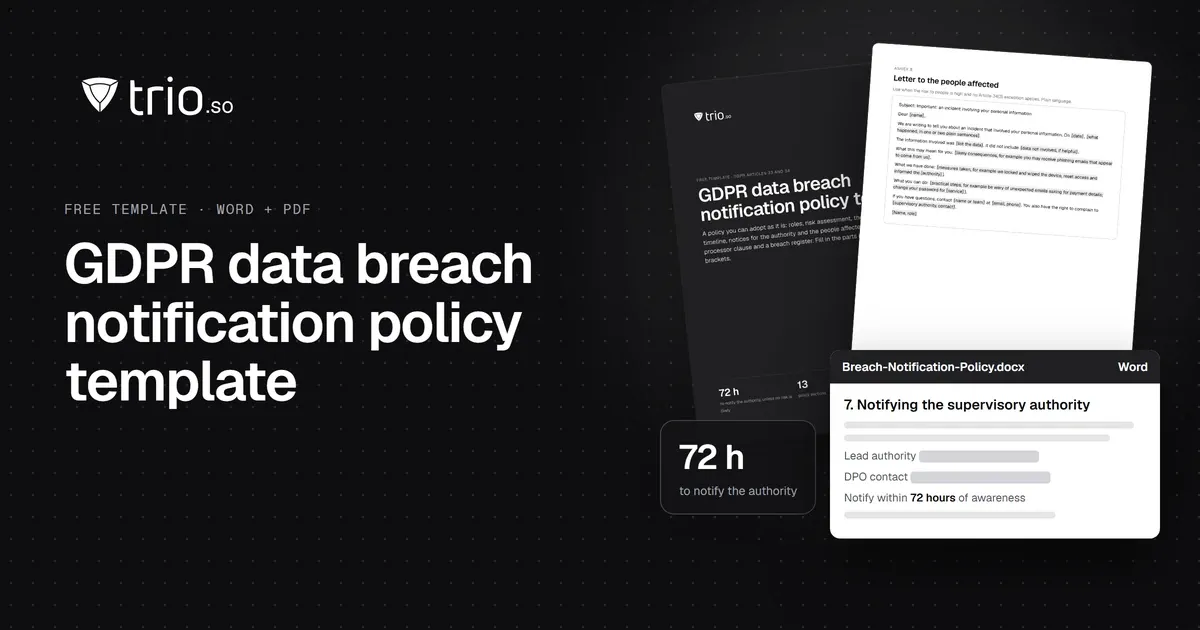
GDPR Data Breach Notification Policy Template (Free Word + PDF)
Free GDPR breach notification policy template (Word + PDF) with a 72-hour timeline, a notify-or-not decision tree, sample letters and a breach register.
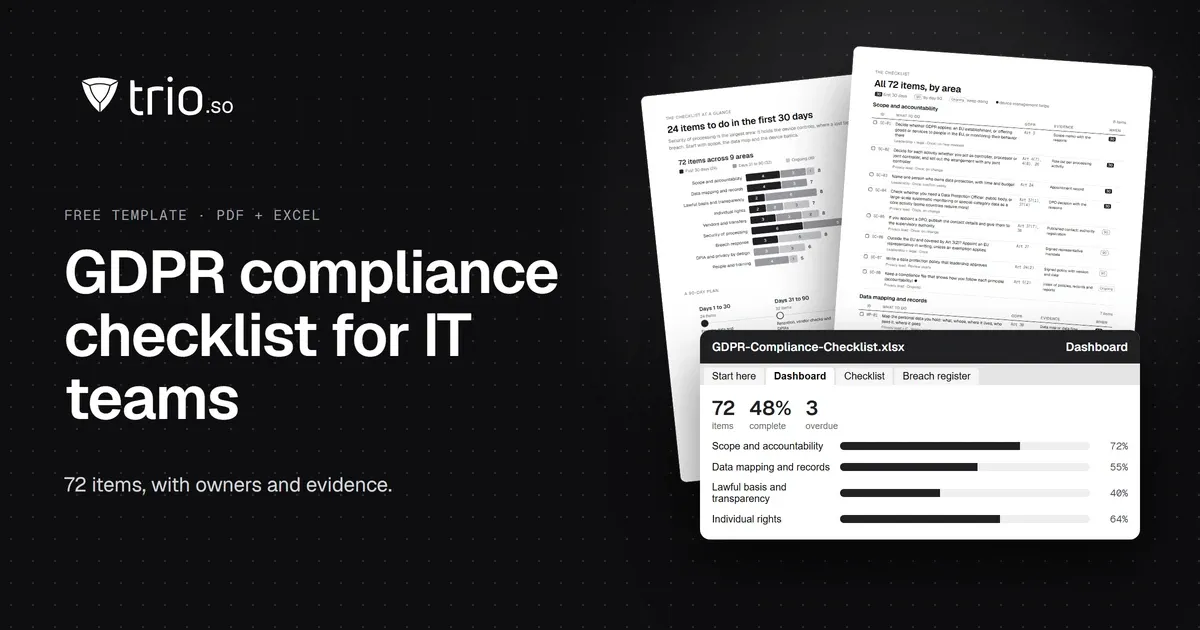
A GDPR compliance checklist for IT teams: 72 items by article, a ROPA template, a 72-hour breach register and device security controls. Free PDF and Excel.

Content writer, trio.so
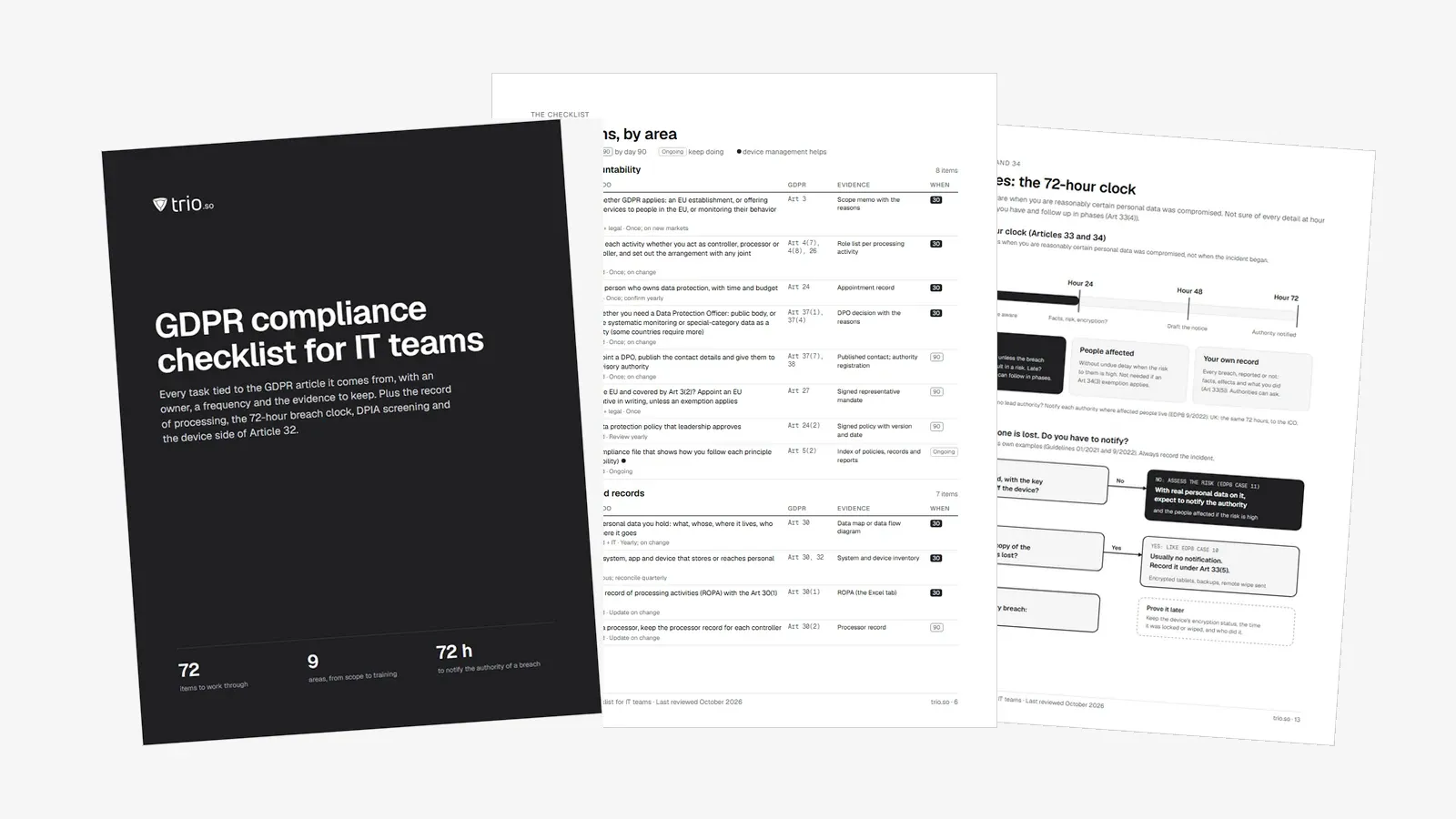
A GDPR compliance checklist turns the regulation's requirements into tasks you can assign, finish and prove. This one has 72 items in nine areas, each tied to the article it comes from, with the evidence to keep. It is written for the people who do the work: IT managers, sysadmins and MSPs, at companies in the EU and at US and other non-EU companies that sell to people there.
Most GDPR checklists stop at policies and consent. This one also covers the parts that land on IT: the record of processing activities, vendor contracts, the 72-hour breach clock, and the security of the laptops and phones where personal data actually lives.
Download it as a printable PDF and an Excel tracker with a dashboard, a ROPA template, a breach register that works out the 72-hour deadline, a rights request log with deadlines, a vendor and transfer register, and a DPIA screening sheet. Or work through it below.
In short
The General Data Protection Regulation has applied since 25 May 2018. Article 3 decides who it covers, and the answer depends on whose data you process and why, not only on where you are based.
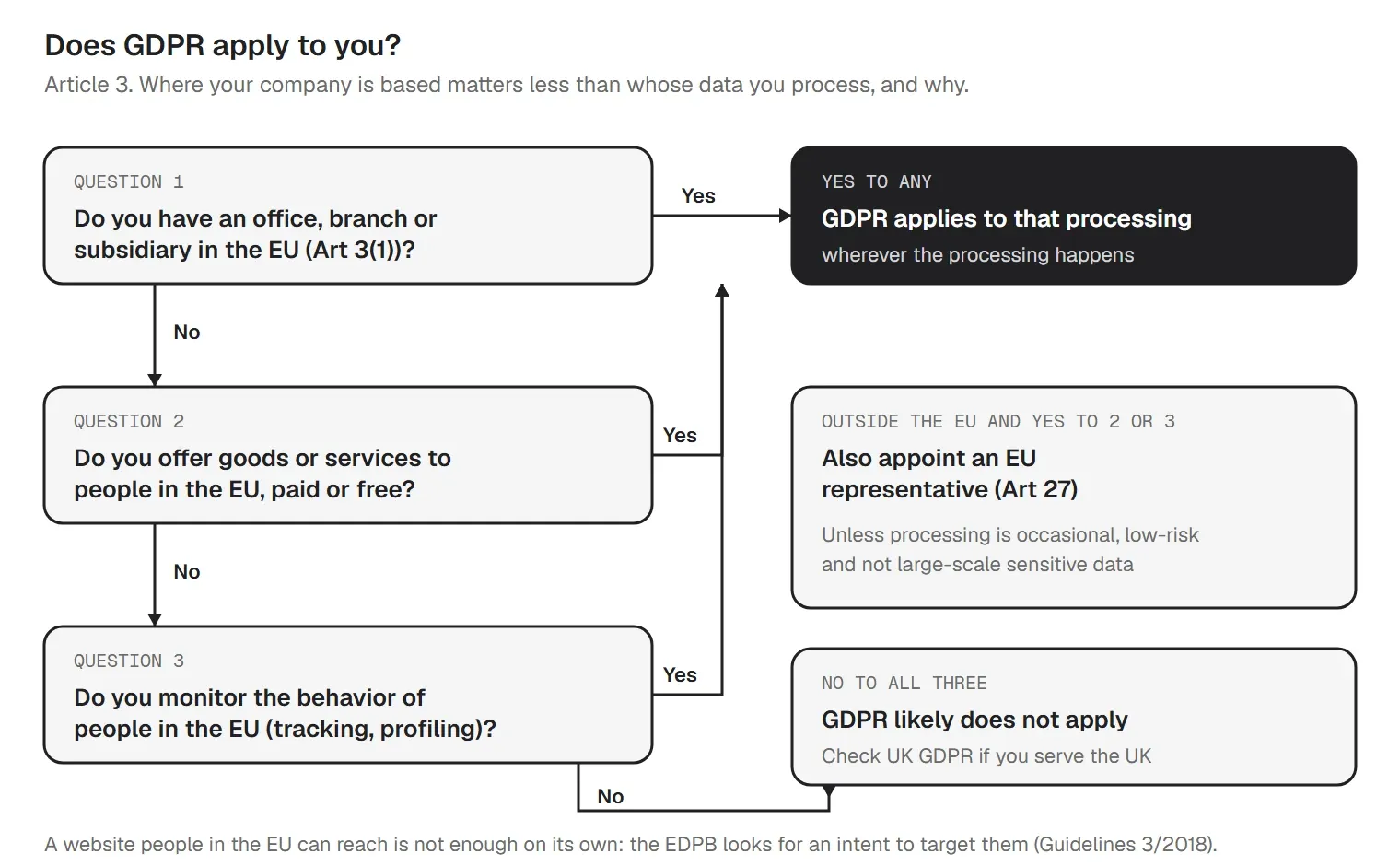
For US companies, the usual trigger is selling to EU customers or tracking EU visitors. If that is you, start with the scope and representative items in the first area of the checklist.
The regulation has 99 articles, but the duties that drive day-to-day work fit in one table. Every item in the checklist below traces back to one of these:
| Requirement | Articles | What it means in practice |
|---|---|---|
| Principles | Art 5 | Process data lawfully, fairly and openly; for set purposes; only what you need; accurate; kept no longer than needed; secure. And be able to show it. |
| Lawful basis | Art 6 | One of six bases for every purpose: consent, contract, legal obligation, vital interests, public task or legitimate interests. |
| Transparency | Art 12–14 | Privacy notices that say what you collect, why, on what basis, for how long, and who gets it. |
| Individual rights | Art 15–22 | Access, rectification, erasure, restriction, portability, objection and safeguards on automated decisions, answered within one month. |
| Records | Art 30 | A written record of processing activities (ROPA). |
| Vendors | Art 28 | A contract with every processor, with the terms Article 28(3) lists. |
| Security | Art 32 | Measures that fit the risk: encryption, resilience, restore, and regular testing. |
| Breaches | Art 33–34 | Authority within 72 hours where there is a risk; people affected when the risk is high; a record of every breach. |
| DPIA | Art 35–36 | An impact assessment before high-risk processing. |
| DPO | Art 37–39 | A Data Protection Officer for public bodies and for large-scale monitoring or sensitive data as a core activity. |
| Transfers | Art 44–49 | A legal mechanism for data leaving the EEA: adequacy (including the EU-US Data Privacy Framework), SCCs, BCRs, or an Art 49 derogation. |
Our guide to GDPR for small businesses explains each requirement in plain terms.
Do the groundwork first. 24 items are marked "first 30 days": scope, the data map and record, notices, the breach plan, vendor contracts and the device basics.
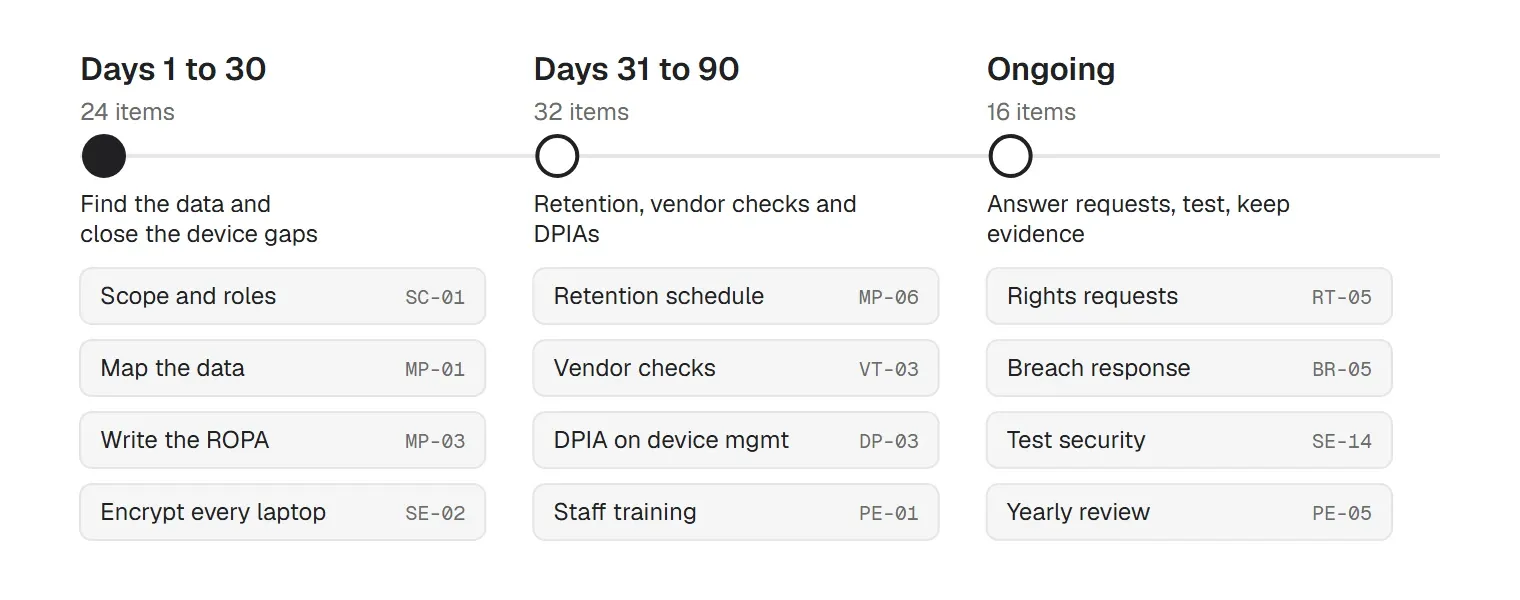
In the Excel tracker, filter the Phase column to see each list, and give every item an owner and a due date before you start.
Each item lists the article it comes from and the evidence to keep. The Excel tracker adds an owner, a frequency, a status and a due date for every row.
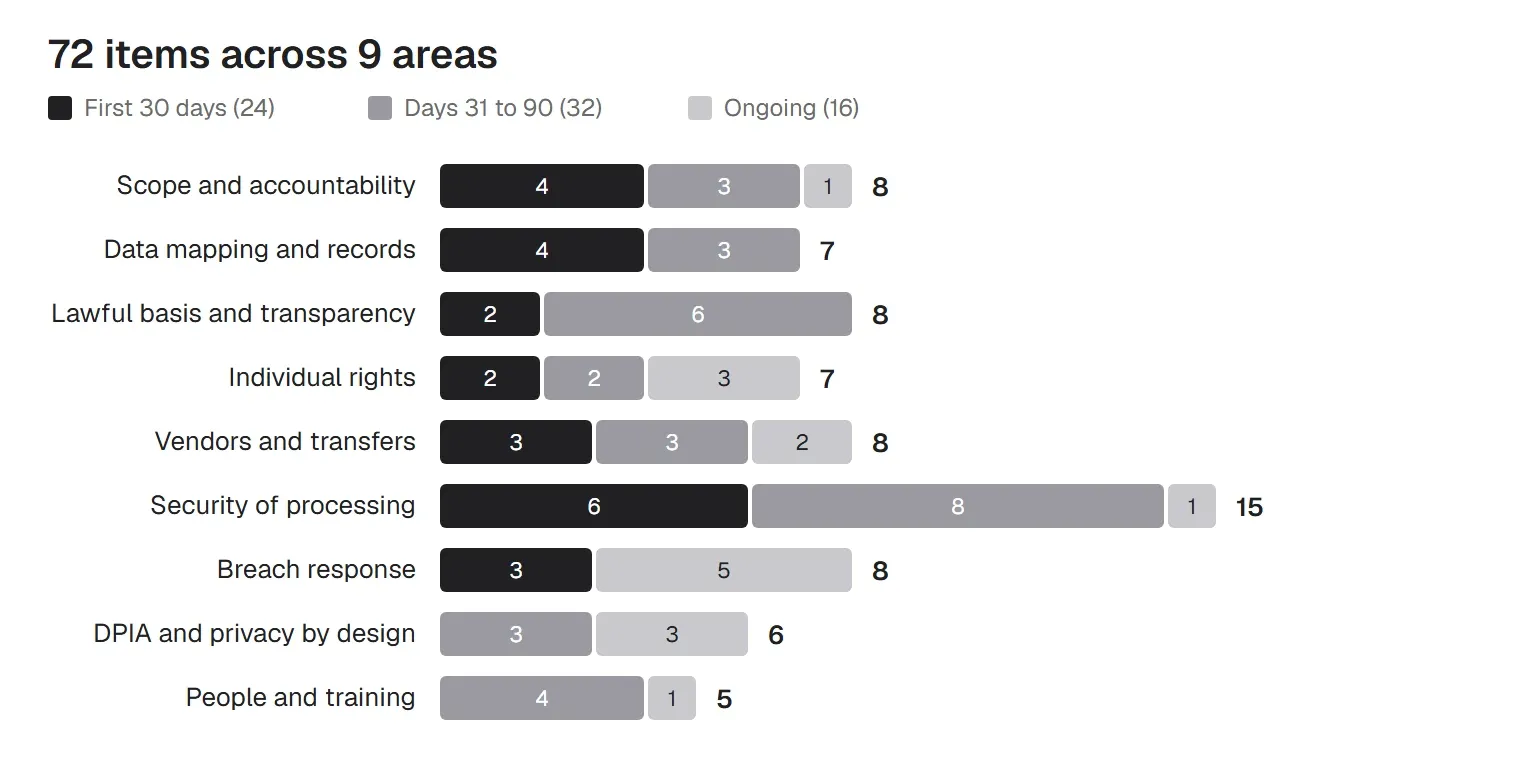
Start by deciding whether GDPR applies, what role you play in each activity, and who owns the program. Accountability (Art 5(2)) means you must be able to show compliance, not only claim it.
| ID | What to do | GDPR | Evidence to keep |
|---|---|---|---|
| SC-01 | Decide whether GDPR applies: an EU establishment, or offering goods or services to people in the EU, or monitoring their behavior there (first 30 days) | Art 3 | Scope memo with the reasons |
| SC-02 | Decide for each activity whether you act as controller, processor or joint controller, and set out the arrangement with any joint controller (first 30 days) | Art 4(7), 4(8), 26 | Role list per processing activity |
| SC-03 | Name one person who owns data protection, with time and budget (first 30 days) | Art 24 | Appointment record |
| SC-04 | Check whether you need a Data Protection Officer: public body, or large-scale systematic monitoring or special-category data as a core activity (some countries require more) (first 30 days) | Art 37(1), 37(4) | DPO decision with the reasons |
| SC-05 | If you appoint a DPO, publish the contact details and give them to the supervisory authority | Art 37(7), 38 | Published contact; authority registration |
| SC-06 | Outside the EU and covered by Art 3(2)? Appoint an EU representative in writing, unless an exemption applies | Art 27 | Signed representative mandate |
| SC-07 | Write a data protection policy that leadership approves | Art 24(2) | Signed policy with version and date |
| SC-08 | Keep a compliance file that shows how you follow each principle (accountability) | Art 5(2) | Index of policies, records and reports |
You can't protect or explain data you haven't found. The data map and the record of processing activities are the base for notices, rights requests, DPIAs and breach response. See the section on the ROPA below, and our data retention policy template.
| ID | What to do | GDPR | Evidence to keep |
|---|---|---|---|
| MP-01 | Map the personal data you hold: what, whose, where it lives, who sees it, where it goes (first 30 days) | Art 30 | Data map or data flow diagram |
| MP-02 | List every system, app and device that stores or reaches personal data (first 30 days) | Art 30, 32 | System and device inventory |
| MP-03 | Write your record of processing activities (ROPA) with the Art 30(1) contents (first 30 days) | Art 30(1) | ROPA (the Excel tab) |
| MP-04 | If you are a processor, keep the processor record for each controller | Art 30(2) | Processor record |
| MP-05 | Fewer than 250 staff? Check the Art 30(5) exemption carefully: regular processing of staff or customer data usually still needs a record (first 30 days) | Art 30(5) | Exemption decision |
| MP-06 | Set a retention period for each data category and delete or anonymize on schedule | Art 5(1)(e) | Retention schedule; deletion logs |
| MP-07 | Describe your security measures in the record, in general terms | Art 30(1)(g) | Security measures summary |
Every purpose needs one of the six lawful bases, chosen before you start. For staff data, avoid consent: the power imbalance means it is rarely free. Tell people what you do, including what device management sees on their laptops and phones.
| ID | What to do | GDPR | Evidence to keep |
|---|---|---|---|
| LB-01 | Pick and record a lawful basis for each processing purpose (first 30 days) | Art 6(1) | Lawful basis per ROPA row |
| LB-02 | For legitimate interests, write and keep a balancing test | Art 6(1)(f) | Legitimate interests assessment |
| LB-03 | Where you rely on consent: opt-in, specific, recorded, and as easy to withdraw as to give | Art 7 | Consent records; withdrawal path |
| LB-04 | Avoid relying on employee consent; use another basis for staff data | Art 6, 7(4) | Basis for HR processing |
| LB-05 | Find any special-category or criminal data and record the Art 9 or Art 10 condition | Art 9, 10 | Special-category register |
| LB-06 | Publish privacy notices with the Art 13 and Art 14 information, for customers, staff and applicants (first 30 days) | Art 13, 14 | Published notices with dates |
| LB-07 | Tell staff what device management does: which devices, which data, and why | Art 13; WP249 | Staff device notice |
| LB-08 | Get consent for non-essential cookies before they are set, where the ePrivacy rules apply | ePrivacy Dir. Art 5(3) | Cookie banner configuration |
People can ask to see, correct, delete, move or restrict their data, and object to its use. You have one month to answer, extendable by two more for complex cases if you say so within the first month.
| ID | What to do | GDPR | Evidence to keep |
|---|---|---|---|
| RT-01 | Set up one route for rights requests, and log every request with its date (first 30 days) | Art 12 | Request log (the Excel tab) |
| RT-02 | Answer within one month; extend by up to two months only with reasons given within the first month (first 30 days) | Art 12(3) | Response dates in the log |
| RT-03 | Verify identity before you disclose anything, without asking for more than you need | Art 12(6) | Verification notes |
| RT-04 | Be able to find, copy, correct and delete one person's data across systems | Art 15–17 | Search procedure; test results |
| RT-05 | Handle restriction, portability and objection, and stop direct marketing on request | Art 18, 20, 21 | Request log |
| RT-06 | Tell recipients about corrections and deletions | Art 19 | Notification records |
| RT-07 | Identify any solely automated decisions with legal or similar effects, and offer human review | Art 22 | Automated decision register |
Most vendors that handle personal data on your behalf are processors and need an Article 28 contract. Some, such as banks or auditors, are controllers in their own right: record them, but they don't sign your DPA. Data leaving the EEA needs a transfer mechanism. MSPs are usually the processor: VT-08 covers that side. Pair this area with our vendor management policy template.
| ID | What to do | GDPR | Evidence to keep |
|---|---|---|---|
| VT-01 | List every vendor that processes personal data for you (first 30 days) | Art 28 | Vendor register (the Excel tab) |
| VT-02 | Sign a data processing agreement with each one, with all Art 28(3) terms (first 30 days) | Art 28(3) | Signed DPAs |
| VT-03 | Check each vendor's security before you sign, and again on renewal | Art 28(1) | Due diligence notes |
| VT-04 | Keep the vendors' sub-processor lists and object to changes where needed | Art 28(2), 28(4) | Sub-processor lists |
| VT-05 | Map transfers outside the EEA and record the mechanism: adequacy, Data Privacy Framework, SCCs or BCRs (first 30 days) | Art 44–49 | Transfer register |
| VT-06 | For SCC transfers, assess the destination country and add measures if needed | Art 46 | Transfer impact assessment |
| VT-07 | Watch the status of the EU-US Data Privacy Framework and have SCCs ready as a fallback | Art 45, 46 | Watch notes; fallback plan |
| VT-08 | If you are a processor (most MSPs): sign each client's Art 28 contract, act only on their documented instructions, get authorization before adding sub-processors and pass the same terms down | Art 28(2)–(4), 29 | Signed client DPAs; sub-processor list |
Article 32 asks for security that fits the risk, and its first example is pseudonymisation and encryption. It names no product. Laptops and phones carry personal data out of the office, and a lost device is one of the most common breaches IT teams handle, so this is the largest area. Our data encryption policy template helps here.
| ID | What to do | GDPR | Evidence to keep |
|---|---|---|---|
| SE-01 | Assess the risk to personal data and choose security measures that fit it (first 30 days) | Art 32(1)–(2) | Risk assessment |
| SE-02 | Encrypt every laptop and desktop (BitLocker, FileVault) and keep recovery keys away from the device (first 30 days) | Art 32(1)(a) | Encryption status per device |
| SE-03 | Encrypt phones and tablets and require a passcode (first 30 days) | Art 32(1)(a) | Mobile encryption and passcode report |
| SE-04 | Lock screens automatically after a short idle time (first 30 days) | Art 32(1)(b) | Screen lock settings report |
| SE-05 | Patch operating systems and apps on a set timeline, fastest for known-exploited flaws (first 30 days) | Art 32(1)(b) | Patch compliance report |
| SE-06 | Scan for vulnerabilities and fix them by risk | Art 32(1)(b), (d) | Vulnerability reports |
| SE-07 | Allow approved apps and block the ones that move data where it should not go | Art 25, 32 | App allow and block lists |
| SE-08 | Block or restrict USB storage where it is not needed | Art 32(1)(b) | USB policy and settings report |
| SE-09 | Turn on the host firewall on every laptop and desktop | Art 32(1)(b) | Firewall settings report |
| SE-10 | Give each person their own account, require MFA, and limit admin rights (first 30 days) | Art 32(1)(b) | Access review; MFA report |
| SE-11 | Back up personal data and test that you can restore it quickly | Art 32(1)(c) | Backup reports; restore tests |
| SE-12 | Wipe devices before reuse or disposal, and keep proof | Art 5(1)(f), 32 | Wipe records |
| SE-13 | Write BYOD rules that keep work data separate and respect private data on personal devices | Art 5(1)(c), 32; WP249 | BYOD policy |
| SE-14 | Test and review your security measures on a schedule | Art 32(1)(d) | Test results; compliance reports |
| SE-15 | Log admin actions on systems that hold personal data, and keep the logs | Art 5(2), 32 | Admin logs; retention setting |
Write the plan before you need it. The clock is 72 hours from awareness to the authority. Our data breach notification policy template gives you the wording.
| ID | What to do | GDPR | Evidence to keep |
|---|---|---|---|
| BR-01 | Write a breach response plan: who decides, who notifies, and within what time (first 30 days) | Art 33, 34 | Plan; test report |
| BR-02 | Teach staff to report a lost device or a suspected breach at once (first 30 days) | Art 33 | Training records; reporting route |
| BR-03 | When a device is lost, lock it, locate it if company-owned, and wipe it if needed | Art 33, 34(3)(b) | Incident record with actions and times |
| BR-04 | Assess the risk fast: what data, how many people, was it encrypted | Art 33(1), 34(1) | Risk assessment in the breach record |
| BR-05 | Notify the supervisory authority within 72 hours of becoming aware, unless the breach is unlikely to result in a risk (no EU establishment? notify each authority where affected people live) | Art 33(1), 33(3) | Notification copy with timestamp |
| BR-06 | Tell the people affected without undue delay when the risk to them is high, unless an Art 34(3) exemption applies | Art 34 | Communication copy |
| BR-07 | Record every breach, reported or not, with facts, effects and actions (first 30 days) | Art 33(5) | Breach register (the Excel tab) |
| BR-08 | Processors: tell the controller without undue delay | Art 33(2) | Notice to controller |
High-risk processing needs a data protection impact assessment before it starts. Monitoring staff devices is a common trigger, so run one on your device management too. See our guide to the data protection impact assessment (DPIA).
| ID | What to do | GDPR | Evidence to keep |
|---|---|---|---|
| DP-01 | Screen every new project, system or vendor for high risk before it starts | Art 35(1) | Screening record (the Excel tab) |
| DP-02 | Run a DPIA when the processing is on your authority's list, and usually when two or more WP248 criteria apply | Art 35(1), 35(3)–(4) | DPIA with the Art 35(7) contents |
| DP-03 | Run a DPIA on your device management itself: monitoring staff devices is a common trigger | Art 35; WP249 | DPIA for device management |
| DP-04 | Ask your DPO's advice on each DPIA, where you have one | Art 35(2) | DPO advice on file |
| DP-05 | Consult the authority before processing if high risk remains after your measures | Art 36 | Consultation record |
| DP-06 | Build data protection into new systems: collect the minimum and set privacy-friendly defaults | Art 25 | Design notes; default settings |
People cause and catch most incidents. Train them, bind them to confidentiality, limit admin access, and close the gaps when they leave.
| ID | What to do | GDPR | Evidence to keep |
|---|---|---|---|
| PE-01 | Train everyone who handles personal data at hire and every year | Art 24, 32(4) | Training records |
| PE-02 | Bind staff and contractors to confidentiality | Art 29, 32(4) | Signed agreements |
| PE-03 | Limit who can see device and user data in admin consoles | Art 5(1)(f), 25(2) | Admin role list |
| PE-04 | Remove access and recover or wipe company devices when people leave | Art 32 | Leaver records with times |
| PE-05 | Review the program yearly and report to leadership | Art 24(1) | Annual review report |
Data mapping is the work; the ROPA is the document that comes out of it. Article 30(1) lists what a controller's record must contain:
Processors keep a shorter record for each controller they work for (Art 30(2)). Keep it in writing, electronic is fine, and be ready to hand it to the supervisory authority on request.
The under-250 exemption is narrower than it looks. Article 30(5) exempts organizations with fewer than 250 staff only if the processing is occasional, unlikely to result in a risk, and includes no special-category or criminal data. Payroll and customer records are processed regularly, so most small businesses still need a record for those. An EU proposal to widen the exemption has been agreed with the Council and goes to a Parliament vote, expected in November 2026; until it is adopted, the 250 rule applies.
To map data quickly, start from systems, not departments. List each app, database and device type, then ask what personal data it holds, whose, where it goes and how long it stays. The device inventory from your device management tool gives you the endpoint rows. The Excel tracker's ROPA tab has the Article 30(1) columns and four worked examples: payroll, customer accounts, device management and marketing email.
Under Article 33, you notify your supervisory authority without undue delay and, where feasible, within 72 hours of becoming aware of a personal data breach, unless it is unlikely to result in a risk to people. You become aware when you are reasonably certain personal data was compromised. If you can't give every detail in time, send what you have and follow up in phases. No EU establishment? There is no lead authority for you, so notify each authority where affected people live.
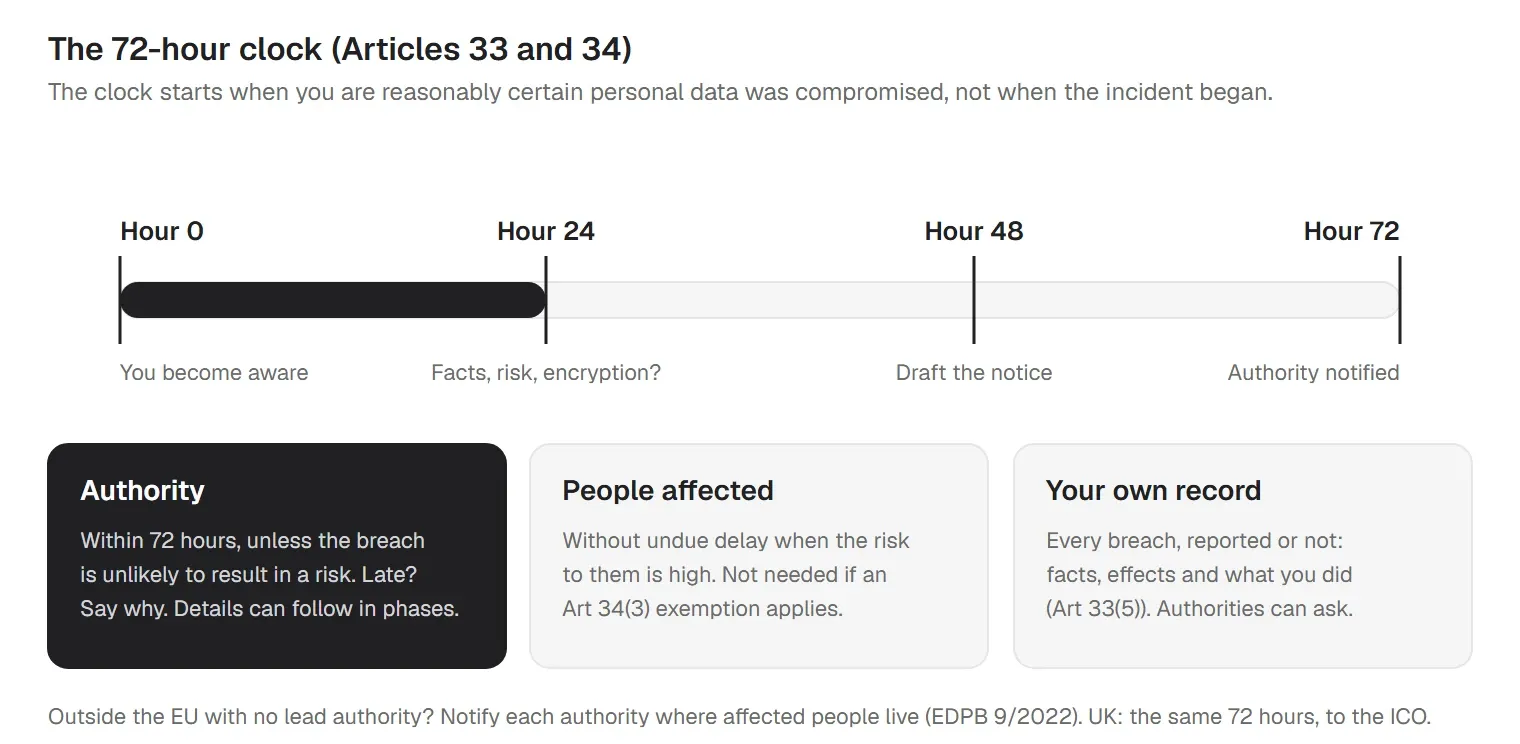
You tell the people affected without undue delay only when the risk to them is high (Art 34). And you record every breach, reported or not, with the facts, the effects and what you did (Art 33(5)).
The most common breach for IT teams is a lost or stolen device. The EDPB's own examples show how much encryption changes the outcome:
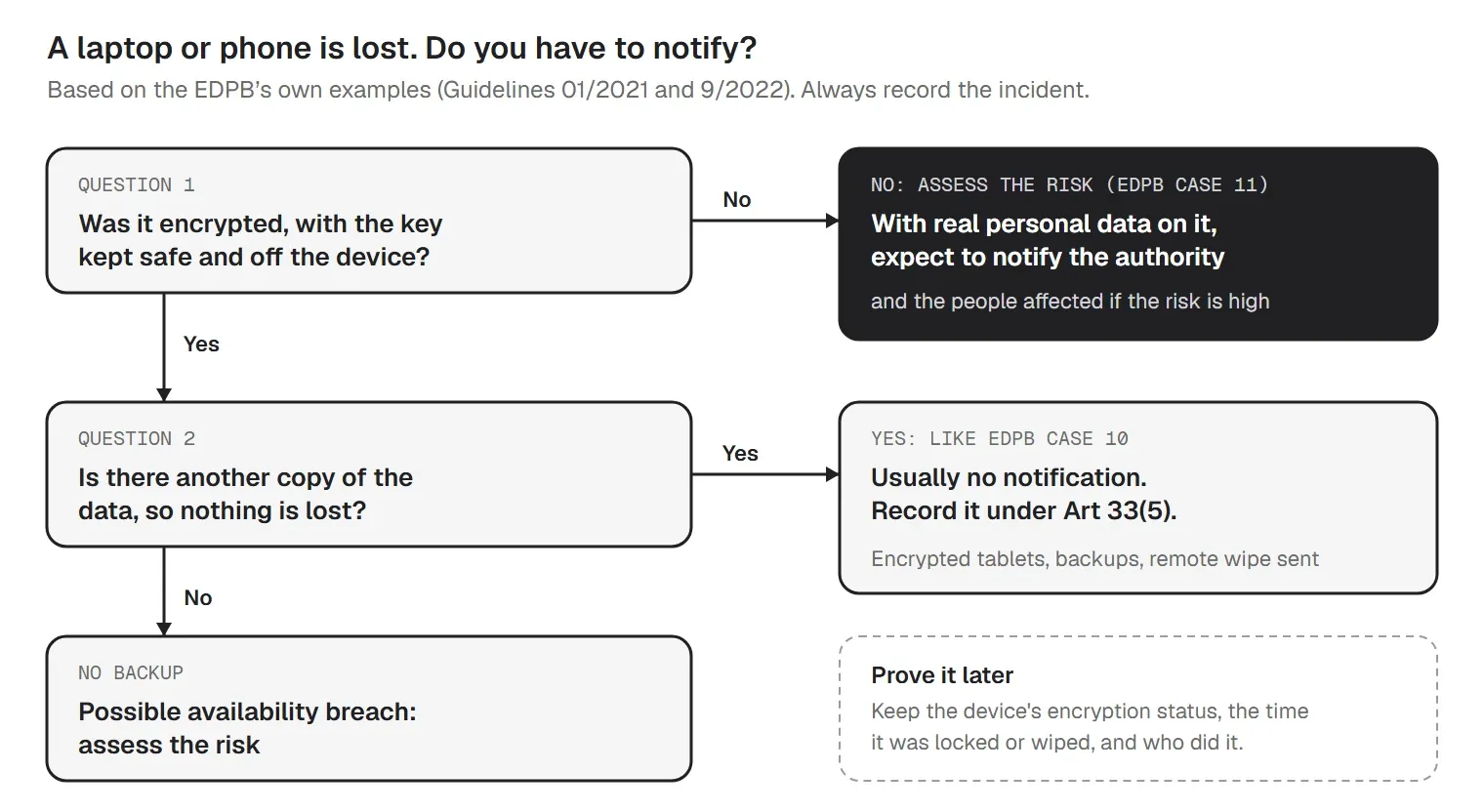
So the evidence you need on day one is simple: which device it was, whether it was encrypted, where the recovery key is, and when it was locked or wiped. Have that ready before a device goes missing. Our data breach response plan covers the full process.
Article 32 asks controllers and processors for security appropriate to the risk, and lists four measures "as appropriate": pseudonymisation and encryption; the ongoing confidentiality, integrity, availability and resilience of systems; the ability to restore data quickly after an incident; and regular testing of the measures. It names no product, standard or algorithm.
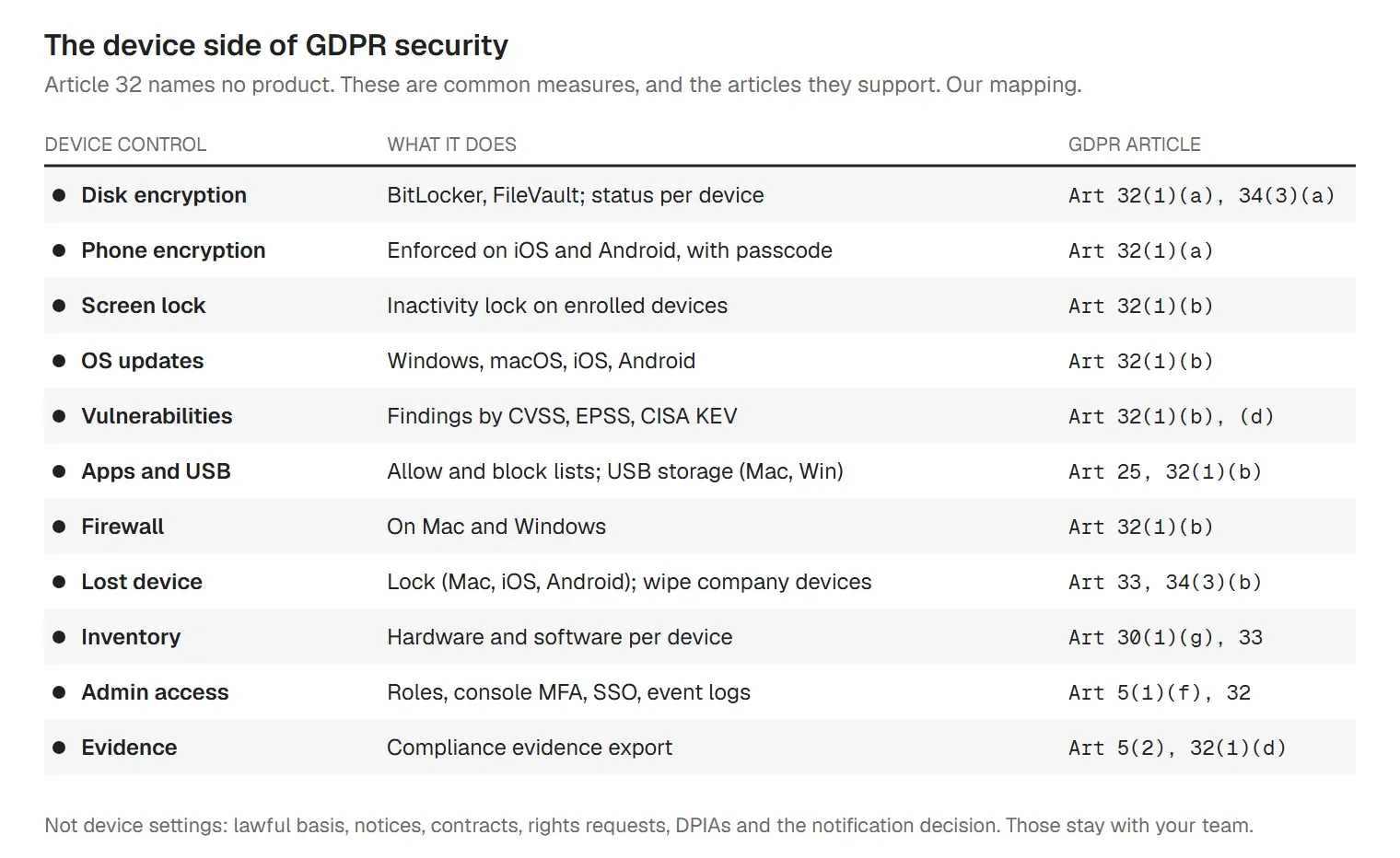
On a mixed fleet of Windows, Mac, iPhone and Android devices, those measures come down to a short list of settings: full-disk encryption with the recovery key kept off the device, a passcode and screen lock, OS updates on a timeline, controlled apps and USB storage, and the ability to lock or wipe a lost device. The encryption guidance from the Information Commission (formerly known as the ICO) gives the same advice on encryption for UK organizations. Our guide to full disk encryption explains the options per platform.
Device management needs its own GDPR check. The EU's data protection authorities said in their opinion on data processing at work (WP249) that employers should run a DPIA before rolling out mobile device management, tell staff what it does, and keep location tracking for lost devices from turning into ongoing monitoring. On personal devices (BYOD), keep work and private use apart. Our BYOD policy template is a starting point.
Accountability means showing your work. Whether the question comes from a customer's security review, an internal audit or a supervisory authority after a complaint, the answer is dated records collected over time.
| Area | Evidence | Refresh |
|---|---|---|
| Scope and roles | Scope memo; controller or processor per activity; DPO decision | Yearly |
| Records | ROPA with Art 30(1) contents; data map | On change |
| Notices | Privacy notices with dates; staff device notice | Yearly |
| Rights | Request log with response dates | Each request |
| Vendors | Signed DPAs; transfer register; transfer assessments | Each contract |
| Security | Encryption status per device; patch reports; access reviews | Monthly |
| Breaches | Breach register, including the ones you did not report | Each incident |
| DPIAs | Screening records; DPIAs; DPO advice | Each project |
| Training | Training records; confidentiality agreements | Yearly |
More GDPR guides for IT teams
GDPR compliance stays your organization's program: the lawful bases, notices, contracts, DPIAs and notification decisions are yours. trio.so covers many of the device items in this checklist from one console, across Windows, Mac, iOS and Android:
Comparing tools? Our guide to GDPR compliance software covers what automation can and can't do.
trio.so's compliance engine includes GDPR among its frameworks, covering the technical controls a device management tool can enforce. Learn more about GDPR compliance in trio.so and compliance automation.
14-day free trial. No credit card required.
Sources. Last reviewed October 2026. This article is guidance, not legal advice. The mapping of device controls to GDPR articles is ours.
trio.so brings device management, patching and security policies for Windows, macOS, Linux, iOS/iPadOS and Android into one console. Enroll a device and see it in the console within minutes.
trio.so brings device management, patching and security policies for Windows, macOS, Linux, iOS/iPadOS and Android into one console. Enroll a device and see it in the console within minutes.





Have questions? We've got answers. This section covers some of the most commonly asked questions related to this topic.
Related
The related industry news, interviews, technologies, and resources.
Free GDPR breach notification policy template (Word + PDF) with a 72-hour timeline, a notify-or-not decision tree, sample letters and a breach register.
What a DPIA is, when GDPR Article 35 requires one, who is involved and the steps to follow. Free DPIA template (Word + PDF) with an MDM worked example.
GDPR compliance software explained: the six main tool types, what each automates, what stays with people, and how Article 32 device controls fit in.
GDPR requirements for small and US businesses: who the law covers, the duties that apply, deadlines, fines and what you can skip. Free checklist.
14-day free trial. No credit card required.
trio.so for MSPs: one console, separate clients