



Explained
Linux Device Management: What It Is and How It Works
Learn what Linux device management is, how it works, and the unique challenges IT teams face when managing Linux endpoints at scale.
Linux user management with the commands you need (useradd, usermod -aG, gpasswd, sudo) and best practices for accounts, groups, SSH keys and auditing.

Content writer, trio.so
To add a user to a group in Linux, run sudo usermod -aG groupname username, then have the user sign out and back in. The -a matters: without it, -G replaces the user's other groups. Below are the commands for creating, changing and removing users and groups on Debian, Ubuntu and RHEL-based systems, and the practices that keep accounts under control.
sudo usermod -aG developers alice     # add alice to developers, keep her other groups
sudo gpasswd -a alice developers      # same result, one group at a time
groups alice                          # check which groups alice is in
id alice                              # same, with numeric IDs
Group changes apply at the next login. To use the new group in the current shell without logging out, run newgrp developers. To remove a user from a group, use sudo gpasswd -d alice developers.
sudo useradd -m -s /bin/bash alice    # create alice with a home directory and bash
sudo passwd alice                     # set her password
On Debian and Ubuntu, sudo adduser alice is the friendlier option: it creates the home directory, asks for a password and fills in details interactively.
useradd is the low-level tool available on every distribution; it does only what its flags say. adduser is a Debian and Ubuntu script that wraps it with sensible defaults. On RHEL, Fedora and their relatives, adduser is just another name for useradd.
sudo usermod -s /bin/zsh alice        # change login shell
sudo usermod -l alice2 alice          # rename the account (home directory stays)
sudo chage -M 90 alice                # password must change every 90 days
sudo chage -l alice # show password ageing settingssudo usermod -L alice # lock the password
sudo usermod -e 1 alice # expire the account so no login method works
sudo userdel -r alice # delete alice and her home directoryLocking only the password does not stop a user who logs in with an SSH key; expiring the account does. When someone leaves, lock and expire first, archive their files, then delete.
sudo usermod -aG sudo alice           # Debian and Ubuntu
sudo usermod -aG wheel alice          # RHEL, Fedora, Rocky, AlmaLinux
For narrower rights, add a file under /etc/sudoers.d/ with sudo visudo -f /etc/sudoers.d/deploy, for example allowing one group to restart one service only. Always edit sudoers with visudo: it checks the syntax, and a broken sudoers file can lock everyone out of sudo.
sudo groupadd developers              # create a group
sudo groupdel developers              # delete a group
getent group developers               # list a group's members
Give permissions to groups, not to individual users. When someone changes team, you change one membership instead of many file permissions.
PermitRootLogin no in /etc/ssh/sshd_config and use sudo.PasswordAuthentication no once keys work./etc/sudoers.d/ over full sudo.useradd -r -s /usr/sbin/nologin so nobody can log in as them./var/log/auth.log or /var/log/secure) and send them off the machine.getent passwd | awk -F: '$7 !~ /(nologin|false)$/ {print $1}' # users who can log in
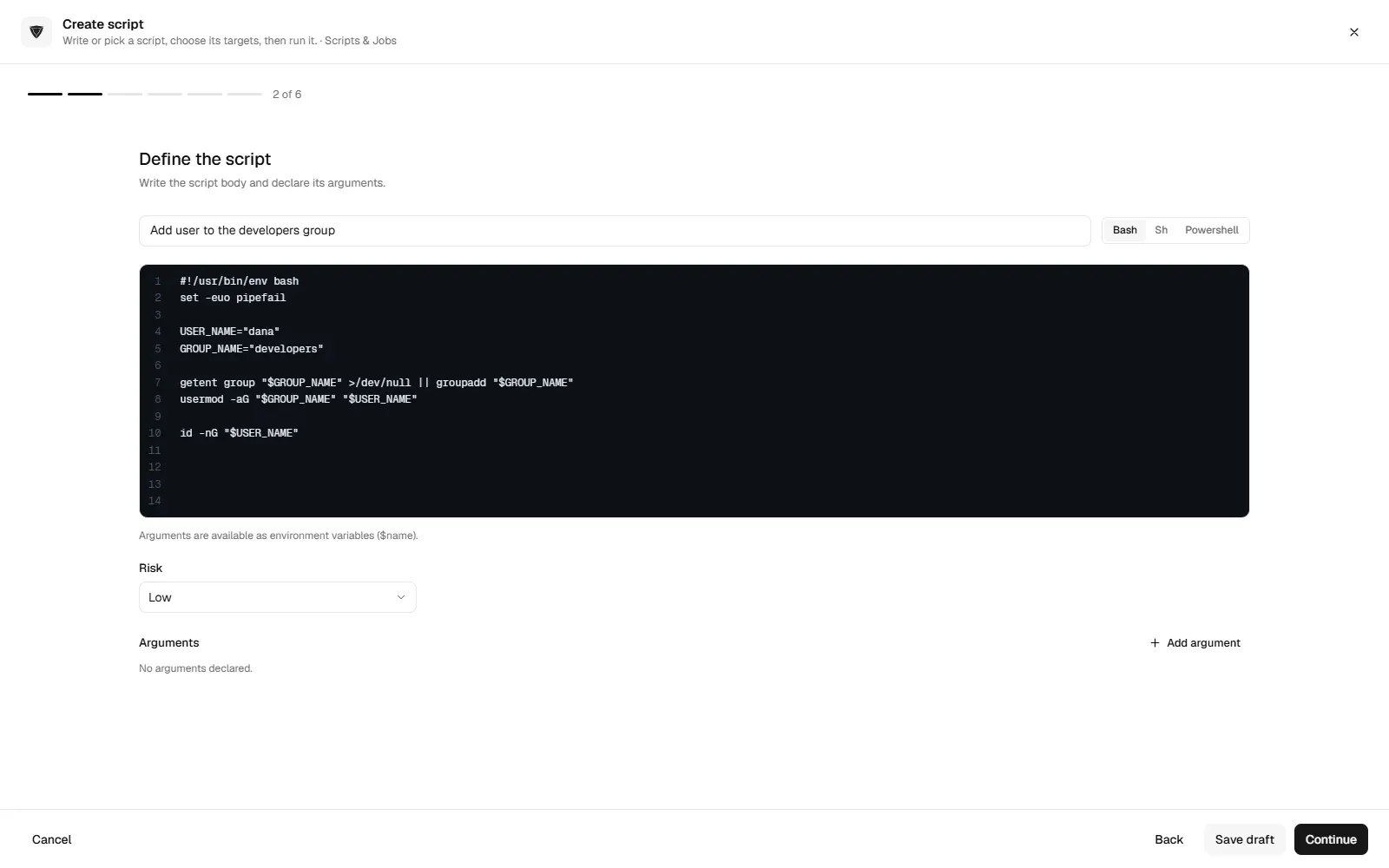
getent group sudo wheel # who has sudoRunning the same user change on ten machines by SSH, one at a time, is where mistakes creep in. trio.so runs scripts and opens a live terminal on enrolled Linux devices from the console, so a tested usermod script can go to the machines you choose. See remote terminal.
Related reading: server security best practices and what is the most secure operating system.
trio.so runs scripts and opens a live terminal on enrolled Linux devices.
trio.so brings device management, patching and security policies for Windows, macOS, Linux, iOS/iPadOS and Android into one console. Enroll a device and see it in the console within minutes.
trio.so brings device management, patching and security policies for Windows, macOS, Linux, iOS/iPadOS and Android into one console. Enroll a device and see it in the console within minutes.





Have questions? We've got answers. This section covers some of the most commonly asked questions related to this topic.
Related
The related industry news, interviews, technologies, and resources.
Learn what Linux device management is, how it works, and the unique challenges IT teams face when managing Linux endpoints at scale.
How Linux MDM works without a built-in protocol, the main Linux device management tools compared on distributions and price, and what to check.
Turn on two-factor authentication for your Apple Account on a Mac, and add MFA to the Mac login with Platform SSO, smart cards or an identity provider.
Disable Control Panel and Settings with Group Policy: the exact policy, its registry value, how to exempt admins and how to allow only some items.
Disable a GPO safely: disable the link, disable user or computer settings, or unlink it, and why to leave the Default Domain Controllers Policy alone.
Turn on Remote Desktop for Windows machines with Group Policy: the exact policy path, the firewall rule, NLA, and how to check it worked.
Windows 11 has no classic Guest account to switch on, but the hidden one can be disabled or deleted. Steps for one PC and for every PC by policy.
What is picture password in Windows 11? Read this blog to learn about its benefits, how to enable it, how to troubleshoot, and the best practices.
14-day free trial. No credit card required.
trio.so for MSPs: one console, separate clients