




Explained
How to Implement an Effective Rugged Computer Solution
Rugged computers are used effectively in many industries today. Read this blog to learn about the benefits of rugged computers for your organization.
How to manage rugged handhelds, scanners and tablets: enrollment, dedicated device mode, kiosk lockdown, updates, location and support in the field.

Content writer, trio.so
Rugged device management is the use of mobile device management (MDM) to set up, lock down, update and support rugged handhelds, barcode scanners, tablets and vehicle-mounted computers that work in warehouses, on construction sites, in vehicles and in the field. Most rugged devices run Android, so MDM for rugged devices usually means Android Enterprise: devices enroll as company-owned dedicated devices by zero-touch or QR code, run in kiosk mode locked to their work apps, and are updated, located and supported remotely, because nobody can walk over to a device that is on a truck or in a freezer.
If you look after a fleet of rugged devices for frontline staff and want to know what an MDM should do for them, this guide covers the challenges, the core MDM features, best practices and a lifecycle you can follow.
A rugged device is built for drops, dust, water, heat and cold: handheld computers with built-in scanners, rugged tablets, wearable scanners and vehicle-mounted terminals. See rugged computers for the hardware side. Rugged device management is everything after the purchase: enrolling the devices, configuring them for one job, keeping them secure and updated, and replacing them at the end of their life, all from a central console.
Devices get dropped, batteries wear out faster in heat and cold, and screens crack. IT needs to see which devices are failing before a shift starts, and swap in a spare that sets itself up without hands-on work.
Rugged fleets work across sites with patchy Wi-Fi, cellular dead zones and devices shared by many people across shifts. Management has to cope with devices that check in late, and with apps that must work for whoever picks the device up.
The MDM shows each device's last check-in, battery, OS version and location, so IT can spot a device that has gone quiet or is running old software, and connect to it to fix a problem instead of collecting it.
Policies apply the same Wi-Fi, restrictions, apps and app settings to every device in a group, so a replacement scanner behaves exactly like the one it replaced.
Android Enterprise zero-touch enrollment registers devices to your account when you buy them from a participating reseller, so they enroll and configure themselves the first time they connect. For devices bought elsewhere, scan a QR code on the welcome screen or type an enrollment token. Rugged devices are usually enrolled as dedicated devices, the Android Enterprise mode for company-owned devices that do one job. See Android Enterprise enrollment.
Kiosk mode keeps the device inside its work apps and hides settings, the home screen and notifications, so staff cannot change Wi-Fi, install games or break the setup. Apps that support managed configurations receive their settings from the MDM, such as a server address or scanner options. See Android tablet kiosk mode and kiosk software.
Remote desktop lets IT see what the user sees and fix a setting or app on the spot, which matters most for devices hours away from the nearest technician.
Enforce a screen lock where the workflow allows it, keep devices encrypted, block what the job does not need, and wipe a device that is lost or retired. Location and geofence alerts tell you when a device leaves the site it belongs to.
Rugged device makers ship their own apps for hardware features such as scanner settings, programmable buttons and battery behaviour. Many expose those settings through managed configurations, so an MDM that supports Android Enterprise can push them like any other app setting. Check with your device maker which settings their tools expose.
Handheld scanners and vehicle-mounted terminals for picking, packing and inventory, shared across shifts.
Rugged tablets for work orders, inspections and maps, often on cellular data far from the office.
Devices that are cleaned often, carried between rooms or vehicles and must be ready instantly.
Tablets and handhelds for drawings, proof of delivery and driver workflows, exposed to dust, weather and drops.
Before you buy, check that the model supports Android Enterprise, how long the maker provides security updates, and which features its tools expose through managed configurations.
Build one policy per device role (picker, driver, inspector) and assign it by group, so every device in a role is set up the same way.
Give frontline staff a one-page guide: how to sign in, what to do when a device fails, and who to call. Keep spares charged and enrolled at each site.
Watch for devices that stop checking in, fall behind on updates or keep losing battery, and replace them before they fail mid-shift.
Link your MDM to Android Enterprise, then enroll devices as dedicated devices by zero-touch, QR code or token.
Assign the role policy: Wi-Fi, kiosk mode, work apps and their managed configurations. Test on one device per model before rolling out.
Track check-ins, location and battery, support devices remotely, and update app settings centrally when processes change.
Schedule OS and app updates outside shift hours, test them on a pilot group first, and review your policies after each major Android release.
Wipe devices that are retired or sent for repair, remove them from the console and your inventory, and enroll the replacement so it picks up the same role.
| Aspect | Rugged devices | Consumer-grade phones and tablets |
|---|---|---|
| Typical use | One job, shared across shifts | One person, many apps |
| Enrollment mode | Dedicated device | Fully managed or work profile |
| Lockdown | Kiosk mode | Restrictions with a normal home screen |
| Updates | Scheduled around shifts, longer maker support | Usually as soon as available |
| Hardware settings | Device-maker tools through managed configurations | Rarely needed |
| Location | Tracked per site, geofence alerts | Usually only for lost devices |
trio.so enrolls Android devices through Android Enterprise as fully managed or dedicated devices, by zero-touch, QR code or enrollment token, and locks them to their work apps with kiosk mode. Apps that support managed configurations get their settings from trio.so's policies, company-owned devices report GPS location with geofence enter and exit alerts, and IT can open a remote desktop session to fix a problem in the field. Operating system updates run through Auto Patch policies. Plans start at $5 per device.
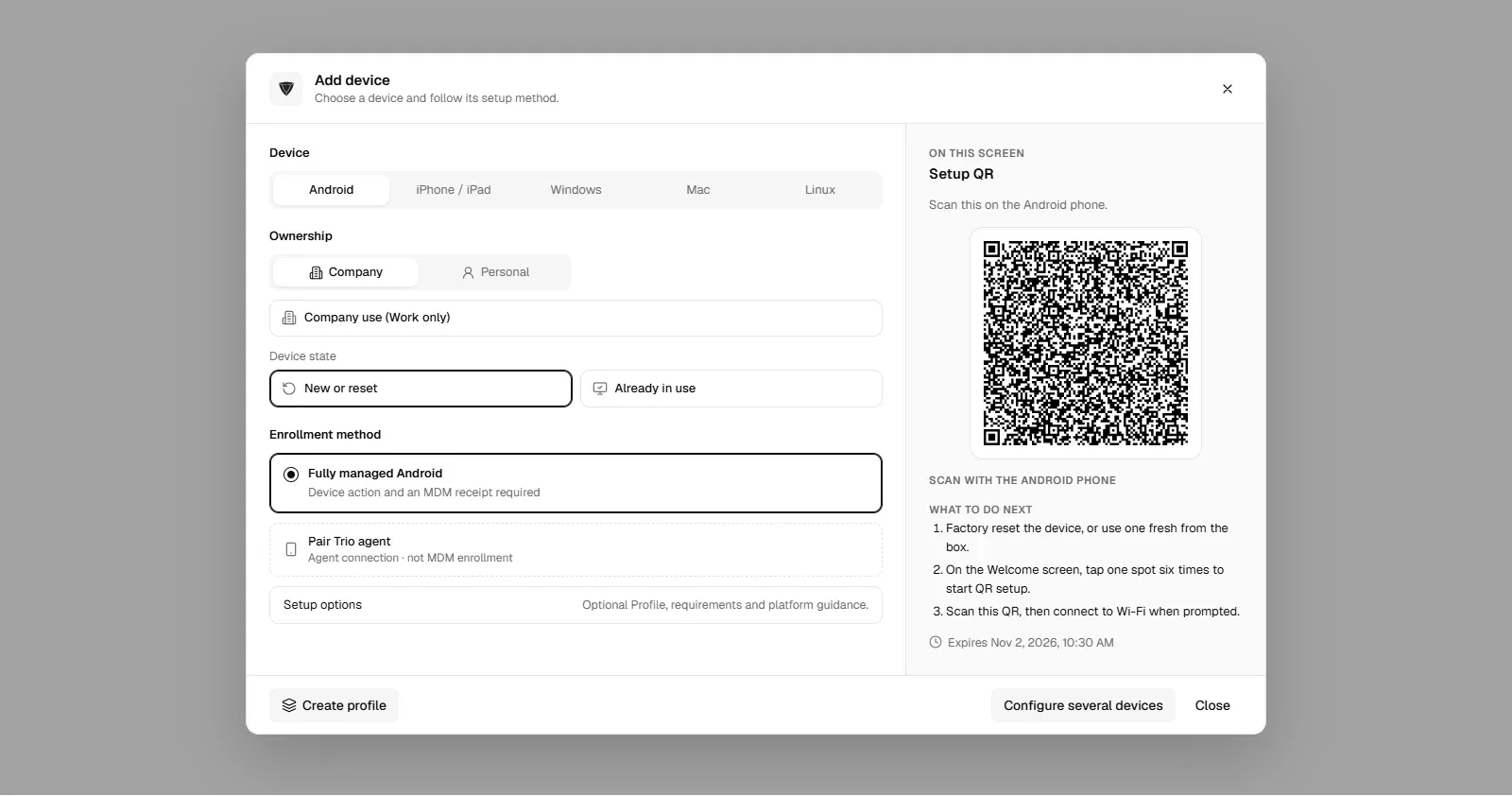
Rugged devices are built to survive harsh places, but they still need to be set up, locked down, updated and supported without anyone touching them. Enroll them as dedicated devices, lock them to their apps, push app settings centrally, plan updates around shifts and watch their health from one console.
Using an MDM to enroll, configure, lock down, update and support rugged handhelds, scanners and tablets used by frontline staff, from a central console.
One that supports Android Enterprise dedicated devices, zero-touch and QR enrollment, kiosk mode, managed configurations for device-maker apps, remote support and location, at a price that works for a large frontline fleet.
Enroll them through Android Enterprise as dedicated devices, lock them to their work apps with kiosk mode, push app settings through managed configurations, and update and support them from the MDM console.
Hardware damage, worn batteries, patchy connectivity, devices shared across shifts and sites far from IT, which all call for remote setup, monitoring and support.
Devices keep their settings and apps while offline and receive changes the next time they connect. For first setup without internet, prepare the Wi-Fi details in the enrollment QR code.
Related reading: rugged computers, Android Enterprise enrollment, Android tablet kiosk mode and SureMDM alternatives.
trio.so enrolls Android devices as dedicated devices, locks them to their apps and lets IT support them remotely. Plans start at $5 per device.
trio.so brings device management, patching and security policies for Windows, macOS, Linux, iOS/iPadOS and Android into one console. Enroll a device and see it in the console within minutes.
trio.so brings device management, patching and security policies for Windows, macOS, Linux, iOS/iPadOS and Android into one console. Enroll a device and see it in the console within minutes.





Have questions? We've got answers. This section covers some of the most commonly asked questions related to this topic.
Related
The related industry news, interviews, technologies, and resources.
Rugged computers are used effectively in many industries today. Read this blog to learn about the benefits of rugged computers for your organization.
Discover how SMB IT teams integrate Mobile Device Management (MDM) with IT Service Management (ITSM) to cut costs and automate device workflows.
What a school staff management system should do, the compliance requirements it must meet, and the IT gaps it often leaves open.

A practical guide to managing every computer on a school network: one console, enrollment, policies by group, patching, labs, Wi-Fi and backups.
Improve classroom communication with the right apps. trio.so helps schools manage devices and ensure secure, effective learning environments.
A school administrator's guide to student database management, with key features, implementation challenges, and best practices.
Discover how student management software revolutionizes education by streamlining administrative tasks, improving communication, and enhancing learning.
Eight types of classroom management tools schools use, from LMS and response systems to monitoring and device management, and what each needs from IT.
14-day free trial. No credit card required.
trio.so for MSPs: one console, separate clients