




Explained
Employee Offboarding Automation: The Ultimate Guide
This article explores the importance and benefits of employee offboarding automation and provides a step-by-step guide to implement it.
An employee equipment agreement template to copy, what each clause covers, how to handle returns and lost devices, and how IT keeps records matched.


Content writer, trio.so
An employee equipment agreement is a short document an employee signs when the company gives them a laptop, phone or other equipment. It lists each item with its serial number, says it remains company property, sets the rules for using and looking after it, explains what happens if it is lost or damaged, and requires the employee to return everything when they leave. A sample agreement you can copy and adapt is below; have the final version checked against your local employment law, especially any clause about deducting money from pay.
If you are issuing laptops to new starters or remote staff and need a ready text, start with the sample agreement; the sections after it cover each clause, how to handle returns and lost devices, and how IT keeps the agreement and the device records in step.
An employee equipment agreement, also called a company equipment agreement, company property agreement or equipment use agreement, is a written record of what equipment the company has issued to an employee and on what terms. It protects the company's assets and data, and it protects the employee too, because both sides know exactly what was handed over, in what condition, and what is expected.
It usually covers laptops, desktops, monitors, phones, tablets, headsets and other accessories, and sometimes software licences or access cards. The employee signs it when they receive the equipment, typically during onboarding, and it is updated when equipment is added, swapped or returned.
It is not the same as an acceptable use policy, which covers how company systems and data may be used in general. The equipment agreement is specific to the items one person holds, and it usually refers to the acceptable use policy rather than repeating it.
Copy this sample and adapt it to your company. It is a starting point, not legal advice: the rules on pay deductions, monitoring and personal use differ by country and state, so have the final text reviewed before you use it.
Employee Equipment Agreement
1. Parties. This agreement is between [Company Name] ("the Company") and [Employee Name], [Job Title], [Department] ("the Employee"), effective [Date].
2. Equipment issued. The Company provides the following equipment for the Employee's work:
- [Item, for example Laptop], [Make and model], serial number [Serial], condition [New / Good / Notes], date issued [Date]
- [Item, for example Mobile phone], [Make and model], serial number or IMEI [Number], condition [ ], date issued [Date]
- [Accessories, for example charger, monitor, headset]
3. Ownership. All equipment listed remains the property of the Company at all times.
4. Use. The equipment is provided for work. [Limited personal use is allowed / Personal use is not allowed]. The Employee will follow the Company's acceptable use and IT security policies, will not let anyone else use the equipment, and will not install software outside the Company's approved methods.
5. Care and security. The Employee will take reasonable care of the equipment, keep it locked with a password or PIN, keep its software updated, not remove or disable security or management software installed by the Company, and not leave it unattended in public places or vehicles.
6. Loss, theft and damage. The Employee will report loss, theft or damage to [IT contact] as soon as possible and within [24 hours]. The Company may lock the equipment or erase its data remotely to protect Company information. [Any cost to the Employee for loss or damage caused by negligence, and how it is recovered, subject to applicable law.]
7. Monitoring and management. The equipment is managed by the Company's device management software. The Company can see device information such as model, serial number, operating system, installed apps, security settings and [location], and can lock or erase the device. [Describe what is not collected, for example personal messages.]
8. Return. The Employee will return all equipment in reasonable working order, allowing for normal wear, when asked or by their last working day, [in person / using the shipping materials provided by the Company]. The Employee will not erase or reset the equipment before returning it unless IT asks them to.
9. Data. Company data on the equipment belongs to the Company. The Employee will not keep copies of Company data after leaving.
10. Changes. Equipment added, replaced or returned will be recorded in an updated equipment list signed by both parties.
Employee signature: __________ Date: __________
Company representative: __________ Date: __________
Each clause in the sample has a job. These are the ones that matter most, and what to think about when you adapt them.
List every item individually with its make, model and serial number (or IMEI for phones), its condition and the date it was issued. "One laptop" is not enough when you need to prove which laptop. Include accessories and peripherals if you expect them back.
Set out how the equipment should be used and protected: who may use it, whether personal use is allowed, keeping it locked and updated, not removing security software, and reporting loss or damage quickly. Quick reporting is the clause that matters most for security: a laptop reported lost within the hour can be locked before anyone gets into it.
Say what the company provides: working equipment, repairs and replacements for normal wear and faults, and support. If the company manages the device and can see certain information or erase it, the agreement is the place to say so plainly, because employees should know before they sign.
State when equipment must be returned (by the last working day, or within a set number of days for remote staff), how (in person, or by prepaid shipping the company arranges), and what happens if it is not returned. Ask employees not to wipe devices themselves: IT needs to check what is on them and reset them properly.
Most equipment problems happen at the end of employment. A simple process prevents nearly all of them:
Deducting the value of unreturned or damaged equipment from final pay is where local law matters most. In the US, federal law does not allow deductions that take pay below the minimum wage, and many states restrict deductions further or require the employee's specific written consent. In the UK, a deduction needs a written term in the contract or the employee's written agreement made in advance. Other countries have their own rules, so check before you include or use such a clause.
A signed list with serial numbers turns "I think she had a laptop" into a record you can act on. It makes clear the equipment belongs to the company and sets expectations for looking after it.
When someone leaves, HR and IT already know what should come back, and the employee already agreed to return it. That removes the most common delays and arguments at the end of employment.
Laptops and phones hold company email, files and saved sign-ins. The agreement's rules on locking, reporting loss and returning devices, combined with removing access on the last day, close the gap where company data walks out with an unreturned device.
HR usually owns the agreement and IT owns the equipment, so they need to share one process. Include the agreement in onboarding, so it is signed before the equipment is handed over. Keep the signed copy with the employee's records, and make sure IT's device records name the same serial numbers. Review the template once a year, and whenever you change device management, monitoring or personal-use rules.
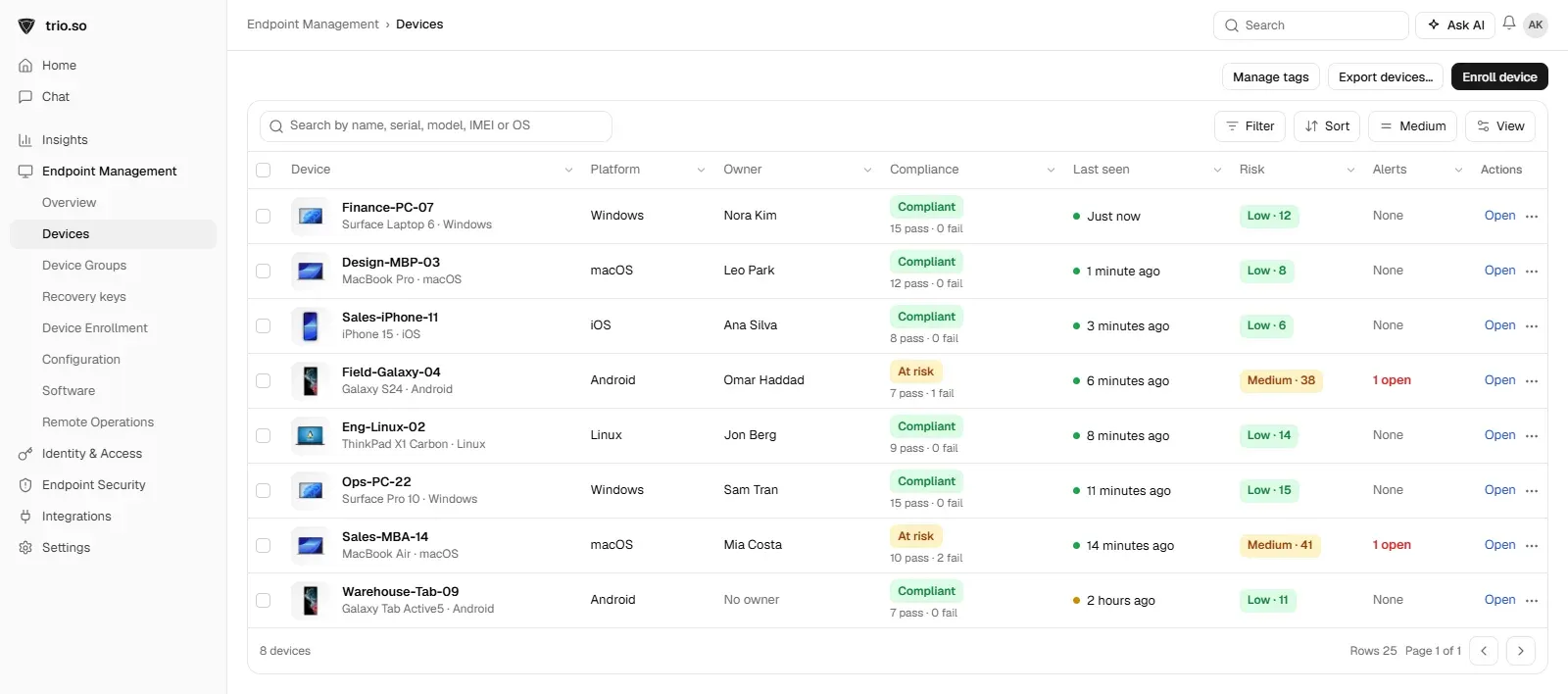
The agreement lists serial numbers, and your device records need to show the same ones. trio.so lists every device with its owner, serial number and last check-in, so the equipment list and the inventory match. When a company device is not returned, IT can lock or wipe it from the console. See IT asset management.
An employee equipment agreement is a page or two that saves a lot of trouble: it records what each person holds, sets the rules for using and protecting it, and makes returns part of leaving. Use the sample above as your starting point, have the final version checked against local law, and keep it matched to your device records so you always know who has what. For the wider picture, see device lifecycle management.
Related reading: IT offboarding checklist, IT asset management, remote wipe on Windows and remote wipe on Android.
trio.so lists every device with its owner and serial number, and can lock or wipe a company device that is not returned.
trio.so brings device management, patching and security policies for Windows, macOS, Linux, iOS/iPadOS and Android into one console. Enroll a device and see it in the console within minutes.
trio.so brings device management, patching and security policies for Windows, macOS, Linux, iOS/iPadOS and Android into one console. Enroll a device and see it in the console within minutes.





Have questions? We've got answers. This section covers some of the most commonly asked questions related to this topic.
Related
The related industry news, interviews, technologies, and resources.
This article explores the importance and benefits of employee offboarding automation and provides a step-by-step guide to implement it.

Explore the importance of offboarding in organizations. Use this employee offboarding checklist to streamline the process.

Discover the benefits of employee onboarding automation! Streamline processes, boost productivity, and improve new hire experiences with trio.so.

Discover the benefits of effective new hire onboarding, along with practical tips to enhance organizational efficiency and security.

Mac vs PC cost for a business: purchase price, lifespan, maintenance, management and resale, compared with current figures and the costs people forget.
What device lifecycle management is, the five stages from purchase to retirement, what IT tracks at each, and how to handle devices for remote staff.
What device inventory management is, which fields to record for every laptop and phone, how to collect them automatically and keep the list current.

The employee onboarding process can determine the future of an employee. Read on to learn how to make it as efficient as possible.
14-day free trial. No credit card required.
trio.so for MSPs: one console, separate clients