For SMBs, IT compliance is not optional—it’s critical for survival. Regulations are stricter than ever, and unmanaged devices or audit failures can lead to lost revenue, lawsuits, and reputational harm. Compliance also safeguards against insider threats and advanced cyberattacks.
Mobile Device Management (MDM) platforms like trio.so streamline compliance through automation, covering device enrollment, patching, encryption, access control, and reporting. For lean IT teams, MDM enables enterprise-grade compliance at scale without adding workload. This guide covers 22 areas where device management supports IT compliance, and where trio.so fits in.
TL;DR: Why SMBs Can’t Ignore IT Compliance
- Non-compliance can bring fines, lost deals and breach costs; prevention is cheaper than cleanup.
- Mobile Device Management (MDM) enforces device-level controls automatically.
- trio.so enforces device security policies and OS updates and exports compliance evidence for audits.
- IT admins spend less time on manual checks and can show auditors device-level evidence.
1. Enhanced Security: IT Compliance as the First Line of Defense
Security is the backbone of IT compliance. SMBs often face phishing attacks, ransomware, and insider breaches that compromise sensitive data. With trio.so, IT admins can enforce encryption and OS updates on Windows, Android, and iOS devices, restrict risky apps with app block lists, lock lost iPhones and Android devices, and wipe company-owned devices. The compliance engine shows which devices fail a check, so issues can be fixed before auditors or regulators flag them.
- Data Encryption: Enforces BitLocker, FileVault and phone encryption, with status per device.
- Remote Lock & Wipe: Lock lost Macs, iPhones and Android devices, and wipe company-owned devices.
- App Block Lists: Keep risky apps off managed devices.
Tying security controls to compliance requirements lowers breach risk and gives you evidence for HIPAA, GDPR, or PCI DSS audits.
2. Simplified Device Management: Centralized Control for IT Compliance
Managing hundreds of employee devices manually is a compliance nightmare. trio.so consolidates oversight into a single dashboard where IT admins can enforce consistent policies across all platforms. This keeps security updates, data handling settings, and app permissions consistent with the frameworks you follow.
- Patch Management: OS update enforcement plus CVE findings with CVSS, EPSS and KEV data, so missing patches show up early.
- Zero-Touch Enrollment: New devices enroll through Apple Automated Device Enrollment, Windows Autopilot or Android zero-touch and get their policies at setup.
- Policy Uniformity: Reduces shadow IT risks by standardizing controls.
Centralized management simplifies audits because device status, audit logs and exportable evidence sit in one place.
3. Regulatory Compliance: Proving IT Compliance with Confidence
Audits can cripple SMBs if data is fragmented or poorly managed. trio.so helps by enforcing encryption, checking devices against compliance framework controls, and keeping audit logs of admin and sign-in activity.
- Evidence Export: Export compliance evidence for GDPR/HIPAA audits.
- Automated Policy Enforcement: Reduces human error.
- Audit Logs: Keep a record of admin and sign-in activity you can export for reviews.
With trio.so, SMBs can demonstrate accountability, lower the risk of regulatory penalties, and build trust with clients and partners.
4. Cost Efficiency: IT Compliance Without Draining Budgets
Compliance is often seen as expensive, but it doesn’t have to be. Automating patching, reporting, and device security reduces the need for constant IT intervention and cuts overhead. By lowering downtime and data breach risks, SMBs avoid many hidden expenses.
- Lower IT Overhead: Fewer manual tasks for admins.
- Fewer Disruptions: Planned update schedules cause fewer surprise restarts.
- ROI-Driven Compliance: Long-term savings from proactive risk management.
With fewer manual tasks, compliance stops being a pure cost center.
5. Improved Productivity: Compliance That Empowers Teams
Compliance shouldn’t slow down operations—it should enable them. trio.so lets IT deploy approved apps to employees wherever they work. With policies running in the background, IT teams no longer need to micromanage devices, and employees can focus on their roles while their devices stay within policy.
- Remote Work Enablement: Secure access from anywhere.
- Scheduled Patching: Plan updates outside working hours to avoid interruptions.
- Role-Based Admin Access: Built-in and custom roles limit what each admin can see and change.
Productivity gains make compliance a driver of efficiency rather than a burden.
6. Mobile Device Management for Windows 10 & 11: IT Compliance at Scale
Windows devices dominate SMB environments, making their management essential for compliance.
trio.so supports Windows 10 and 11, so you can enforce BitLocker, OS updates and app rules on every laptop, desktop, and tablet.
- Windows-Specific Policies: Tailored compliance configurations.
- Integration with Microsoft Entra ID (formerly Azure AD): Brings in your users and groups for identity and access management.
- Compliance Checks: Shows which devices fail a framework control.
By aligning Windows device management with IT compliance, SMBs can strengthen their defenses while simplifying audits.
7. Automated Patch Management: Closing Compliance Gaps Fast
Unpatched devices are a common cause of audit findings. trio.so enforces OS updates on Windows, macOS, iOS and Android and matches installed software against known CVEs, so you don’t rely on manual checks.
- Remediation Plans: Deploy third-party fixes from the trio.so catalog or your own uploaded packages.
- Risk Data: Findings carry CVSS, EPSS and CISA KEV data so you fix what matters first.
- Evidence: Patch status and scheduled reports you can share with auditors.
Automation closes gaps and reduces compliance risks tied to delayed patching.
8. Compliance Monitoring: Stay Ahead of Audits
Instead of waiting for annual audits, trio.so shows compliance status per device, so IT admins can see failures like disabled encryption, outdated OS versions, or blocked apps.
- Compliance Overview: See framework status and failing controls across the fleet.
- Alerts: Get notified when a blocking control fails on a device.
- Device Detail: See which controls apply to each device and which ones fail.
Continuous monitoring transforms compliance into a proactive process.
9. Access Control: Enforcing Least-Privilege IT Compliance
Unauthorized access leads to both data breaches and audit failures. trio.so brings identity and access controls into the same console, to help keep sensitive data limited to the right people.
- Admin Roles: Give each admin only the permissions their job needs.
- Multi-Factor Authentication: Require MFA when users sign in.
- Conditional Access: Control access to company apps with conditional access policies.
Access control supports least privilege and zero-trust principles.
10. Endpoint Encryption: Securing Data for IT Compliance
Encryption is a core safeguard under HIPAA, GDPR, and PCI DSS. trio.so enforces BitLocker on Windows, FileVault on macOS (with recovery key escrow) and encryption on iPhones and Android phones, so data on a lost or stolen device stays unreadable.
- Per-Device Status: See which devices are encrypted and which are not.
- Remote Enforcement: Enforce encryption policies remotely.
- Proof for Audits: Export encryption status as evidence.
Encryption is one of the easiest controls to show an auditor.

11. BYOD Management: IT Compliance in Flexible Work Environments
Bring-Your-Own-Device (BYOD) introduces compliance risks when personal devices access company data. On Android, trio.so uses a work profile that keeps work apps and data apart from personal ones.
- Work Profiles: Separate work apps and data from personal ones on Android.
- Clear Rules: Write down what IT can and cannot see or do on a personal device.
- Minimum Standards: Require a screen lock and a supported OS version before a personal device gets company data.
BYOD no longer has to mean compromising compliance.
12. Application Management: Shadow IT and Compliance Risks
Unapproved apps can cause compliance violations. trio.so lists the apps installed on Windows, macOS, iOS and Android devices and lets you allow or block apps.
- Allow and Block Lists: Approve safe apps, block risky ones.
- App Deployment: Push approved apps to managed devices.
- App Inventory: See which apps are installed on each device.
This prevents shadow IT from undermining compliance.
13. Remote Work Compliance: Securing Distributed Teams
Remote work creates compliance blind spots. trio.so applies the same policies to a device wherever it connects from.
- VPN Profiles: Push VPN settings, including always-on VPN on supervised iPhones and iPads.
- Screen Lock and Encryption: Require both on every remote device and check the status per device.
Remote teams keep their flexibility, and IT keeps the same controls.
14. Audit-Ready Reporting: Simplifying IT Compliance Proof
Manual audit preparation wastes valuable time. trio.so exports compliance evidence for auditors.
- Framework View: Check devices against frameworks such as CIS or PCI DSS and export the evidence.
- Audit Logs: A record of admin and sign-in activity.
- Scheduled Reports: Send reports by email to the people who need them.
Audit prep becomes a streamlined process instead of a crisis.
15. Data Loss Prevention: IT Compliance Through Proactive Protection
Data leakage is both a compliance and reputational risk. trio.so restriction policies help keep sensitive data on managed devices.
- Removable Storage Blocking: Block USB drives and other removable storage.
- Screenshot Control: Block screenshots and screen recording.
- Forcepoint DLP: Bring Forcepoint DLP incidents into trio.so and match them to managed devices.
Proactive DLP lowers the risk of a reportable data leak and protects brand trust.
16. Incident Response: Fast Recovery with IT Compliance Logs
Regulators require documented incident responses. trio.so gives you audit logs and remote actions to support an investigation.
- Response Plan: Write down who does what in the first hour after a device is lost or compromised.
- Audit Logs: A record of the admin actions taken during the response.
- Remote Actions: Lock lost Macs, iPhones and Android devices, or wipe company-owned devices.
Incident response becomes faster and easier to document.
17. Zero Trust Architecture: Enforcing IT Compliance by Design
Zero Trust principles align directly with compliance mandates. trio.so supports least privilege with admin roles, MFA and conditional access.
- Device Health: Keep devices encrypted, locked and up to date, and check their status per device.
- User Authentication: Require MFA at sign-in.
- Least Privilege: Give users and admins only the access they need.
This architecture strengthens both security and regulatory compliance.
18. Scalability: Future-Proofing IT Compliance
As SMBs grow, compliance requirements expand. trio.so manages fleets from a handful of devices to thousands.
- Automated Policy Rollouts: Consistency across expanding teams.
- Cloud-Native Infrastructure: No hardware costs.
Growth no longer has to open new compliance gaps.
19. Industry-Specific Compliance Templates
Different industries have unique compliance frameworks. trio.so includes compliance frameworks such as CIS and PCI DSS.
- Healthcare: Encryption, screen lock and evidence export for HIPAA audits.
- Finance: Encryption and app block lists on devices in PCI DSS scope.
- Education: Consistent policies and app rules on student devices.
Starting from a framework is faster than building every control from scratch.
20. Integration with Existing IT Tools
Compliance often fails when tools don’t integrate. trio.so connects to SIEM tools and identity providers.
- SIEM Integration: Data Streamer sends trio.so log events to Splunk, another SIEM or an HTTP endpoint.
- Identity Management: Connects to Okta and Microsoft Entra ID.
Integration prevents compliance silos and keeps data consistent across tools.
21. Training and Awareness for Employees
Employees often break compliance rules without meaning to. Short reminders, clear rules and visible results help them avoid it.
- Share Results: Show teams how many devices pass key checks.
- Short Refreshers: Brief, regular training on phishing and device rules.
- Easy Requests: Employees can ask IT for help through the trio.so self-service portal.
Awareness empowers employees to become compliance allies.
22. Continuous Improvement: IT Compliance as a Business Advantage
Compliance is not static; it evolves with regulations and threats. Treat it as a cycle of review and improvement.
- Adaptive Policies: Update rules as regulations change.
- Risk Scores: trio.so scores patch findings from 0 to 100, so weak points show up early.
- Regular Reviews: Revisit policies and controls every quarter.
This transforms compliance from a defensive necessity into a competitive advantage.
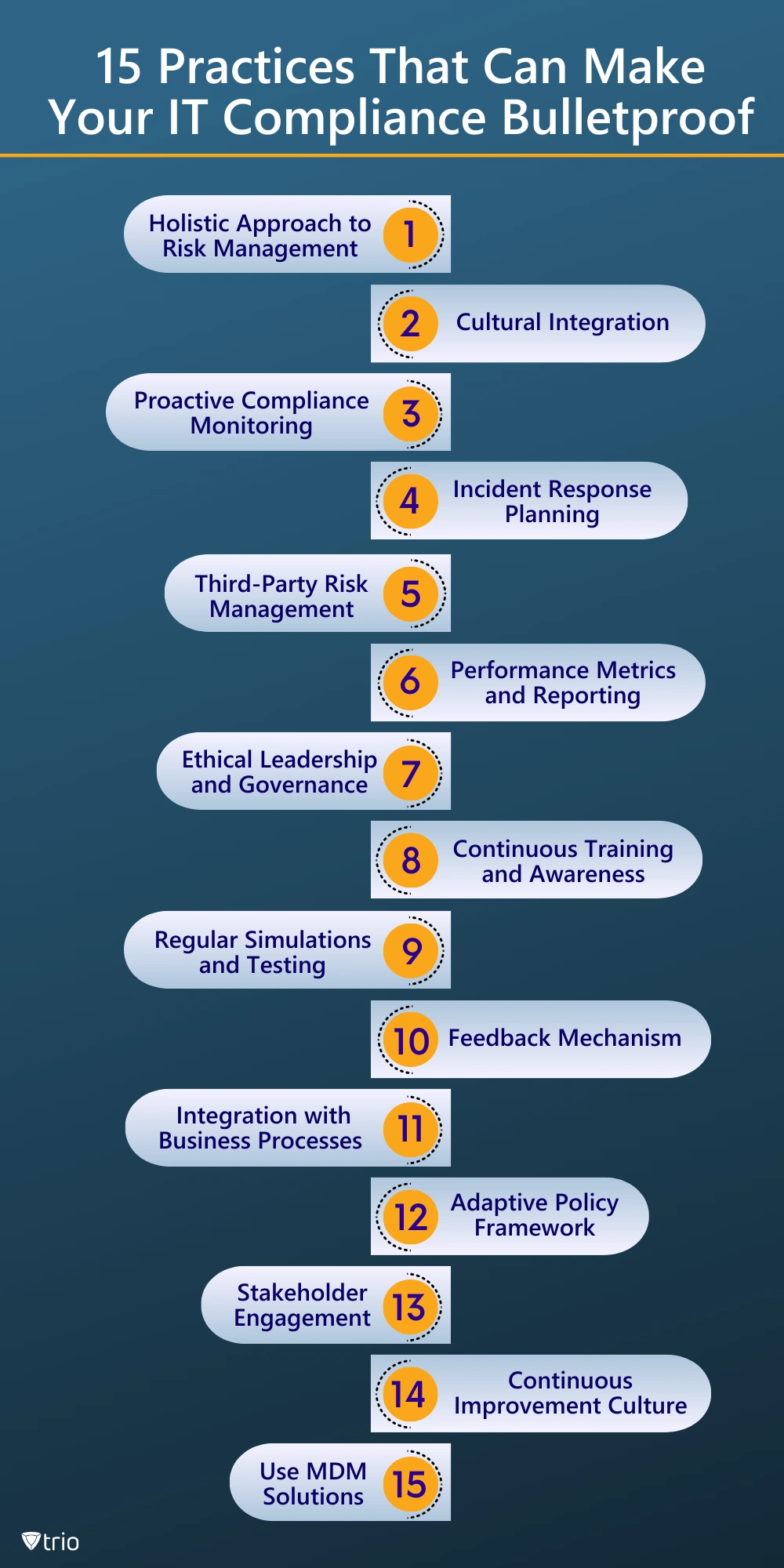
15 Best Practices for Stronger IT Compliance
trio.so brings policy enforcement, a compliance engine and evidence export into one cloud console, which supports several of the practices below.
| # |
Best Practice (Keep for Policy Docs) |
Why It Matters (Pain + Consequence) |
| 1 |
Holistic Risk Management |
Auditors want tech, financial & reputational risk tied together. |
| 2 |
Cultural Integration |
Users bypass rules when they're invisible. |
| 3 |
Proactive Monitoring |
Waiting for quarterly audits = blind spots. |
| 4 |
Incident-Response Playbook |
Regulators ask for proof you can act fast. |
| 5 |
Third-Party Risk Mgmt |
Vendors and contractors can be the way in. |
| 6 |
KPIs & Reporting |
Execs fund what they can measure. |
| 7 |
Ethical Leadership |
Penalties rise sharply when "willful neglect" is proven. |
| 8 |
Continuous Training |
Regular refreshers keep phishing awareness current. |
| 9 |
Table-Top & Sim Tests |
Dry runs expose policy gaps safely. |
| 10 |
Feedback Loop |
Silent staff = hidden risk. |
| 11 |
Process Embedding |
Compliance bolted-on = brittle. |
| 12 |
Adaptive Framework |
Laws change; PDFs don't. |
| 13 |
Stakeholder Engagement |
Customers now ask for SOC-2 proof pre-sale. |
| 14 |
Continuous-Improvement Culture |
Static rules cause noisy alerts & burnout. |
| 15 |
Use MDM Solutions |
Manual device checks take hours every week and miss changes between audits. |
Full infographic here.
Real-World Use Cases: IT Compliance in Action
- Healthcare: trio.so enforces encryption on devices that handle PHI and exports evidence for HIPAA audits.
- Finance: Enforces encryption and app block lists on devices in PCI DSS scope.
- Education: Manages 1:1 device programs with consistent policies.
- Retail: Runs POS and shared devices in dedicated device (kiosk) mode, so staff can use only the approved apps.
Conclusion: IT Compliance Made Simple with trio.so
For SMB IT admins, regulatory pressure isn’t slowing down—your tooling has to speed up. Spreadsheets and scattered agents can’t keep pace with HIPAA updates, PCI-DSS 4.0 deadlines, or the next GDPR fine headline. The stakes are real: one misconfigured laptop or lost phone can erase years of margin and customer trust.
Modern MDM is a practical place to start. By bringing encryption enforcement, wipe for company-owned devices, compliance checks, and evidence export into a single cloud dashboard, trio.so turns much of your device policy into controls you can enforce and show to auditors, without a stack of overlapping tools.
Bottom line: IT compliance standards don’t have to be a cost center. With trio.so, it becomes a built-in safeguard that wins deals, calms auditors, and frees your team to focus on growth.
Feel the difference in one lunch break:
Free Compliance Checklists for IT Teams
Working with more than one framework? Each checklist below is a free PDF with an Excel tracker you can use to plan and record your work:
Plans start at $5 per device. 14-day free trial. No credit card required.