



Explained
Miradore Alternatives for Teams Outgrowing the Free Plan
Seven Miradore alternatives compared on platforms and published pricing, with Miradore's own plans and its 50-device free limit.
Seven IBM MaaS360 alternatives compared on platforms and published pricing, with MaaS360's own plans and what to check before you switch.


Content writer, trio.so
The main IBM MaaS360 alternatives are Microsoft Intune, Omnissa Workspace ONE, Hexnode, ManageEngine Endpoint Central, Scalefusion and trio.so for mixed fleets, and Jamf for Apple-only fleets. MaaS360 is IBM's unified endpoint management (UEM) service for phones, tablets and laptops, with mobile threat management and analytics in its higher tiers. Teams usually compare it with other tools at renewal, when the tier they need, the add-ons or the effort of running an IBM product weigh more than the entry price.
If you run MaaS360 today and want to know what else fits, this guide explains what MaaS360 is and costs, compares seven MaaS360 competitors on platforms and published pricing, and covers what to check before you switch.
IBM MaaS360 is a cloud UEM service that IBM describes as multi-OS management for smartphones, tablets and laptops. It enrolls devices, applies policies, distributes apps and documents, and, in its higher tiers, adds mobile threat management and AI-assisted analytics. It is sold in tiers, with a 30-day free trial.
MaaS360 is an established product, and many teams use it without problems. The reasons teams look around tend to be specific:
IBM's MaaS360 pricing page, checked on 8 November 2026, lists these starting prices per client device per month:
| Tier | From |
|---|---|
| Fast Start | $1.64 |
| Essentials | $4.24 |
| Deluxe | $5.30 |
| Premier | $6.63 |
| Enterprise | $9.54 |
| Mobile Security Suite | $6.00 |
IBM offers a 30-day free trial. Map each feature you use to a tier before comparing alternatives, because the entry tier is rarely the one a business runs on.
For the difference between the categories vendors use, see MDM vs. EMM vs. UEM.
Prices come from each vendor's own pricing page, checked on 8 November 2026. Vendors change them often, so confirm before you buy.
Microsoft's cloud endpoint management service for Windows, macOS, iOS/iPadOS, Android and some Linux devices, included in Microsoft 365 E3 and E5.
See also Intune alternatives.
Workspace ONE UEM, part of VMware until 2024 and now sold by Omnissa, manages Windows, macOS, iOS, Android, Linux, ChromeOS and rugged devices from a cloud console.
A multi-platform UEM for Windows, macOS, iOS, Android, tvOS and Linux.
See Hexnode alternatives.
A broad endpoint management suite for Windows, macOS, Linux, iOS, iPadOS, Android, ChromeOS and tvOS, in the cloud or on premises.
A multi-platform tool known for Android frontline and kiosk devices, which also manages iOS, macOS and Windows, and lists Linux and ChromeOS.
For fleets that are mostly Mac, iPhone and iPad, Jamf is the Apple specialist.
Comparing Jamf Pro and MaaS360 directly comes down to fleet mix: Jamf goes deeper on Apple, MaaS360 covers more operating systems. See Jamf alternatives.
A device management platform for Windows, macOS, Linux (Ubuntu and Debian), iOS/iPadOS and Android in one console.
| Tool | Platforms | Published starting price | Best for |
|---|---|---|---|
| IBM MaaS360 | Phones, tablets and laptops across operating systems | $1.64 per device per month | Larger, security-led organizations |
| Microsoft Intune | Windows, macOS, iOS/iPadOS, Android, Linux | $8 per user per month (Plan 1) | Microsoft 365 shops |
| Omnissa Workspace ONE | Windows, macOS, iOS, Android, Linux, ChromeOS | $3.00 per device per month | Enterprise scope |
| Hexnode | Windows, macOS, iOS, Android, tvOS, Linux | $2.2 per device per month | Broad coverage on a budget |
| ManageEngine Endpoint Central | Windows, macOS, Linux, iOS, iPadOS, Android, ChromeOS, tvOS | $795 per year for 50 endpoints | Broad features, cloud or on premises |
| Scalefusion | Android, iOS, macOS, Windows; Linux and ChromeOS listed | $2 per device per month (annual) | Kiosk and frontline fleets |
| Jamf | Apple | $5.75 per mobile device, $12.50 per Mac | Apple-only fleets |
| trio.so | Windows, macOS, Linux, iOS/iPadOS, Android | $5 per device | Mixed fleets in one console |
For a full plan, see MDM migration.
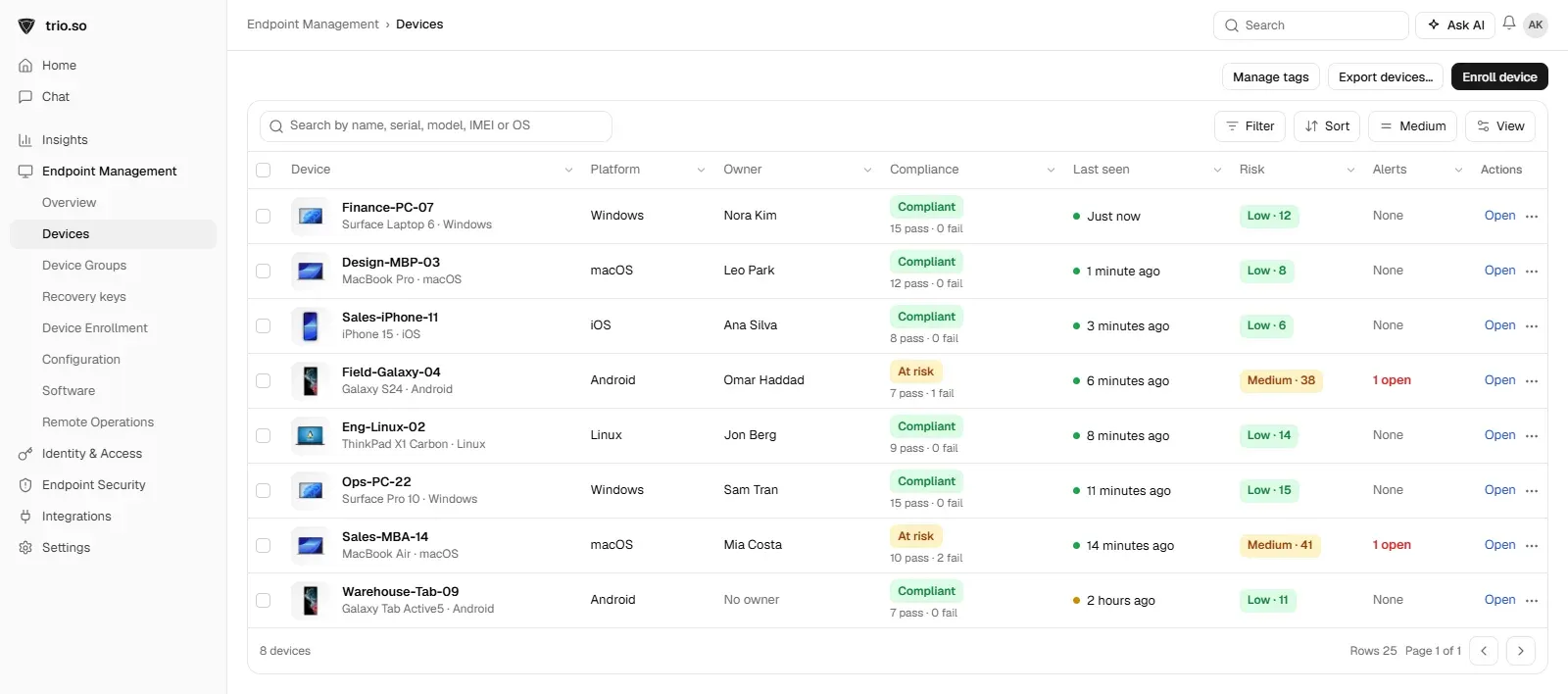
trio.so manages Windows, macOS, Linux, iOS/iPadOS and Android devices from one console, with automatic enrollment through Apple Business, Windows Autopilot and Android zero-touch, remote desktop and terminal in every plan, and per-device policy status. Personal Android phones get a separate work profile; on personal iPhones, iPads and Macs, IT cannot erase, lock or locate the device and sees only the work apps it installed. Plans start at $5 per device. For a head-to-head view, see trio.so vs. MaaS360, side by side.
IBM's cloud unified endpoint management service for smartphones, tablets and laptops across operating systems. It enrolls devices, applies policies and distributes apps, with mobile threat management and analytics in its higher tiers.
Microsoft Intune, Omnissa Workspace ONE, Hexnode, ManageEngine Endpoint Central, Scalefusion and trio.so for mixed fleets, and Jamf for Apple-only fleets. The best fit depends on your platforms, your stack and how you want to pay.
Microsoft Intune and Omnissa Workspace ONE are the closest enterprise competitors. Hexnode, ManageEngine, Scalefusion and trio.so compete for smaller and mid-size fleets, and Jamf for Apple-only fleets.
IBM lists MaaS360 from $1.64 per device per month (Fast Start) up to $9.54 (Enterprise), with a Mobile Security Suite from $6.00 and a 30-day free trial.
MDM tools, MaaS360 included, generally see device details such as model, operating system and installed managed apps, not the contents of personal photos or messages. What an employer can see depends on how the device is enrolled, so check your company's policy and IBM's own documentation.
Related reading: Hexnode alternatives, Intune alternatives, MDM software vendors and MDM migration.
trio.so manages Windows, Mac, Linux, iPhone, iPad and Android from one console. Plans start at $5 per device.
trio.so brings device management, patching and security policies for Windows, macOS, Linux, iOS/iPadOS and Android into one console. Enroll a device and see it in the console within minutes.
trio.so brings device management, patching and security policies for Windows, macOS, Linux, iOS/iPadOS and Android into one console. Enroll a device and see it in the console within minutes.





Have questions? We've got answers. This section covers some of the most commonly asked questions related to this topic.
Related
The related industry news, interviews, technologies, and resources.
Seven Miradore alternatives compared on platforms and published pricing, with Miradore's own plans and its 50-device free limit.
Seven 42Gears SureMDM alternatives compared on platforms and published pricing, with SureMDM's own plans and when it still fits.
The best Microsoft Intune alternatives for IT teams: an honest comparison of features, platforms and published pricing, and when to stay on Intune.

Learn how to calculate ROI of MDM with proven cost savings formulas. Organizations achieve 200-400% return through reduced IT costs and enhanced productivity.

Mobile device security protects endpoints through encryption, MDM, and threat defense to safeguard business data from cyber attacks.
Windows Autopilot sets up new PCs and Intune manages them after. How the two work together, what Autopilot reset does, and what small IT teams need.

Discover the key Microsoft Intune pros and cons. This SMB-focused comparison highlights strengths and drawbacks of Microsoft Intune.

MDM vs GPO: how Group Policy and MDM differ, what happens when both set the same policy (MDMWinsOverGP), and how to move Windows settings to MDM in stages.
14-day free trial. No credit card required.
trio.so for MSPs: one console, separate clients