



Templates
NIST 800-171 Compliance Checklist: 110 Requirements and SPRS
A NIST 800-171 compliance checklist with all 110 Rev. 2 requirements, their SPRS points, Rev. 3 changes, CMMC status and a self-assessment guide. Free Excel.
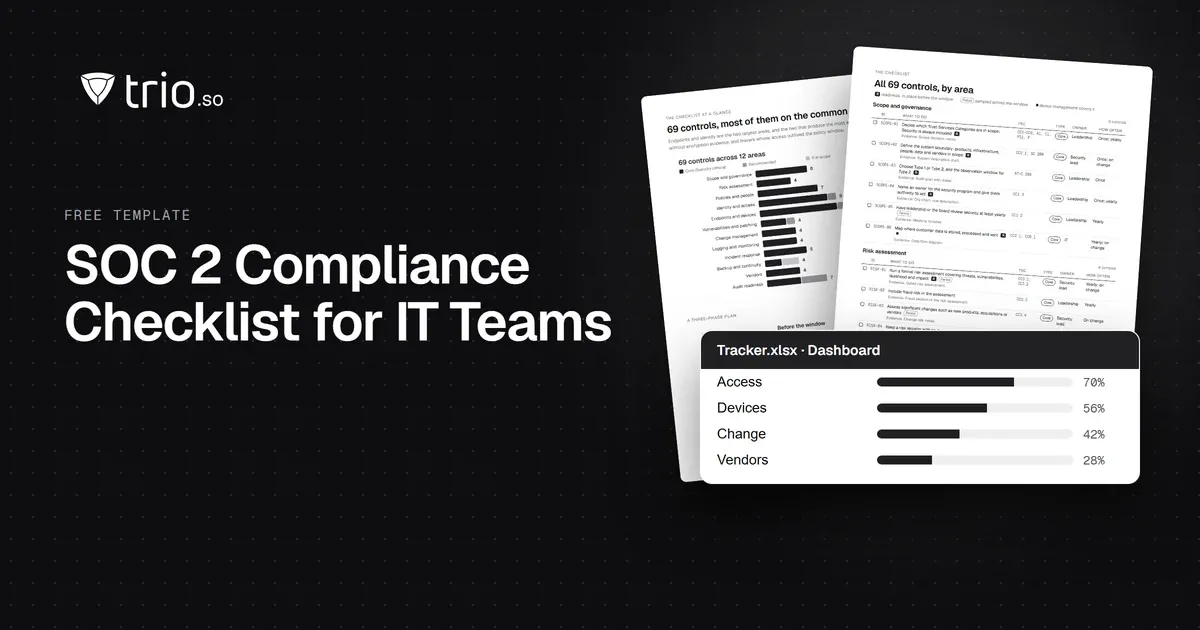
A SOC 2 compliance checklist for IT teams: 69 controls mapped to the Trust Services Criteria, with the evidence auditors sample. Free PDF and Excel.
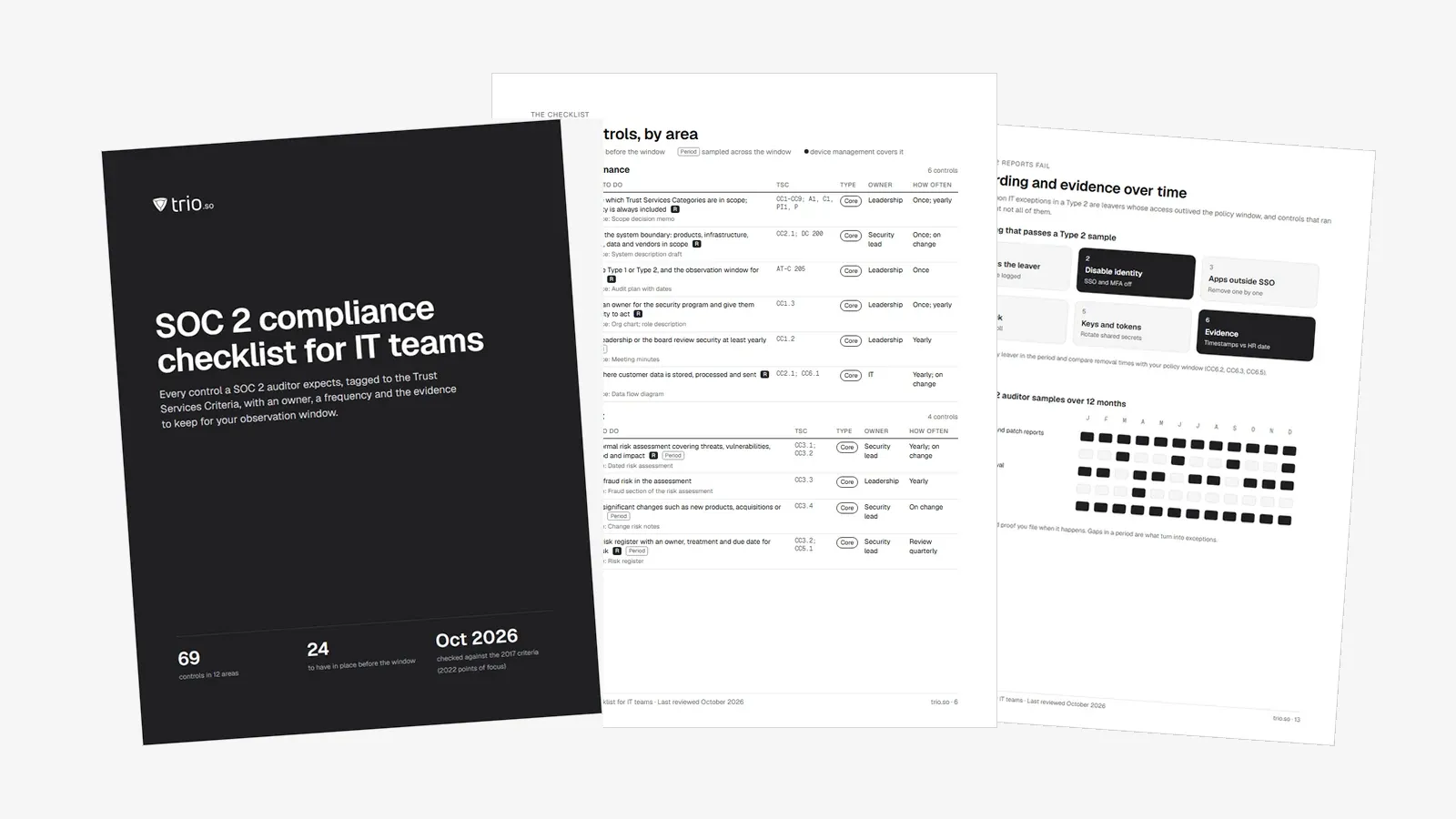
A SOC 2 compliance checklist lists the controls an auditor expects to test, and the proof that they ran. This one has 69 controls in 12 areas. Each control is tagged with the Trust Services Criteria it supports and comes with the evidence auditors sample. The PDF and Excel versions add an owner and a frequency to each control.
It is written for the people who carry most of the work: IT managers, sysadmins, engineering leads and MSPs at SaaS and service companies. The endpoint and offboarding sections go further than most checklists, because that is where IT teams often pick up Type 2 exceptions.
Download the checklist as a printable PDF and an Excel tracker with a dashboard and an evidence log, or work through it below.
In short
If you already know the Trust Services Criteria and the difference between Type 1 and Type 2, skip to the checklist.
SOC 2 is an examination of a service organization's controls, performed by a licensed CPA firm under the AICPA attestation standards. The result is a report your customers read during security review. There is no SOC 2 certificate, and no list of mandatory controls. For the full background, see our guide to SOC 2 compliance.
The report is built on the 2017 Trust Services Criteria, with revised points of focus from 2022. The criteria cover five categories:
Many first reports cover Security alone, or Security plus Availability and Confidentiality. Ask your largest customers what they need before you add more.
A Type 1 report tests whether your controls are designed well as of a single date. A Type 2 report tests whether they worked over a period, usually 3 to 12 months. Enterprise buyers usually ask for a Type 2. Our comparison of SOC 2 Type 1 vs Type 2 goes deeper.
| Type 1 | Type 2 | |
|---|---|---|
| What it tests | Control design at a single date | Design and operating effectiveness over a period |
| Observation period | None | Usually 3 to 12 months; 12 once you renew |
| Typical time to report | About 3 to 4 months from kickoff | About 6 to 12 months in total |
| Typical audit fee | About $5k to $40k (vendor estimates) | About $7k to $75k (vendor estimates) |
| What customers usually ask for | Accepted as a first step | The report most enterprise buyers expect |
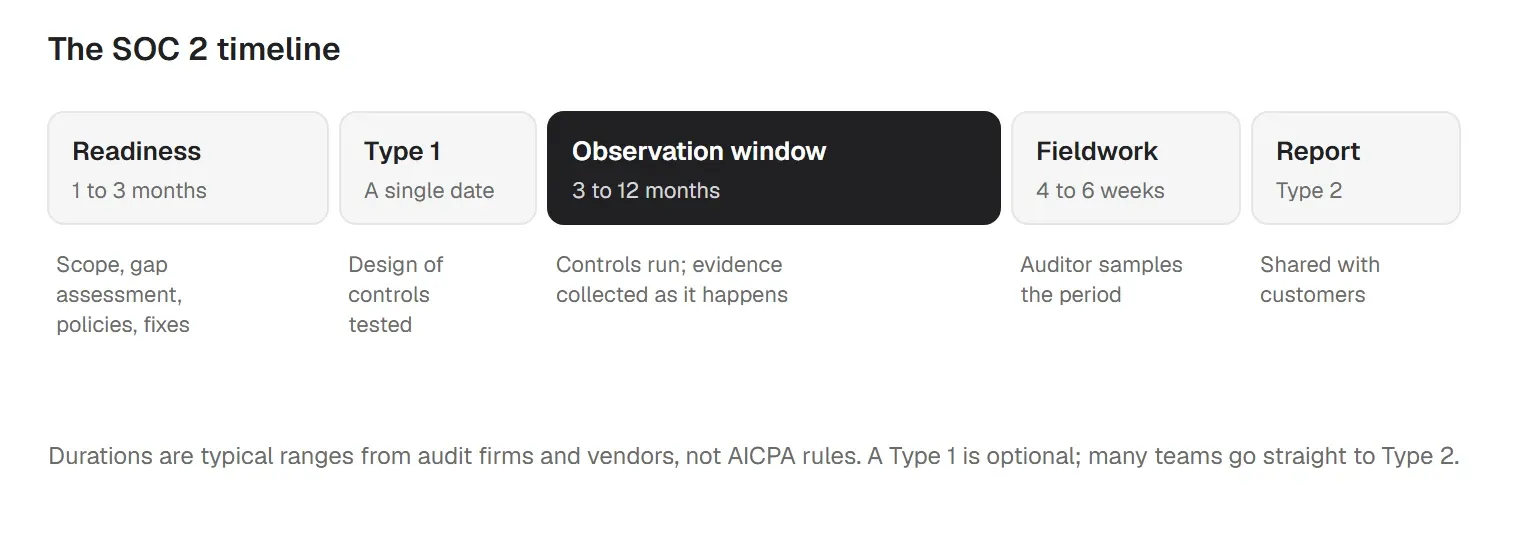
The cost and time figures above are estimates from audit firms and compliance vendors, not AICPA rules. Your own staff time is often the larger cost.
Reports do not expire, but buyers expect a fresh one. The AICPA sets no expiry date. In practice, customers expect a new Type 2 every 12 months, and a period that ended more than 6 to 12 months ago starts to look stale. A management-signed bridge letter covers the gap between the end of your last period and today.
Split the work by the observation window, because the auditor tests from day one:
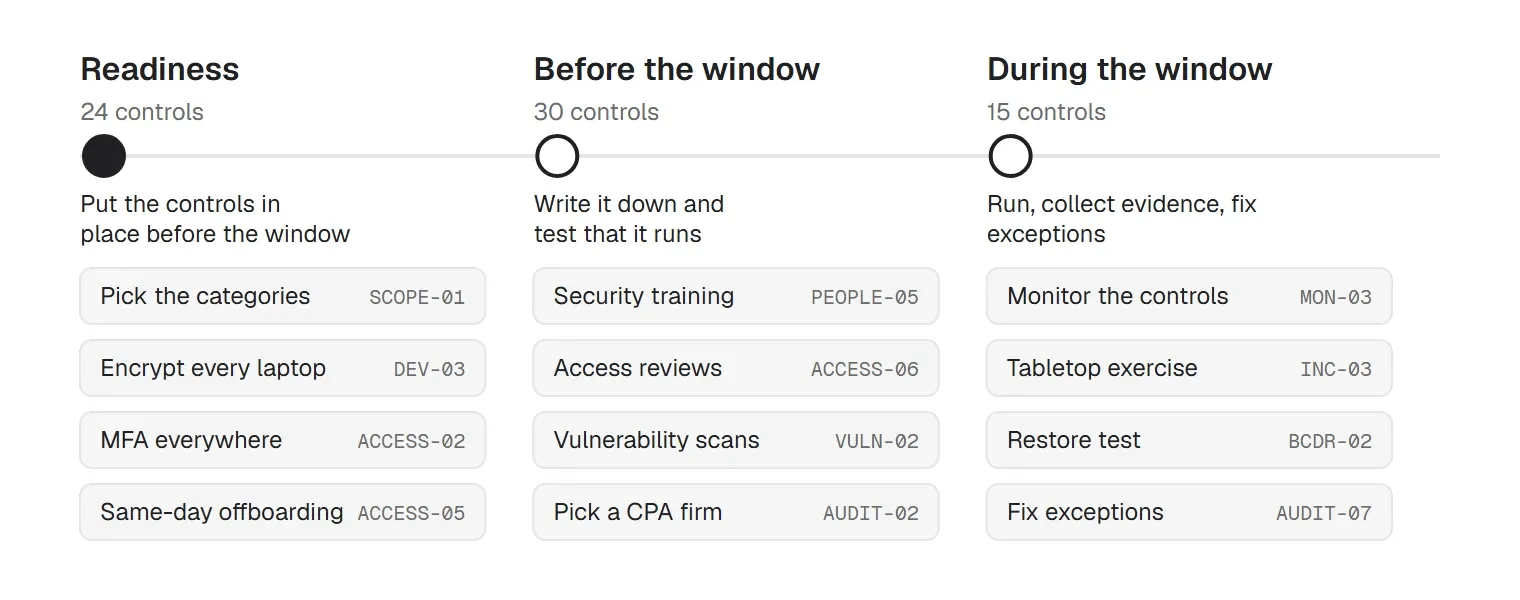
In the Excel tracker, filter the Phase column to see each list. Give every item a named owner and a due date before you start.
There is no official SOC 2 controls list. The AICPA publishes criteria, and each company designs its own controls to meet them. The auditor then tests those controls. That is why two SOC 2 reports can contain very different control lists.
Security, the common criteria, is always in scope. It has 33 criteria in nine series:
| Series | Area | Criteria | Typical controls |
|---|---|---|---|
| CC1 | Control environment | 5 | Code of conduct, org chart and responsibilities, background checks, accountability |
| CC2 | Communication and information | 3 | Policies published to staff, security information shared with customers |
| CC3 | Risk assessment | 4 | Yearly risk assessment, fraud risk, assessing changes |
| CC4 | Monitoring activities | 2 | Checking that controls still work, reporting deficiencies |
| CC5 | Control activities | 3 | Choosing controls, technology controls, policies that put them in place |
| CC6 | Logical and physical access | 8 | Asset inventory, MFA, onboarding and offboarding, access reviews, encryption, device and malware controls |
| CC7 | System operations | 5 | Vulnerability scanning, logging and monitoring, incident response and recovery |
| CC8 | Change management | 1 | Approved, tested changes, including patches and configuration |
| CC9 | Risk mitigation | 2 | Business disruption risk, vendor and partner risk |
The optional categories add more: Availability (A1, 3 criteria), Confidentiality (C1, 2 criteria), Processing integrity (PI1, 5 criteria), Privacy (P1-P8, 18 criteria). All five together come to 61 criteria. The checklist below turns them into 69 practical controls, each tagged with the criteria it supports.
Auditors start with your policies, because each one is a promise they will test. A first report needs a set of written policies and plans. These are the ones IT usually owns, with a free template for each:
| Policy | Criteria | Template |
|---|---|---|
| Information security policy | CC1, CC2, CC5 | Template |
| Acceptable use policy | CC1.1, CC2.2 | Template |
| Access control policy | CC6.1-CC6.3 | Template |
| User access review procedure | CC6.2, CC6.3 | Template |
| Data encryption policy | CC6.1, CC6.7 | Template |
| Workstation security policy | CC6.1, CC6.7, CC6.8 | Template |
| BYOD policy | CC6.7, CC6.8 | Template |
| Patch management policy | CC7.1, CC8.1 | Template |
| Asset disposal policy | CC6.5 | Template |
| Data retention policy | C1.1, C1.2 | Template |
| Vendor management policy | CC9.2 | Template |
| Risk management plan | CC3.1-CC3.4 | Template |
| Incident and breach response plan | CC7.3-CC7.5 | Template |
| Disaster recovery plan | CC7.5, A1.2-A1.3 | Template |
| Offboarding checklist | CC6.2, CC6.5 | Template |
Edit every template to match what you actually do. A policy you adopt but don't follow becomes an exception.
Here is the full checklist. Start with the items marked "readiness". Core controls support the common criteria, which are always in scope. Recommended controls are not named in the criteria, but they make a criterion much easier to evidence. "If in scope" applies only when you add that category.
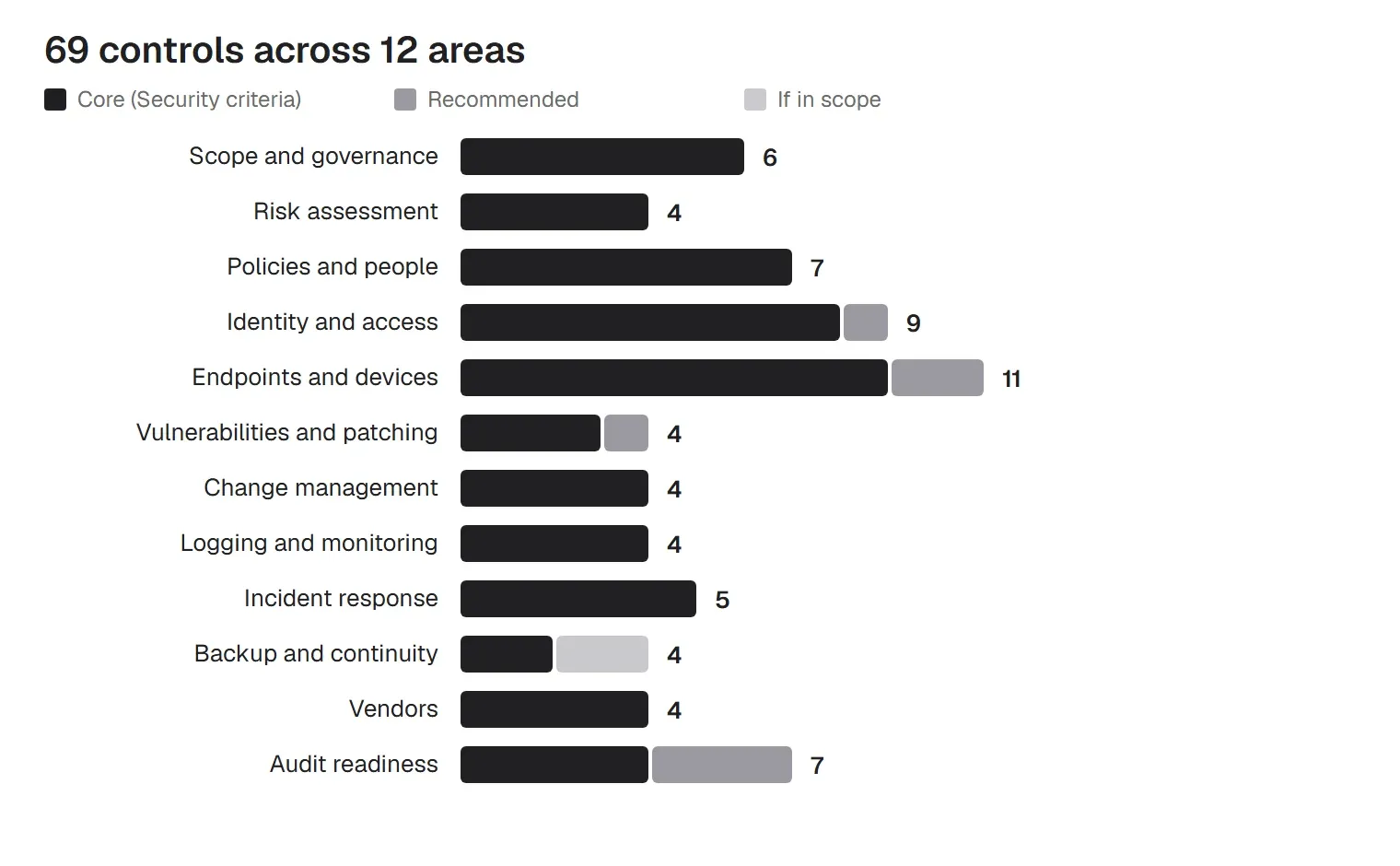
Scope decides how much work everything else takes. Keep the boundary tight: the product customers buy, and the people and systems that run it.
| ID | What to do | Criteria | Type | Evidence auditors sample |
|---|---|---|---|---|
| SCOPE-01 | Decide which Trust Services Categories are in scope; Security is always included (readiness) | CC1-CC9; A1, C1, PI1, P | Core | Scope decision memo |
| SCOPE-02 | Define the system boundary: products, infrastructure, people, data and vendors in scope (readiness) | CC2.1; DC 200 | Core | System description draft |
| SCOPE-03 | Choose Type 1 or Type 2, and the observation window for Type 2 (readiness) | AT-C 205 | Core | Audit plan with dates |
| SCOPE-04 | Name an owner for the security program and give them authority to act (readiness) | CC1.3 | Core | Org chart; role description |
| SCOPE-05 | Have leadership or the board review security at least yearly | CC1.2 | Core | Meeting minutes |
| SCOPE-06 | Map where customer data is stored, processed and sent (readiness) | CC2.1; CC6.1 | Core | Data flow diagram |
The risk assessment is where auditors start. It should explain why you chose the controls in the rest of this list.
| ID | What to do | Criteria | Type | Evidence auditors sample |
|---|---|---|---|---|
| RISK-01 | Run a formal risk assessment covering threats, vulnerabilities, likelihood and impact (readiness) | CC3.1; CC3.2 | Core | Dated risk assessment |
| RISK-02 | Include fraud risk in the assessment | CC3.3 | Core | Fraud section of the risk assessment |
| RISK-03 | Assess significant changes such as new products, acquisitions or vendors | CC3.4 | Core | Change risk notes |
| RISK-04 | Keep a risk register with an owner, treatment and due date for every risk (readiness) | CC3.2; CC5.1 | Core | Risk register |
Policies tell the auditor what you promised to do. Every line you adopt from a template becomes something they test, so cut what you will not run.
| ID | What to do | Criteria | Type | Evidence auditors sample |
|---|---|---|---|---|
| PEOPLE-01 | Write and approve the core policies: information security, acceptable use, access, change, incident, vendor, backup (readiness) | CC5.3; CC2.2 | Core | Policies with approval dates |
| PEOPLE-02 | Write a device and workstation policy: encryption, screen lock, updates, BYOD (readiness) | CC5.3; CC6.7 | Core | Device policy |
| PEOPLE-03 | Get every employee and contractor to accept the policies and a code of conduct | CC1.1; CC2.2 | Core | Signed acknowledgements |
| PEOPLE-04 | Run background checks where the law allows, before access is granted | CC1.4 | Core | Background check records |
| PEOPLE-05 | Train everyone on security at hire and at least yearly | CC1.4; CC2.2 | Core | Training completion records |
| PEOPLE-06 | Hold people accountable: a sanctions process for policy breaches | CC1.5 | Core | Sanctions policy; records |
| PEOPLE-07 | Publish how customers and staff report security issues | CC2.2; CC2.3 | Core | Security contact page |
Identity is a common source of IT exceptions: access that outlived a leaver, and reviews that slipped. Pair this section with our IT offboarding checklist.
| ID | What to do | Criteria | Type | Evidence auditors sample |
|---|---|---|---|---|
| ACCESS-01 | Use one identity provider with single sign-on for in-scope systems (readiness) | CC6.1 | Recommended | IdP app list |
| ACCESS-02 | Require MFA for the identity provider, cloud consoles, code and admin tools (readiness) | CC6.1; CC6.6 | Core | MFA enforcement settings; user report |
| ACCESS-03 | Approve access before it is granted, based on role | CC6.2; CC6.3 | Core | Sampled access tickets |
| ACCESS-04 | Grant least privilege and keep admin rights separate | CC6.3 | Core | Role matrix; admin list |
| ACCESS-05 | Remove all access within your policy window when someone leaves (readiness) | CC6.2; CC6.3 | Core | HR leaver list matched to removal timestamps |
| ACCESS-06 | Review user and admin access to in-scope systems every quarter | CC6.2; CC6.3 | Core | Signed access reviews |
| ACCESS-07 | Control service accounts and API keys: owners, rotation, least privilege | CC6.1; CC6.3 | Core | Service account register |
| ACCESS-08 | Set password rules for systems outside single sign-on | CC6.1 | Core | Password settings |
| ACCESS-09 | Restrict physical access to offices and any server or network rooms | CC6.4 | Core | Badge list; visitor log |
Most SOC 2 checklists barely mention devices, yet laptops are a common source of Type 2 exceptions. The criteria do not name products. They ask that devices be inventoried, protected and controlled (CC6.1, CC6.7, CC6.8, CC7.1), and auditors test that across the window.
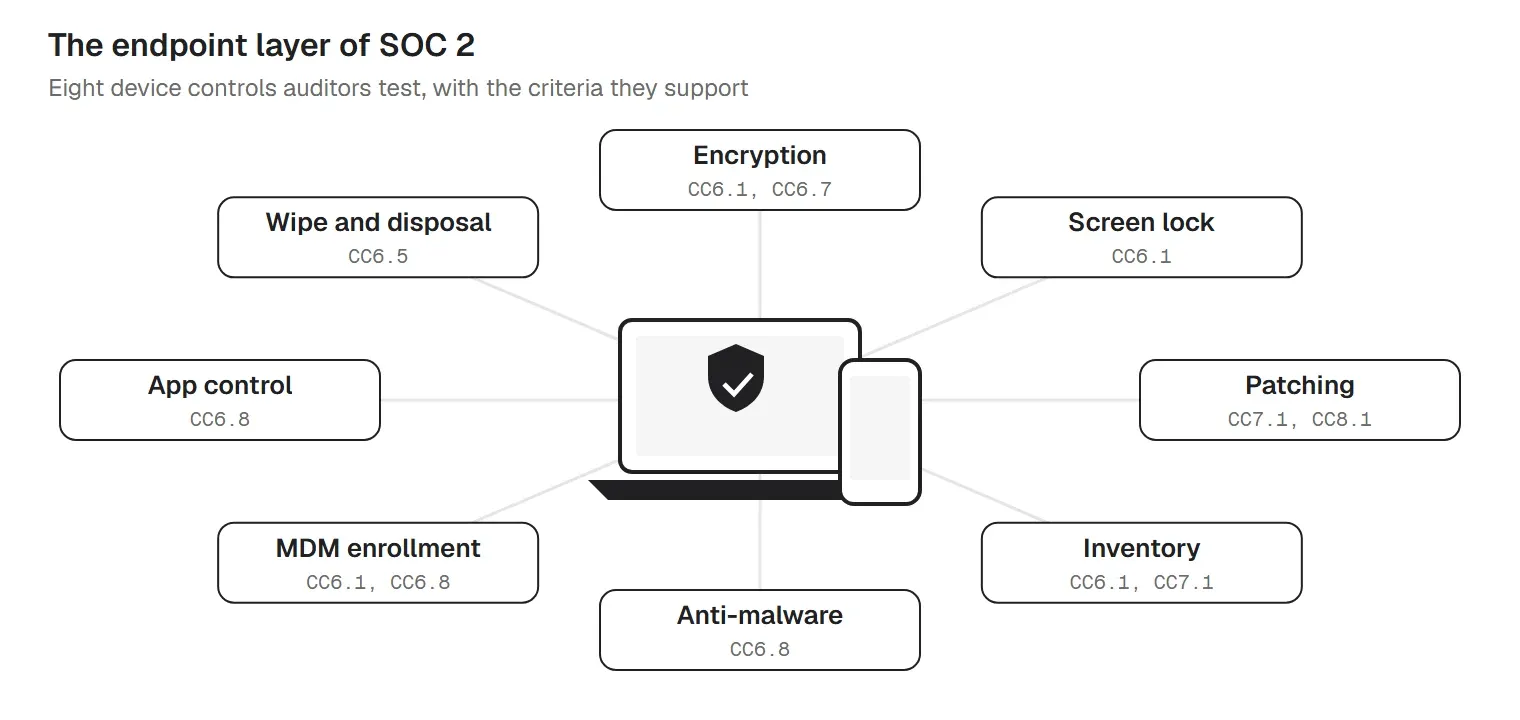
| ID | What to do | Criteria | Type | Evidence auditors sample |
|---|---|---|---|---|
| DEV-01 | Keep a complete inventory of company devices with owner, OS and last check-in (readiness) | CC6.1; CC7.1 | Core | Device inventory export |
| DEV-02 | Enroll every company laptop and phone in device management before first use (readiness) | CC6.1; CC6.8 | Recommended | Enrollment report |
| DEV-03 | Encrypt every laptop and desktop and store recovery keys centrally (readiness) | CC6.1; CC6.7 | Core | Encryption compliance report |
| DEV-04 | Require passcodes and automatic screen lock (readiness) | CC6.1 | Core | Screen lock and passcode settings |
| DEV-05 | Run anti-malware or EDR on every endpoint (readiness) | CC6.8 | Core | Anti-malware or EDR coverage report |
| DEV-06 | Turn on host firewalls and restrict USB storage | CC6.6; CC6.7 | Recommended | Configuration report |
| DEV-07 | Control software installs with an approved app list | CC6.8 | Core | Approved app list; block list |
| DEV-08 | Set a secure baseline for each OS and check devices against it | CC7.1; CC8.1 | Core | Baseline document; compliance report |
| DEV-09 | Decide whether personal devices may access customer data, and what they need | CC6.7; CC5.3 | Core | BYOD rules in the device policy |
| DEV-10 | Lock, locate or wipe lost and stolen devices, and log the event | CC6.7; CC7.3 | Core | Lost device log |
| DEV-11 | Wipe devices before reuse or disposal and keep proof | CC6.5 | Core | Wipe records; disposal certificates |
The inventory is the population. Auditors sample from your device list. A laptop missing from it is a laptop nobody can prove was encrypted, so enroll devices before first use and reconcile the list against HR and purchasing.
| Platform | Encryption | Rest of the baseline |
|---|---|---|
| Windows | BitLocker with recovery keys escrowed | Screen lock; updates enforced; Defender or EDR |
| macOS | FileVault with recovery keys escrowed | Screen lock; updates enforced; EDR |
| Linux | LUKS full-disk encryption, set at install | Screen lock; a patch job; EDR where supported |
| iOS and iPadOS | Data protection, on with a passcode | Minimum OS version; managed apps |
| Android | Encryption on by default, with a screen lock | Work profile for personal devices |
Personal devices are allowed if your policy says what they need and you can show they meet it. Most teams either keep customer data off personal devices or require a work profile and a passcode. If you allow contractors' own laptops, write down how you check them.
The 2022 points of focus added patch management to change management (CC8.1). Show a written timeline and reports that meet it. See our guide to patch management.
| ID | What to do | Criteria | Type | Evidence auditors sample |
|---|---|---|---|---|
| VULN-01 | Patch operating systems and apps on a written timeline by severity (readiness) | CC7.1; CC8.1 | Core | Patch compliance reports for the period |
| VULN-02 | Scan infrastructure and endpoints for vulnerabilities | CC7.1 | Core | Scan reports; remediation tickets |
| VULN-03 | Run a penetration test and fix the findings | CC4.1; CC7.1 | Recommended | Pen test report; fix tickets |
| VULN-04 | Retire or isolate unsupported operating systems | CC7.1 | Core | OS version report; exceptions |
Change management covers code and infrastructure, and also the configuration of your devices and tools.
| ID | What to do | Criteria | Type | Evidence auditors sample |
|---|---|---|---|---|
| CHG-01 | Require review and approval before changes reach production (readiness) | CC8.1 | Core | Sampled pull requests with approvals |
| CHG-02 | Test changes before release and separate test from production | CC8.1 | Core | CI results; environment list |
| CHG-03 | Document emergency changes and review them afterwards | CC8.1 | Core | Emergency change log |
| CHG-04 | Track infrastructure and configuration changes, including device policies | CC8.1; CC7.1 | Core | Change log; admin event log |
Monitoring covers both security events and the controls themselves. A control that silently stopped running is an exception waiting to be found.
| ID | What to do | Criteria | Type | Evidence auditors sample |
|---|---|---|---|---|
| MON-01 | Collect logs from the identity provider, cloud, code and key systems (readiness) | CC7.2 | Core | Log sources list; retention settings |
| MON-02 | Alert on suspicious activity and follow up every alert | CC7.2; CC7.3 | Core | Sampled alerts with follow-up |
| MON-03 | Monitor that the controls themselves keep working | CC4.1 | Core | Control monitoring report |
| MON-04 | Report control failures to the people who must fix them, and track the fix | CC4.2 | Core | Deficiency tickets |
Write the plan before you need it, and test it once a year. Our data breach response plan template is a starting point.
| ID | What to do | Criteria | Type | Evidence auditors sample |
|---|---|---|---|---|
| INC-01 | Write an incident response plan with roles, severity levels and contacts (readiness) | CC7.3; CC7.4 | Core | Incident response plan |
| INC-02 | Log every security incident and how it was handled | CC7.3; CC7.4 | Core | Incident log |
| INC-03 | Run a tabletop exercise and fix what it finds | CC7.4; CC7.5 | Core | Tabletop notes |
| INC-04 | Tell affected customers within your committed timeframe | CC7.4; CC2.3 | Core | Customer notices |
| INC-05 | Do a root cause review after major incidents | CC7.5 | Core | Post-incident reviews |
Recovery from incidents is part of the common criteria (CC7.5), and continuity planning sits in CC9.1. Auditors expect backup, restore testing and capacity monitoring evidence if Availability is in scope. See our disaster recovery plan template.
| ID | What to do | Criteria | Type | Evidence auditors sample |
|---|---|---|---|---|
| BCDR-01 | Back up production data and check that backups succeed (readiness) | CC7.5; A1.2 | Core | Backup job reports |
| BCDR-02 | Test restoring from backup | A1.3 | If in scope | Restore test record |
| BCDR-03 | Write a business continuity and disaster recovery plan | CC9.1; A1.2 | Core | BC/DR plan |
| BCDR-04 | Monitor capacity and uptime against your commitments | A1.1 | If in scope | Capacity and uptime reports |
Your cloud provider and key SaaS tools are part of your system. Most reports carve them out and rely on their own SOC 2 reports, so read those reports and run the controls they expect from you.
| ID | What to do | Criteria | Type | Evidence auditors sample |
|---|---|---|---|---|
| VEND-01 | List every vendor that touches customer data or in-scope systems (readiness) | CC9.2 | Core | Vendor inventory |
| VEND-02 | Review each critical vendor's SOC 2 report or security answers | CC9.2 | Core | Reviewed vendor reports |
| VEND-03 | Put security and confidentiality terms in vendor contracts | CC9.2; C1.1 | Core | Signed contracts or DPAs |
| VEND-04 | Check the controls you must run for each vendor (their CUECs) | CC9.2 | Core | CUEC mapping |
These items turn a working program into a report. Start the auditor conversation early: it shapes the window and the evidence format.
| ID | What to do | Criteria | Type | Evidence auditors sample |
|---|---|---|---|---|
| AUDIT-01 | Run a gap assessment against the criteria before the audit (readiness) | CC4.1 | Recommended | Gap assessment |
| AUDIT-02 | Pick a licensed CPA firm that is peer reviewed | AT-C 205 | Core | Engagement letter |
| AUDIT-03 | Write the system description and management's assertion | DC 200 | Core | System description |
| AUDIT-04 | Keep evidence as it happens, dated, for the whole window | CC4.1 | Recommended | Evidence folder by control |
| AUDIT-05 | List the controls your customers must run (complementary user entity controls) | DC 200 | Core | CUEC list |
| AUDIT-06 | Prepare a management-signed bridge letter for customers between reports | Management letter | Recommended | Bridge letter |
| AUDIT-07 | Fix exceptions from the report and plan the next period | CC4.2 | Core | Remediation plan |
Auditors pull every leaver in the window from HR, then compare the date and time access was removed with your policy window. One late removal is an exception. Work through the same six steps every time, and keep the timestamps:
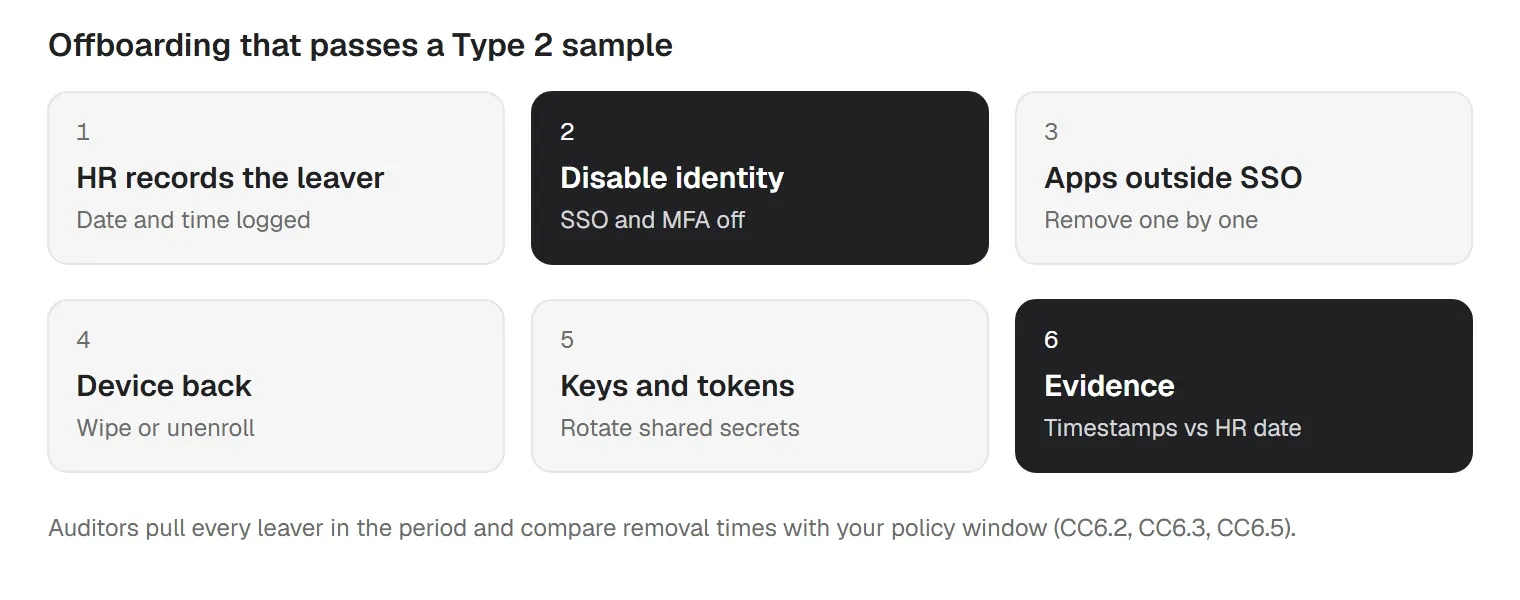
If an auditor finds a leaver with access after the window, check apps outside single sign-on first. Shared accounts and tools bought on a credit card are where access survives.
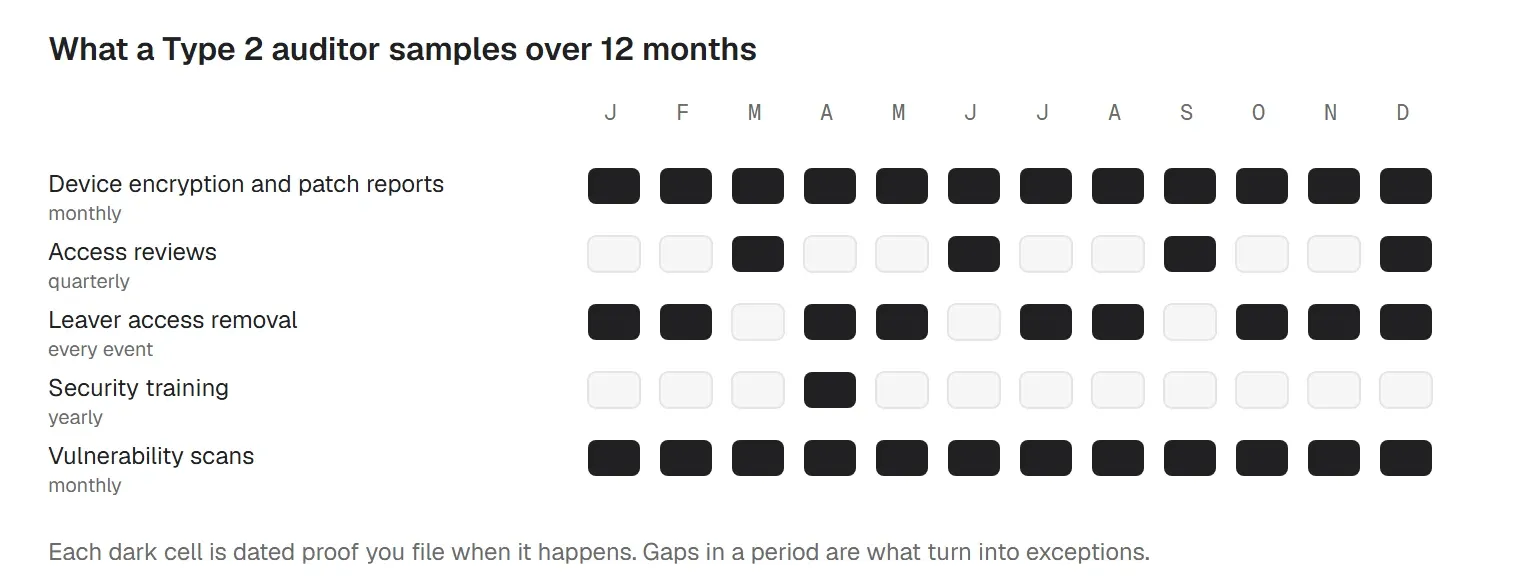
A Type 2 auditor does not look at your systems on one day. They pull the full population for each control (every leaver, every change, every month of patching) and test a sample. A typical request list runs from 40 to 140 items.
| Control | Evidence | Suggested refresh |
|---|---|---|
| Access removal | HR leaver list matched to removal timestamps | Every departure |
| Access reviews | Signed quarterly reviews of user and admin access | Quarterly |
| MFA | Enforcement settings and a user report | Monthly |
| Device inventory | Every device with owner, OS and last check-in | Monthly |
| Disk encryption | Encryption status per device for the period | Monthly |
| Patching | Patch compliance reports by severity | Monthly |
| Anti-malware | EDR coverage report | Monthly |
| Change approvals | Sampled pull requests with reviewer and approval | Every change |
| Vulnerability scans | Scan reports and remediation tickets | Monthly or quarterly |
| Training | Completion records for all staff | Yearly |
| Backups | Backup job reports and the last restore test | Monthly |
| Vendors | Vendor list and reviewed SOC 2 reports | Yearly |
Generate device reports on a schedule, not on request. A screenshot proves one moment; twelve dated monthly reports prove a control ran. The Excel tracker has an evidence log for exactly this.
A SOC 2 audit is an examination by a licensed CPA firm under the AICPA attestation standards. For a Type 2, it runs roughly in this order:
SOC 2 audit checklist for the week before fieldwork:
Most delays come from evidence that can't be produced for a sampled date. Collect it as you go, using the evidence log in the Excel tracker.
If you manage IT for clients, two questions come up. First, clients going through their own SOC 2 will treat you as a vendor: expect security questionnaires and requests for your report (CC9.2). Second, if you pursue your own report, your management tools and client access are in scope. Keep each client's devices, admins and evidence separate, so you can answer one client's auditor without exposing another. See trio.so for MSPs.
The criteria have not changed. Reports still use the 2017 Trust Services Criteria with the 2022 points of focus. In February 2026 the AICPA's Auditing Standards Board proposed changes to the attestation standards that tighten how auditors judge evidence. They are not final, and they would apply to engagements starting on or after June 15, 2029. There are no AI-specific criteria yet.
What did change is scrutiny. The AICPA guided peer reviewers to look harder at SOC 2 engagements, and buyers now ask which firm signed a report. Choose a licensed CPA firm enrolled in peer review.
More SOC 2 guides for IT teams
trio.so covers many of the device controls in this checklist from one console:
SOC 2 stays your program: the policies, reviews, vendor checks and the audit are yours to run. What trio.so gives you is control of many of the device settings this checklist asks for, plus the device reports that show they are working. Learn more about compliance automation.
14 day free trial. No credit card required.
Sources. Last reviewed October 2026. This article is guidance; your auditor decides what evidence satisfies each criterion.
Every organization today needs a solution to automate time-consuming tasks and strengthen security. Without the right tools, manual processes drain resources and leave gaps in protection. trio.so is designed to solve this problem, automating key tasks, boosting security, and ensuring compliance with ease.
Every organization today needs a solution to automate time-consuming tasks and strengthen security. Without the right tools, manual processes drain resources and leave gaps in protection. trio.so is designed to solve this problem, automating key tasks, boosting security, and ensuring compliance with ease.





Have questions? We've got answers. This section covers some of the most commonly asked questions related to this topic.
Related
The related industry news, interviews, technologies, and resources.
A NIST 800-171 compliance checklist with all 110 Rev. 2 requirements, their SPRS points, Rev. 3 changes, CMMC status and a self-assessment guide. Free Excel.
Learn what each Conditional Access policy template does and when to use it. Download ready-to-use ACP templates for identity security.
Complete SAMA compliance checklist for Saudi financial institutions. Domain-by-domain requirements, obligations, and practical implementation steps.
The NCA compliance checklist your team actually needs: ECC-2:2024 domains, NCNICC-1:2025, and what auditors look for as evidence.
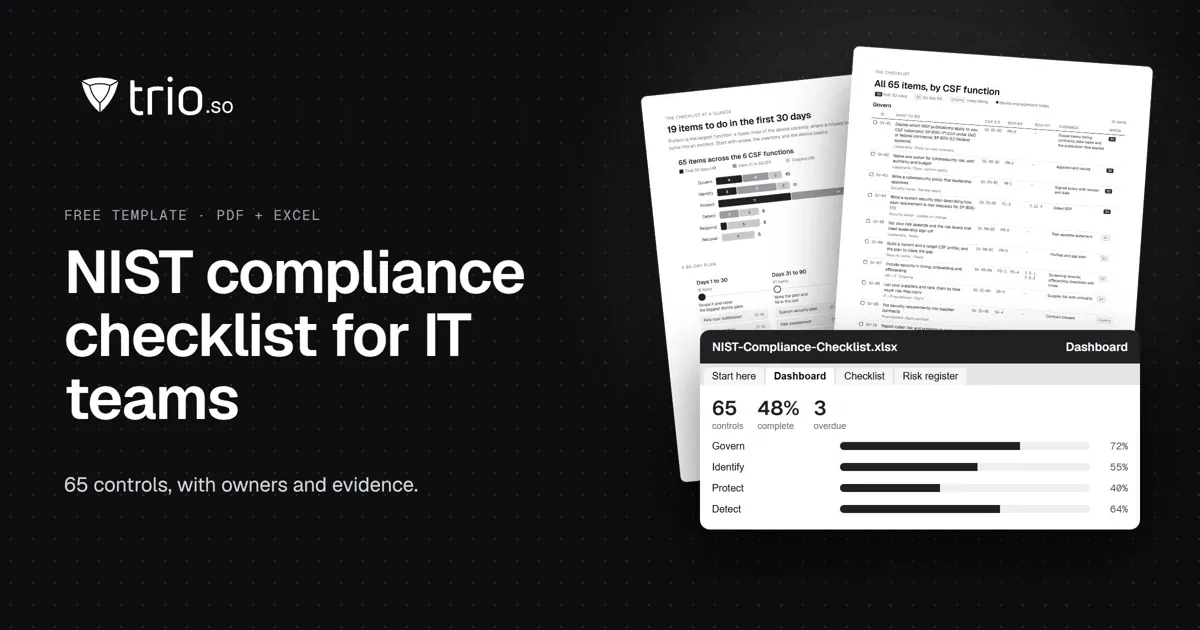
A NIST compliance checklist for IT teams: 65 controls by CSF 2.0 function, mapped to SP 800-53 and 800-171, with an SPRS calculator. Free PDF and Excel.
Feeling overwhelmed by CCPA? Use this comprehensive CCPA Compliance Checklist to secure customer data on mobile devices. Discover how MDM simplifies compliance.
Need an MDM audit checklist? Our guide covers 7 key areas & compliance strategies to ensure your mobile device management is secure and efficient.
Make the most of your MDM solution to boost data security and operational efficiency with this easy-to-follow MDM implementation checklist.