



Explained
The Comprehensive Guide to Mac Inventory Management
In this guide, we’ll discuss Mac inventory management solutions that offer a centralized approach to monitoring and maintaining Apple devices.
Free device cost management template: an Excel tracker for device TCO per device and department, lease vs buy and licenses, plus a cost checklist.

Content writer, trio.so
Device cost management is the habit of knowing what every company phone, tablet and laptop really costs, from the day it is bought or leased to the day it is wiped and sold, and acting on what you find. The purchase price is the easy part. The carrier plan, the licenses, the repairs, the accessories, the setup time and the spare devices nobody uses add up to more than most budgets show.
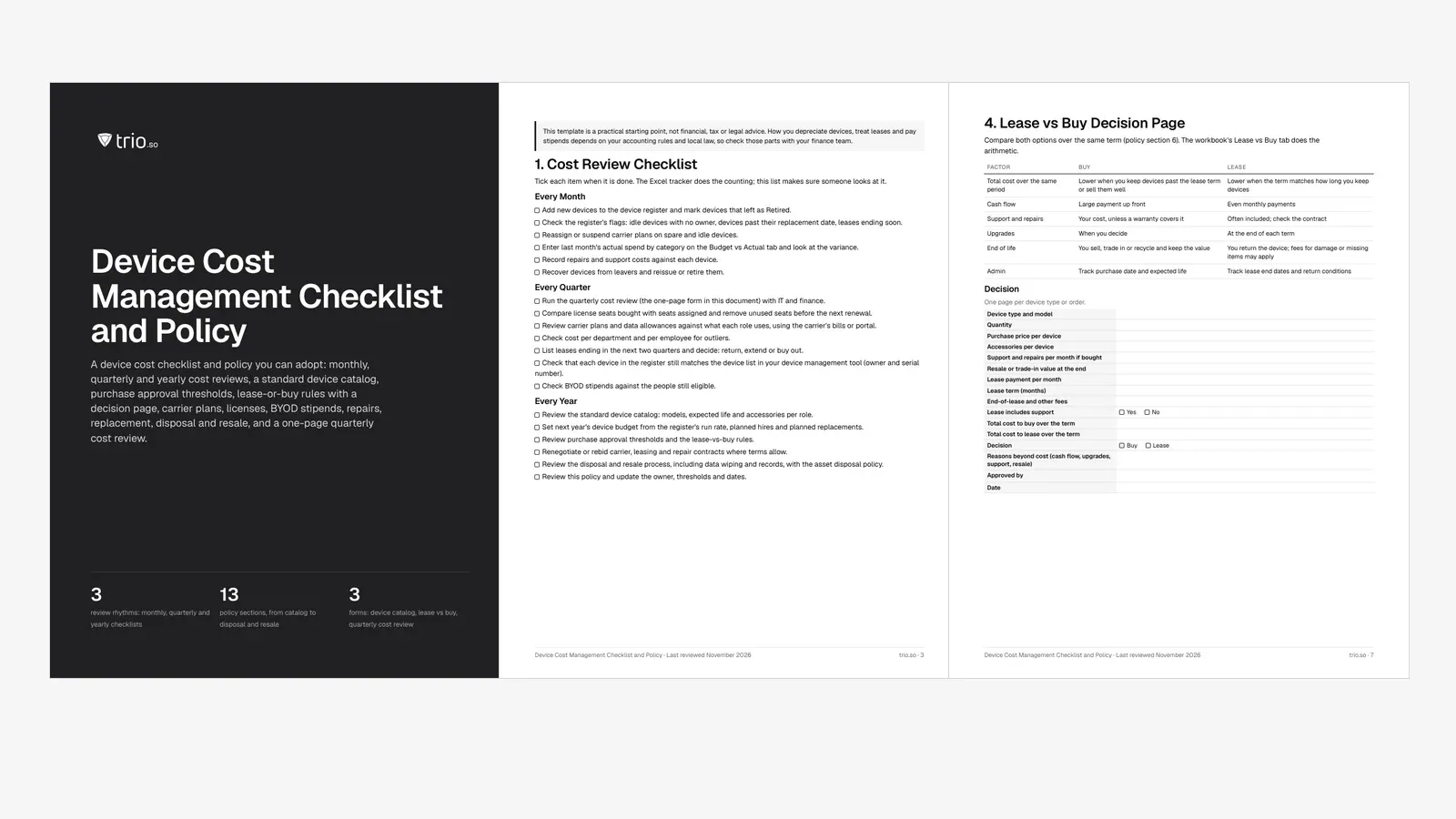
This free template gives you an Excel Device Cost Tracker that works out the total cost of ownership (TCO) of each device per month and over its life, sums it per department and per employee, flags idle devices, overdue replacements and leases about to end, compares leasing with buying, tracks license seats and compares budget with actual spend. A checklist and policy in PDF and Word adds monthly, quarterly and yearly review steps and the rules that keep costs down.
In short
Mobile device cost management is the work of tracking and controlling everything company devices cost over their life: buying or leasing them, connecting them, licensing the software on them, supporting and repairing them, and retiring them. It answers three questions finance asks sooner or later: what does a device really cost us, where does that money go, and which of it could we stop paying.
The method behind it is total cost of ownership. Instead of looking at the price on the invoice, you add up every cost a device causes over its expected life and subtract what you get back when it leaves. That turns a laptop that looked cheap into one that may cost more than a pricier model once repairs are counted, and it shows that a phone's carrier plan can outweigh the phone itself.
Device cost management sits between two neighbors. Your IT budget template covers all IT spending, from cloud services to salaries; this template goes one level down, to each device. Your IT asset management policy sets how assets are recorded and owned; this template adds the cost columns and the review rhythm. If you are building IT asset management from scratch, start with the device register here and grow from it.
"Mobile cost management" is often used to mean telecom expense management (TEM): auditing carrier bills, matching data usage to plans, pooling data and catching roaming charges. TEM is one part of device cost, and dedicated TEM tools read carrier invoices and usage feeds to do it.
This template covers the whole device instead. It records each device's carrier plan cost so you can see it next to the hardware, licenses and repairs, and it flags plans still running on spare or idle devices. For usage and roaming detail, use your carrier's bills or business portal and adjust the plan column when a plan changes.
Every device carries these cost lines. The template has a column for each, so nothing is left out because it arrives on a different invoice:
| Cost line | What it includes | When | Template column |
|---|---|---|---|
| Purchase or lease | Purchase price, or the monthly lease payment and any upfront or end-of-lease fees | One-time or monthly | Purchase cost, Monthly lease |
| Carrier plan | Voice and data plan for phones, tablets and laptops with a SIM or eSIM | Monthly | Carrier plan per month |
| Accessories | Cases, chargers, docks, keyboards and external displays issued with the device | One-time | Accessories |
| Licenses | Device management (MDM) and other per-device software: security, productivity, support tools | Monthly | Licenses per month |
| Support and repairs | Repairs, replacement screens and batteries, warranty or insurance, help desk time you choose to charge | As they happen | Support and repairs to date |
| Setup and admin time | Enrollment, configuration, app installs and offboarding work | Per device | Add to Support and repairs if you track it |
| Replacement and disposal | Expected life in months, and what the device is worth when it leaves (resale or trade-in value) | End of life | Expected life, Disposal value |
Setup and admin time is the line most often skipped. If you charge IT time to devices, add it to Support and repairs. If you don't, count it at least once when you compare options: a device type that needs an hour of manual setup costs more to roll out than one that enrolls itself.
The tracker uses one formula for every device, so results are comparable:
Here is how it works out for three devices from the template's example tab. The company and every amount are made up, and the example leaves the Licenses column empty, so add your own license costs per device:
| Device | Hardware per month | Carrier plan per month | Monthly TCO | Lifetime TCO |
|---|---|---|---|---|
| Phone, bought (iPhone 15, 36 months) | $19.17 | $35 | $54.17 | $1,950 |
| Laptop, bought (MacBook Air, 48 months) | $24.38 | $0 | $24.38 | $1,170 |
| Laptop, leased (MacBook Pro, 36-month lease) | $95 | $0 | $95 | $3,420 |
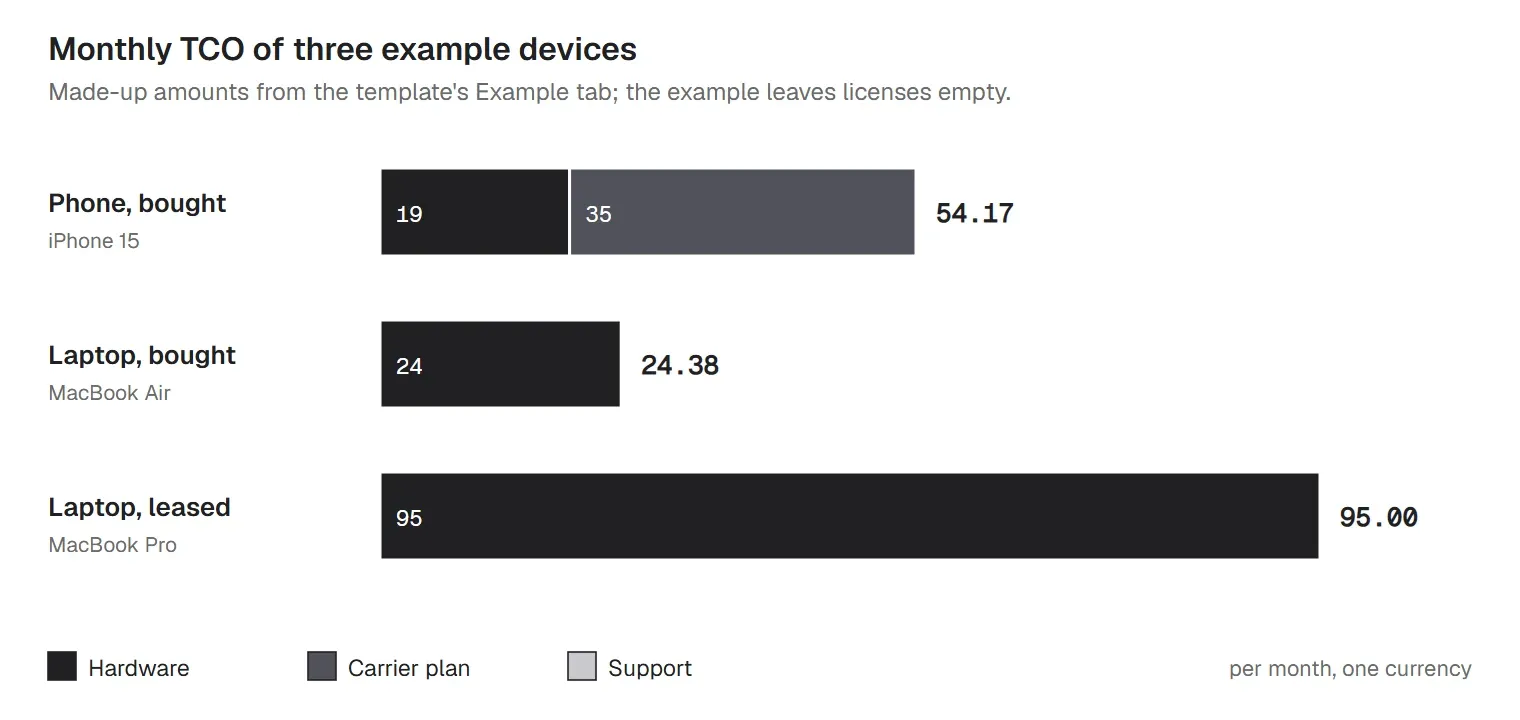
Two things stand out even in made-up numbers. The phone costs more per month than the laptop that was bought for more, because its carrier plan runs every month. And the leased laptop is the most expensive line of the three, which is not a verdict on leasing: a lease spreads a higher-end machine over a shorter term. That is what the lease-vs-buy calculator further down is for.
Monthly TCO is a planning number. It spreads one-time costs over the device's life, so it won't match the cash you spend in any given month. Use it to compare devices and departments, and use the Budget vs Actual tab for cash.
The device management tool is one of the license lines in the TCO, and people often ask what it should cost per device. Vendors price differently, so compare on what you will actually pay, not the headline number. Four things drive it:
| Driver | What to check |
|---|---|
| License tier | Which features sit in which plan. Patching, compliance and identity features are often in higher tiers. |
| Device count | Minimums, volume steps and whether phones, tablets and computers are priced the same. |
| Add-ons | Remote support, app catalogs, identity and security modules sold on top of the base plan. |
| Setup and admin time | Hours to enroll, configure and support devices. A cheaper tool that needs more manual work can cost more per device. |
Put the license cost per device in the Licenses column, and the hours in Support and repairs if you track them. For published vendor prices, see our overview of MDM pricing.
Leasing turns a large purchase into even monthly payments and makes refresh cycles automatic. Buying usually costs less in total when you keep devices longer than a lease term or sell them for a good price. The honest answer depends on your numbers, so compare both over the same period:
| Factor | Buy | Lease |
|---|---|---|
| Total cost over the same period | Lower when you keep devices past the lease term or sell them well | Lower when the term matches how long you keep devices |
| Cash flow | Large payment up front | Even monthly payments |
| Support and repairs | Your cost, unless a warranty covers it | Often included; check the contract |
| Upgrades | When you decide | At the end of each term |
| End of life | You sell, trade in or recycle and keep the value | You return the device; fees for damage or missing items may apply |
| Admin | Track purchase date and expected life | Track lease end dates and return conditions |
The workbook's Lease vs Buy tab compares three device types side by side. In its example values, buying wins for the laptop ($1,330 against $1,720 over 36 months) and the phone, and leasing wins for the tablet ($708 against $754), because that lease includes support and the tablet's resale value is low. The calculator leaves out financing cost, tax and depreciation, so check those with finance before you sign. The PDF and Word files include a decision page to record what you chose and why.
Whatever you choose, track lease end dates. Many leases roll over or charge for late returns, and the register flags any lease ending within 60 days (you can change the window).
Totals hide where the money goes. The Department Summary tab adds up devices, monthly TCO, annual TCO and lifetime TCO for each department, and divides by headcount to give device cost per employee. Type your departments and headcount once; the register's Department column then offers the same list, so names match.
Cost per employee is the number finance can plan with: multiply it by planned hires to budget next year's devices. It also shows outliers worth a question. A team with more devices than people may be carrying spares nobody returned, and a team with a much higher cost per head may have a good reason or an old lease. For splitting shared IT costs across departments more broadly, see our IT resource allocation template.
Per-device and per-user licenses grow quietly. People leave, projects end, and the seats stay on the invoice until renewal. The License Tracker tab lists each product with its cost per seat, seats bought and seats assigned, and works out the unused seats, what they cost each month and which renewals are coming up within 60 days.
In the example, 56 unused seats across three products cost $372 a month, and one product has more seats assigned than bought, which is its own problem at audit time. Check seats a quarter before each renewal, while you can still change the count. Your device management tool's app inventory shows which apps are actually installed where, which is a useful cross-check against what you pay for. When a license sits with an outside supplier, our vendor management policy template covers the contract side.
Cost control is mostly about finding money that is spent without anyone deciding to spend it. The register's flags point at the usual places:
Better data beats harder negotiation: you can't renegotiate a carrier contract or a license renewal well without knowing how many lines and seats are really in use.
Letting staff use their own phones moves the hardware cost to them, but it doesn't make device cost disappear. Most companies pay a stipend or reimburse business use, still pay for licenses, and still spend support time. Count all of it before you compare: a stipend per person per month against the monthly TCO of a company phone from the register.
The checklist and policy include a BYOD stipend section with placeholders for the amount, eligible roles and when payment stops. Expense, tax and wage rules for stipends differ by country and state, so confirm the terms with finance and legal counsel. The BYOD policy template covers the rest of the agreement for personal devices, and the mobile device management policy covers how company devices are managed.
Expected life drives the biggest number in the TCO, so set it per device type in the standard catalog and stick to it unless a device earns an exception. Replace devices at the end of their expected life, when they stop getting security updates from their maker, or when a repair would cost more than the limit you set, whichever comes first. Our guide to device lifecycle management covers the stages around it.
At the end, the device still has value. Record the resale or trade-in amount as the disposal value: the TCO formula subtracts it, which rewards devices that hold their value. Before a company device is reissued, sold, returned to a lessor or recycled, wipe it, remove it from your device management tool and from any zero-touch enrollment program, and sanitize the storage in line with your asset disposal policy. NIST SP 800-88 Rev. 2 describes how to clear, purge or destroy data on storage, and a factory reset counts as clearing for many devices. A wipe is one step; it does not replace verified sanitization when drives leave your control.
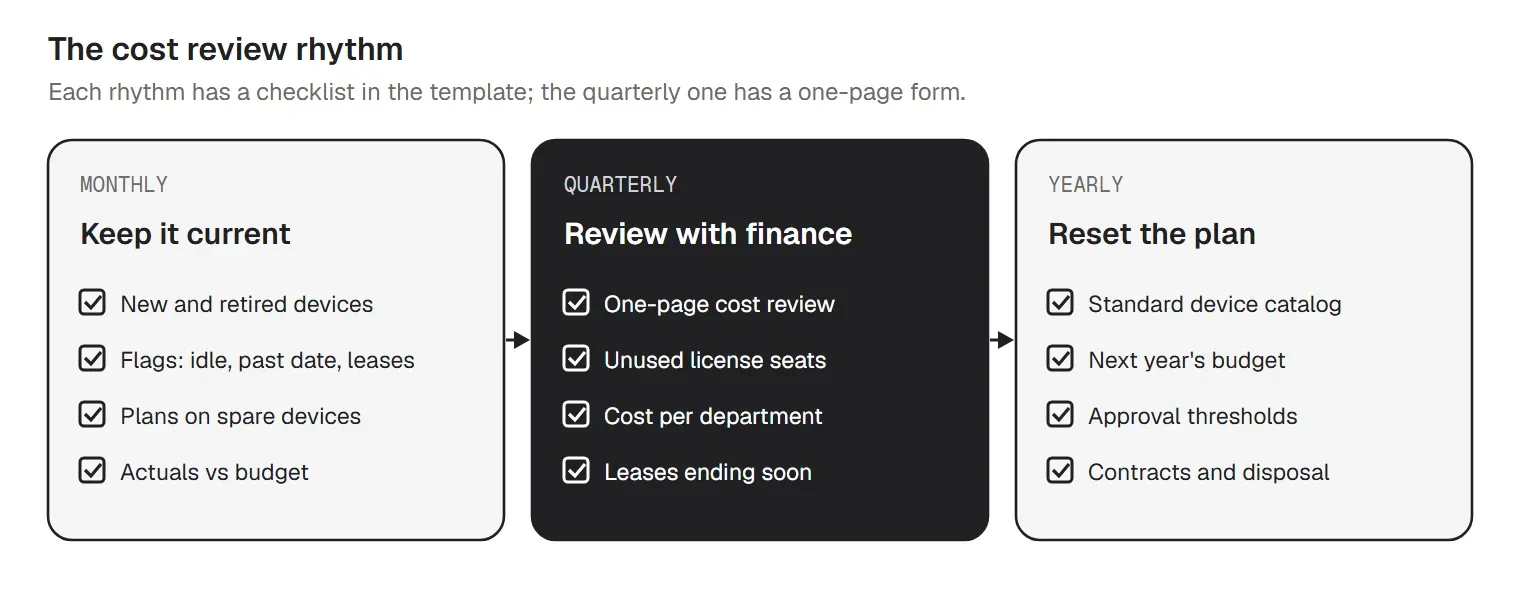
A tracker only works if someone reads it. The checklist splits the work into three rhythms:
| When | What to do |
|---|---|
| Monthly | Add new devices to the device register and mark devices that left as Retired. Check the register's flags: idle devices with no owner, devices past their replacement date, leases ending soon. Reassign or suspend carrier plans on spare and idle devices. Enter last month's actual spend by category on the Budget vs Actual tab and look at the variance. |
| Quarterly | Run the quarterly cost review (the one-page form in this document) with IT and finance. Compare license seats bought with seats assigned and remove unused seats before the next renewal. List leases ending in the next two quarters and decide: return, extend or buy out. Check that each device in the register still matches the device list in your device management tool (owner and serial number). |
| Yearly | Review the standard device catalog: models, expected life and accessories per role. Set next year's device budget from the register's run rate, planned hires and planned replacements. Review purchase approval thresholds and the lease-vs-buy rules. Renegotiate or rebid carrier, leasing and repair contracts where terms allow. |
The quarterly review gets its own one-page form: the numbers from the Dashboard, the decisions and who owns each, and sign-off from IT and finance. Checking the register against your device management tool's device list every quarter matters more than it sounds: CIS Controls v8.1 Safeguard 1.1 asks for an asset inventory with each device's owner and department, reviewed at least every six months, and the register is that inventory with costs added.
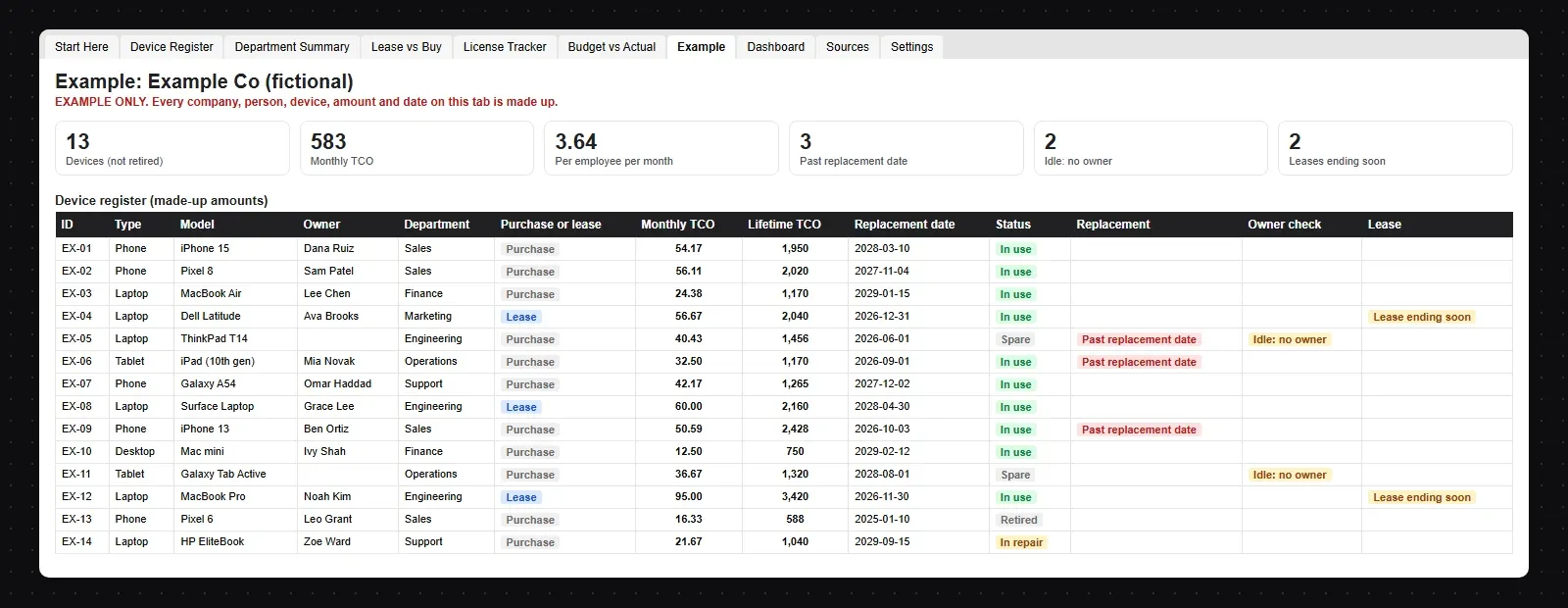
The example has 14 devices at a made-up 160-person company, including a spare laptop past its replacement date with no owner, a spare tablet still on a carrier plan, a phone and a tablet past their replacement dates, two leases ending within 60 days and a retired phone that stays on record but out of the totals. Its monthly device TCO comes to $582.84, about $3.64 per employee, so you can see every flag and total before you add your own devices.
trio.so is device management for Windows, macOS, Linux, iOS/iPadOS and Android, from one console. For device costs it gives you the device list the spreadsheet starts from; the cost columns live in the workbook. Use trio.so's device list, with each device's owner, serial number and installed apps, as the source for the register, and keep the cost columns in the workbook. It helps with the cost lines themselves too:
Read more about mobile device management with trio.so, or our guide to unified endpoint management. Plans start at $5 per device.
14-day free trial. No credit card required.
Sources. Last reviewed November 2026. The cost method (total cost of ownership as the sum of purchase or lease, running and support costs over a device's life) is general practice; the wording, formulas and example are ours. References to CIS Controls v8.1 and NIST SP 800-88 are general pointers. trio.so is not affiliated with or endorsed by CIS or NIST.
trio.so shows every device with its owner, serial number and installed apps, and supports users through remote desktop and terminal, on Windows, macOS, Linux, iOS/iPadOS and Android.
trio.so brings device management, patching and security policies for Windows, macOS, Linux, iOS/iPadOS and Android into one console. Enroll a device and see it in the console within minutes.
trio.so brings device management, patching and security policies for Windows, macOS, Linux, iOS/iPadOS and Android into one console. Enroll a device and see it in the console within minutes.





Have questions? We've got answers. This section covers some of the most commonly asked questions related to this topic.
Related
The related industry news, interviews, technologies, and resources.
In this guide, we’ll discuss Mac inventory management solutions that offer a centralized approach to monitoring and maintaining Apple devices.

This guide discusses the most crucial work from home equipment, software, and apps that your employees need in a remote or hybrid work model.

Learn more about Google Workspace offboarding best practices to secure your sensitive corporate data.

Turnover happens, but it doesn't have to crash your business. Learn how to create an employee transition plan for a smooth offboarding process.

What to do with a terminated employee's email: block access, forward or delegate, keep it for legal needs, and remove it from the devices they used.

An employee equipment agreement template to copy, what each clause covers, how to handle returns and lost devices, and how IT keeps records matched.

This article explores the importance and benefits of employee offboarding automation and provides a step-by-step guide to implement it.

Explore the importance of offboarding in organizations. Use this employee offboarding checklist to streamline the process.
14-day free trial. No credit card required.
trio.so for MSPs: one console, separate clients