



Explained
MDM vs MAM: Here’s What Most SMBs Get Wrong
MDM vs. MAM, which one should you choose for your company's mobile security? Read about their benefits and key differences here.
Can MDM track your location? What IT can see on company phones and laptops, what a work profile hides, how geofencing works, and the privacy rules.

Content writer, trio.so
Yes, mobile device management (MDM) can show where a device is, but only on devices the company owns and only in the ways each platform allows. On a company-owned Android phone or tablet, the MDM can read the device's location. On a company iPhone or iPad, Apple only lets an MDM locate a supervised device after IT puts it in Managed Lost Mode. On Windows and Mac laptops, location comes from the device's location services or a management agent, with location turned on. On a personal phone enrolled with an Android work profile, or a personal iPhone with User Enrollment, the company does not see your location through the MDM, and it never sees your messages, photos or browsing.
If you are an employee wondering what your work phone reveals, the next section answers that; if you are in IT, the rest of the post covers how location tracking works, what it is used for, and the privacy rules to set first.
It depends on who owns the phone and how it was enrolled:
| Device | Can the company see its location through MDM? |
|---|---|
| Company-owned Android, fully managed or dedicated | Yes, where the MDM and its policies allow it and location is on |
| Company-owned Android with a work profile | Possible, if the policy allows it and the management app has location permission |
| Personal Android with a work profile | No, not through the MDM. A work app you allow to use location can still use it like any app |
| Company iPhone or iPad (supervised) | Only when IT puts it in Managed Lost Mode, and the phone shows that it is in Lost Mode |
| Personal iPhone (User Enrollment) | No |
| Company Windows PC or Mac | Yes, if location services are on and the MDM or agent is allowed to read them |
What an MDM never shows on any of these: your messages, photos, personal email, browsing history or what you do in personal apps. If you want to know exactly what your employer collects, ask IT for the device policy. For the personal-phone side, see Android work profile.
MDM is how IT teams configure, secure and support company devices. Location is one of its features, and it comes in three forms:
Microsoft Intune, for comparison, locates a device only when an admin runs the Locate device action, on supported company-owned Android, supervised iOS in Lost Mode and Windows devices, and keeps that location for 24 hours.
Location is useful for a few clear jobs. Each one is easier to justify to employees when it is written down.
Put these rules in your MDM policy, and make sure location services cannot be turned off on devices where you do need them; see prevent location services from being turned off on Android.
Check, for each platform you run: whether the MDM shows last location and history, how accurate and how recent the position is, whether it supports geofences and what happens on a crossing, how long it keeps location data, and whether it can leave personal devices out.
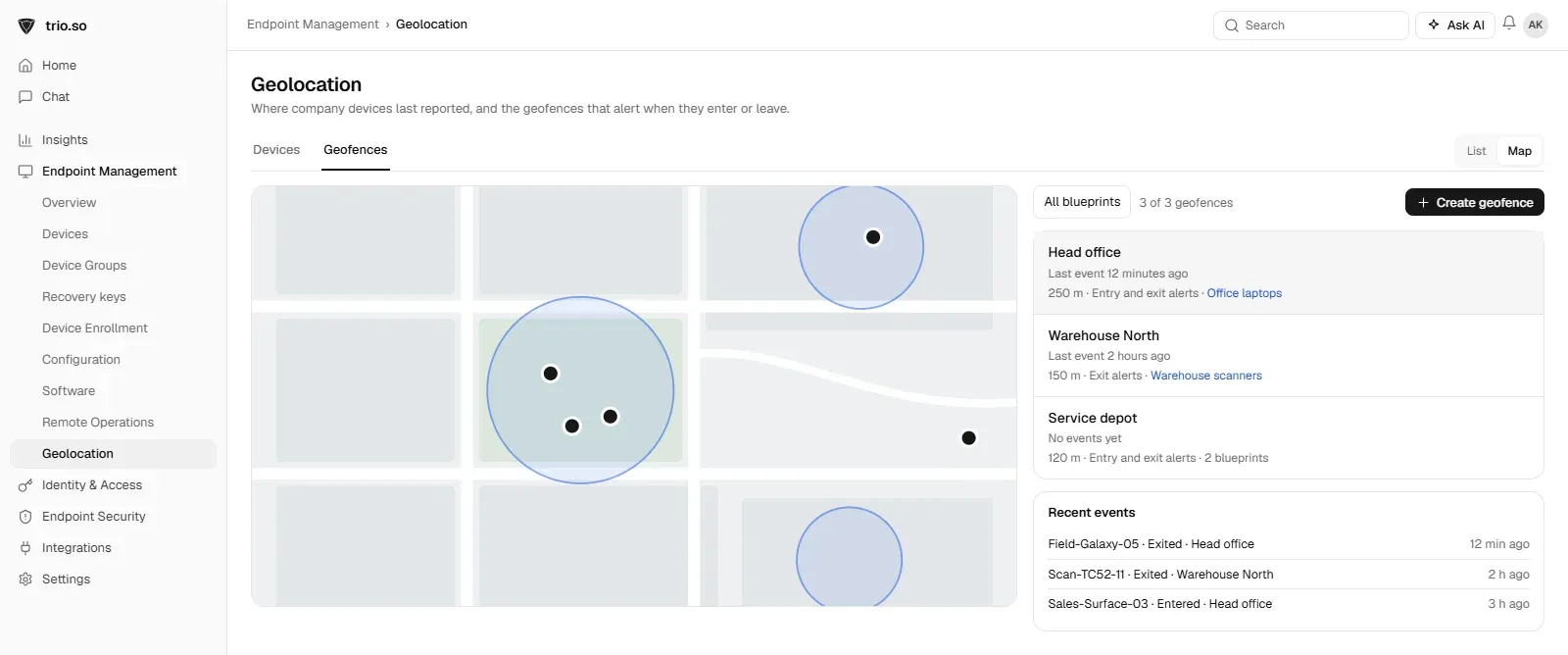
Use the map to see where devices last reported and filter by group or state. Open a device to see its last position, when it was reported and how accurate it was, then its history if your MDM keeps one. Set geofences around offices or sites, choose whether to alert on entry, exit or both, and review the events when an alert fires.
An MDM can show where company devices are, with rules that differ by platform: easiest on company Android, limited to Lost Mode on iPhone and iPad, and dependent on location services on laptops. Personal phones enrolled with a work profile or User Enrollment keep their location private. Track company devices, tell people what you collect, keep it short, and use location for finding lost devices and keeping sites secure.
trio.so shows where company devices last reported, with location history, and lets you set geofences that alert when a device enters or leaves an area. See Android device management.
Related reading: device location history, Android work profile, remote lock on Android and remote wipe on Android.
trio.so shows where company phones and laptops last checked in and alerts you when one leaves a geofence.
trio.so brings device management, patching and security policies for Windows, macOS, Linux, iOS/iPadOS and Android into one console. Enroll a device and see it in the console within minutes.
trio.so brings device management, patching and security policies for Windows, macOS, Linux, iOS/iPadOS and Android into one console. Enroll a device and see it in the console within minutes.





Have questions? We've got answers. This section covers some of the most commonly asked questions related to this topic.
Related
The related industry news, interviews, technologies, and resources.
MDM vs. MAM, which one should you choose for your company's mobile security? Read about their benefits and key differences here.
Device provisioning for employee laptops and phones: zero-touch with Apple Business, Windows Autopilot and Android Enterprise, a checklist, and fixes.
How to implement mobile device management in phases: scope, policies, enrollment per platform, pilot, communication and rollout, with a 30/60/90-day plan.
An effective MDM strategy can improve an organization. Read on to learn how Mobile Device Management solutions can help you.
A mobile device management policy sets the governance rules for device use, security, and enforcement, here is how to structure one that works.
How to move devices from one MDM to another: planning, Apple devices on iOS and macOS 26, Android and Windows steps, and which devices need a reset.

On-premise MDMs have specific advantages to them, but are they better than cloud –based MDM solution? Read on to find out.
What cloud MDM is, how cloud-based device management works, cloud vs on-premises MDM compared, and what to check before you move your devices.
14-day free trial. No credit card required.
trio.so for MSPs: one console, separate clients