



Templates
IT Budget Template (Free Excel + PDF): What to Include
A free IT budget template in Excel with a PDF guide: 11 cost categories, a worked 50-person example, and how to plan, forecast and track your IT budget.
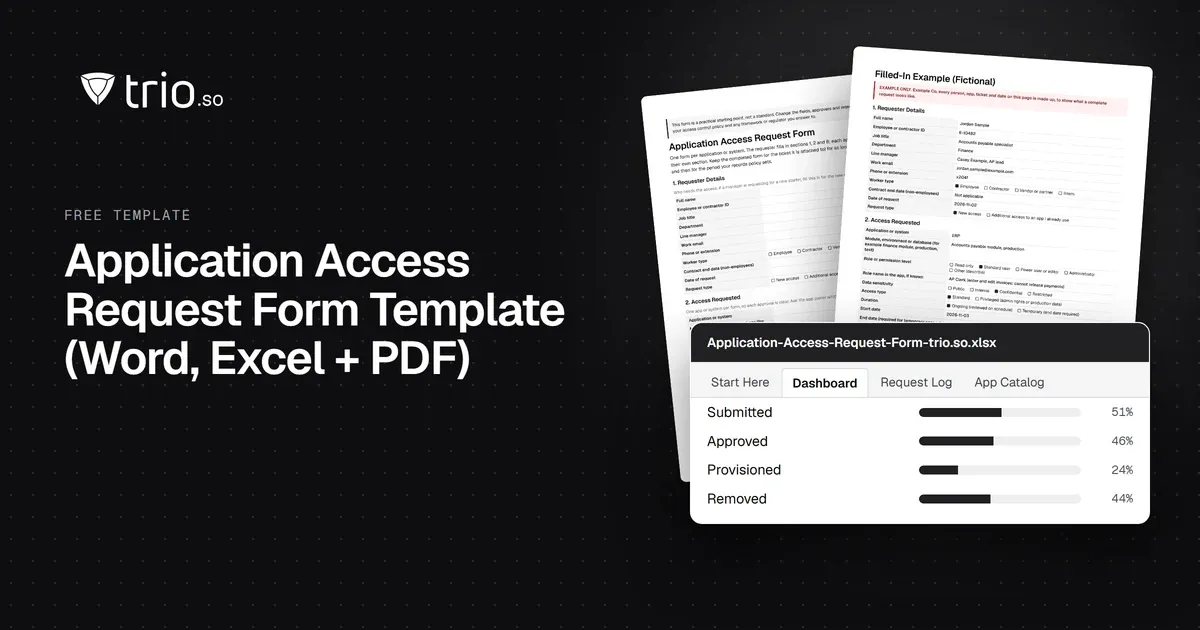
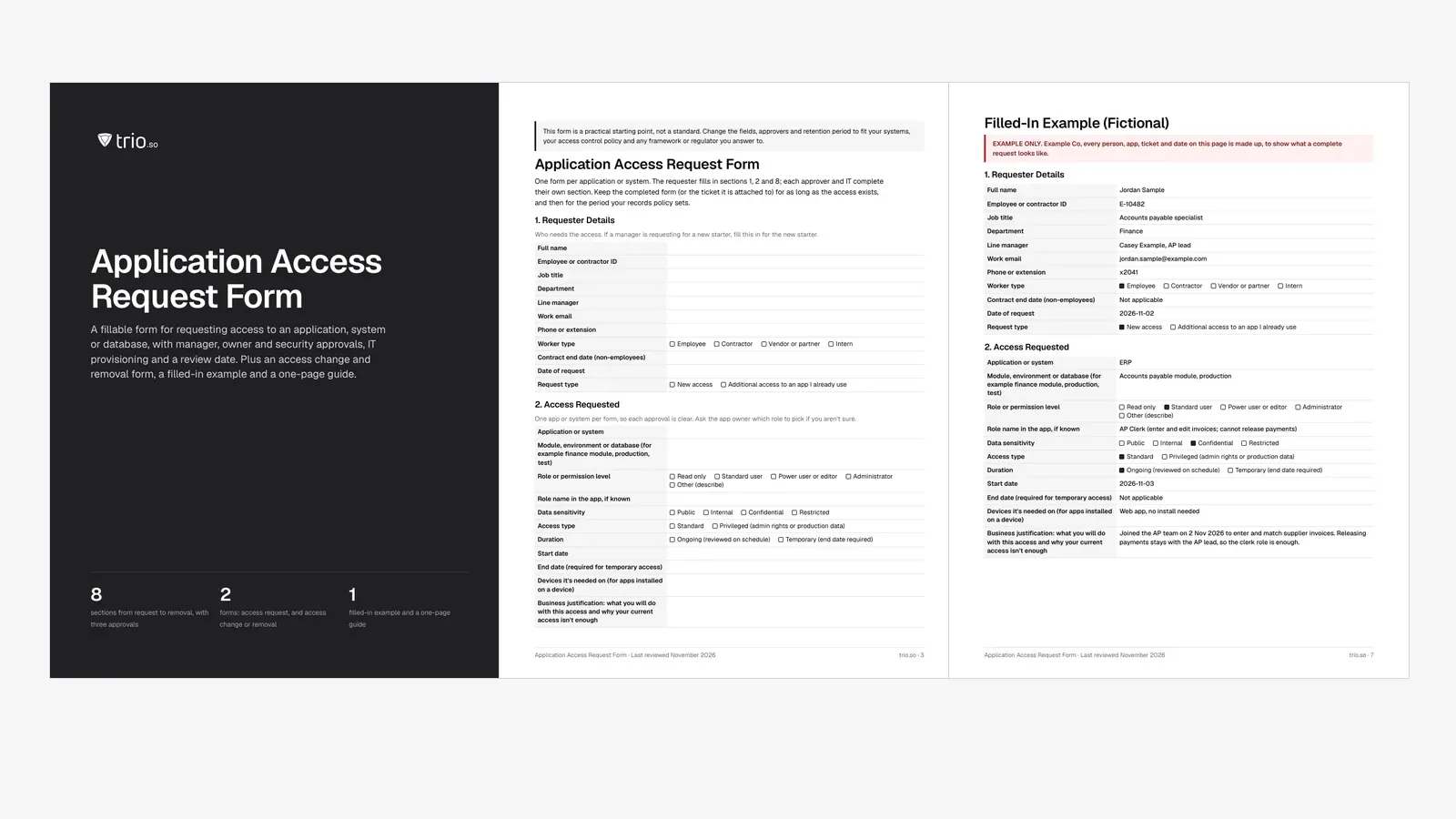
Free application access request form in Word and PDF, with a change and removal form, a filled-in example and an Excel log that flags expired access.

Content writer, trio.so
Someone needs access to the finance system. They send a chat message, a manager replies "fine by me", and IT adds them to the admin group because that was quickest. Six months later nobody remembers who approved it, the person has moved teams, and the access is still there.
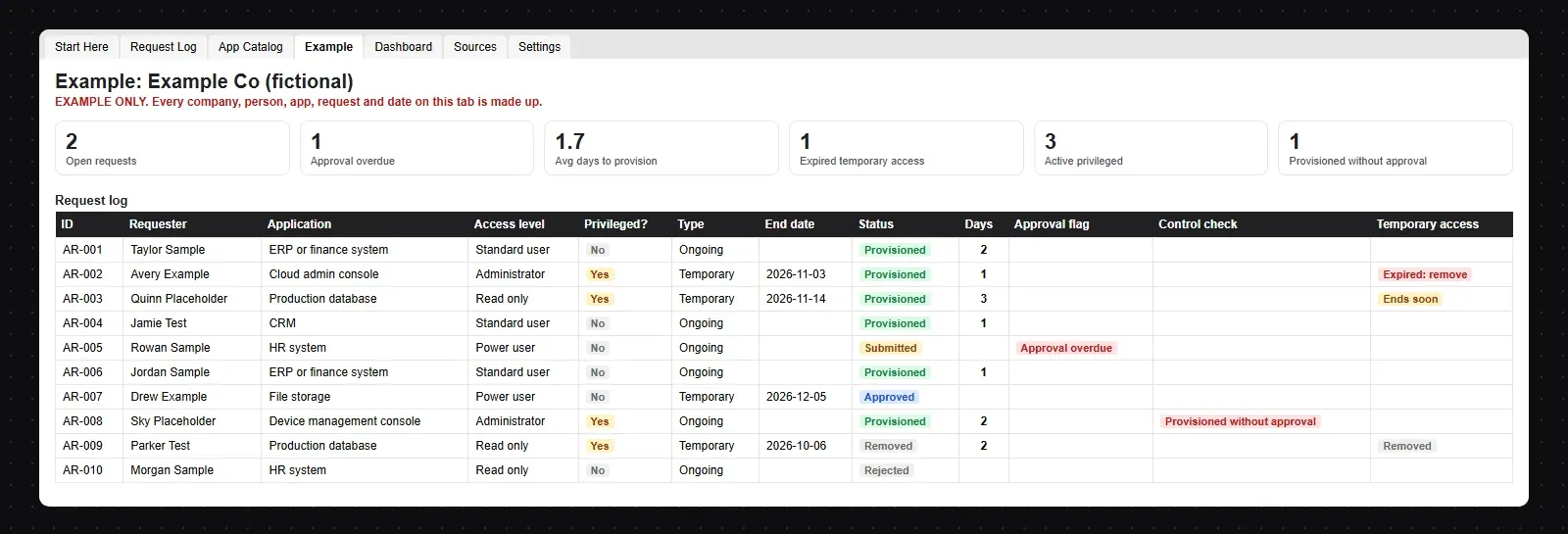
An application access request form fixes that with one page: who needs access, to which app, at what level, for how long and why, and who approved it before IT granted anything. This free template gives you that form in Word and PDF, a second form for changing or removing access, a filled-in example, and an Excel log that flags approvals that are stuck, access granted without approval and temporary access that should have ended.
In short
An application access request form is the written record of one decision: this person may use this app, in this role, for this reason, until this date. It turns a casual "can you give me access?" into something an app owner can judge and an auditor can check later.
It does three jobs:
This form is for people who already have a work account and need access to an app, a system, a database or a higher role. A new starter who doesn't have an account yet goes through account creation first: use our user account creation request form template for that, then this form for each app beyond the standard set. Many teams bundle the standard apps for a role (email, chat, the intranet) into onboarding and use access requests only for everything else. Our IT onboarding checklist covers the bundle.
The template has eight sections. Each one is filled in by one person, so nobody signs for something they didn't check.
| Section | Fields | Filled in by |
|---|---|---|
| 1. Requester details | Name, ID, job title, department, manager, worker type, contract end date for non-employees | Requester |
| 2. Access requested | App or system, module or environment, role, data sensitivity, standard or privileged, ongoing or temporary, start and end dates, devices, business justification | Requester |
| 3. Manager approval | Decision, conditions, signature, date | Line manager |
| 4. Owner approval | Decision, role approved if different, conditions, signature, date | App or data owner |
| 5. Security approval | MFA, separate admin account, end or review date, decision (privileged access and restricted data only) | Security lead |
| 6. IT provisioning | Who granted it, when, account, group or role assigned, ticket reference, requester told, removal scheduled | IT |
| 7. Review and removal | Next review date, review outcome, date removed, removed by | App owner and IT |
| 8. Acknowledgment | Business use only, no shared passwords, data handling, report when no longer needed | Requester |
A few fields do most of the work:
Most access requests need two approvals, and privileged ones need a third. Each approver answers a different question:
| Approver | What they check | When |
|---|---|---|
| Line manager | Does this person need this access to do their job? Is the duration right? | Every request |
| App or data owner | Is this the smallest role that does the job? Is the data's sensitivity understood? Any conflict with other duties? | Every request |
| Security or IT security lead | Is this privileged or restricted access? Is MFA on, is there a separate admin account, is there an end date? | Privileged access and restricted data |
| IT (provisioner) | Are all approvals present before anything is granted? Was exactly the approved role given? | Every request, before provisioning |
Two rules keep approvals honest. Nobody approves their own request, and the person who grants access in the system isn't the person who approved it. That split, between asking, approving and granting, is a small piece of segregation of duties. It matters most where one person could both enter and release payments, change and approve their own code, or create and use an admin account. Our guide to segregation of duties goes further, and the role-based access control guide shows how to design roles so owners have sensible options to approve.
Least privilege is the test every approver applies: the smallest role that lets the person do the job, for as long as they need it. NIST SP 800-53 calls this AC-6 Least Privilege, and the same idea runs through ISO/IEC 27001 and SOC 2 (more on those below).
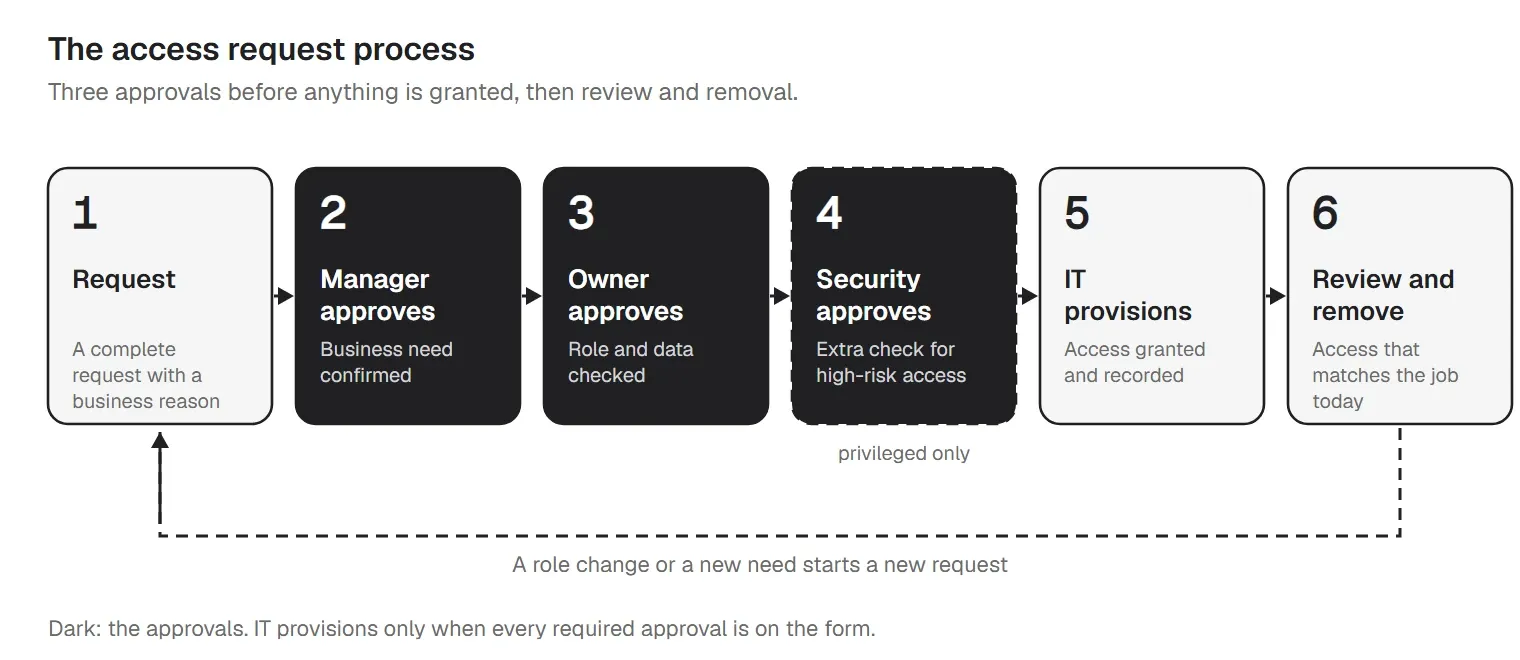
| Step | What happens | Output |
|---|---|---|
| 1. Request | The requester (or their manager) fills in the form: who, which app, which role, why, and for how long. | A complete request with a business reason |
| 2. Manager approves | The manager confirms the person needs this access for their job, and nothing more. | Business need confirmed |
| 3. Owner approves | The app or data owner checks the role matches the job and the data's sensitivity. | Role and data checked |
| 4. Security approves | For privileged access or restricted data only: security checks MFA, a separate admin account and an end date. | Extra check for high-risk access |
| 5. IT provisions | IT creates the account or adds the role, records what was done, and tells the requester. | Access granted and recorded |
| 6. Review and remove | Owners review access on a schedule; temporary access ends on its date; leavers lose access on their last day. | Access that matches the job today |
Set a target for each step and write it into your access control policy. A common pattern is approvals within two or three working days and provisioning within a day of the last approval, but pick numbers your team can keep. The workbook flags any request still waiting for an approval after the number of days you set.
Provisioning is where shortcuts happen. IT should grant exactly the role on the form, not "admin, to save time", and never before every required approval is recorded. The workbook's Control check column marks any row that was provisioned without its approvals. It's the first thing an auditor will look for in a sample.
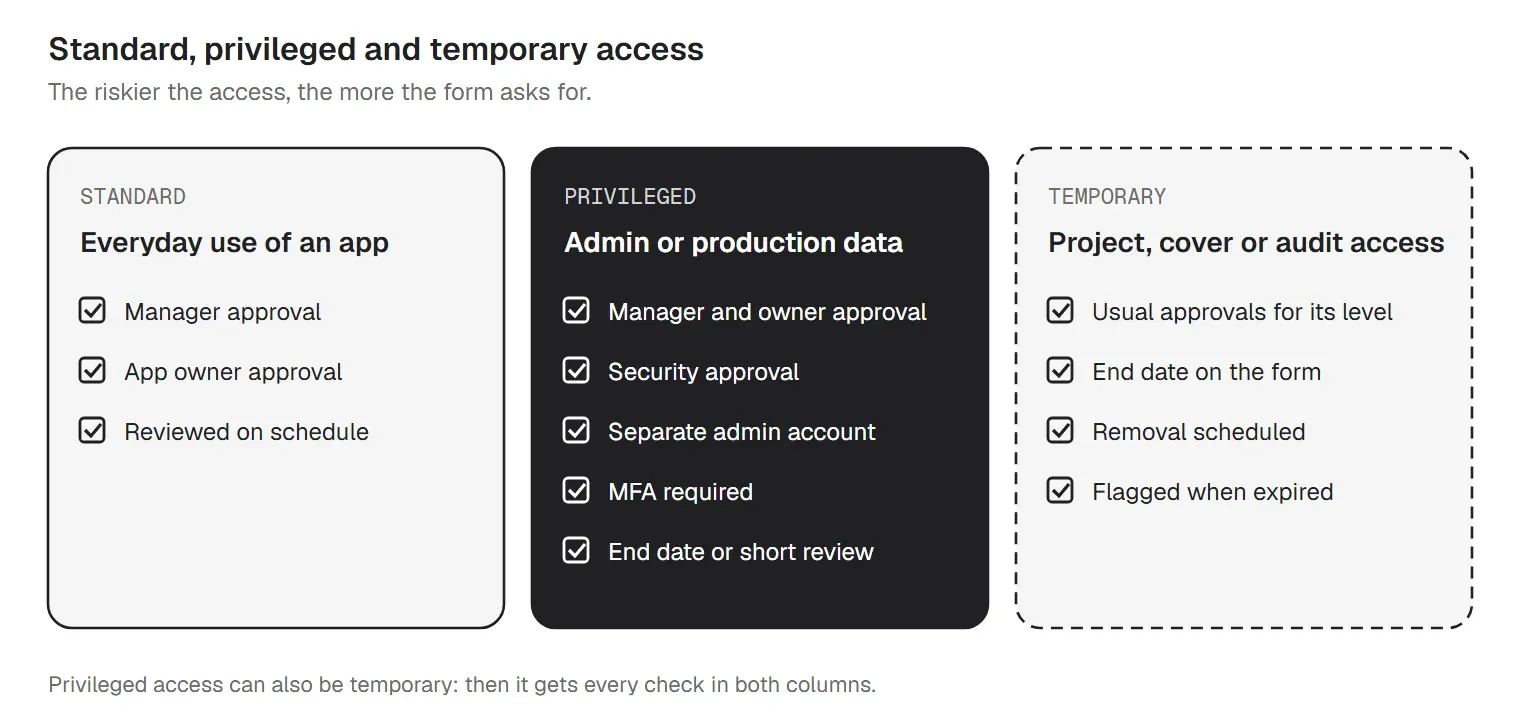
Most requests are standard: a sales rep needs the CRM, a finance analyst needs read access to reports. They follow the two-approval path.
Privileged access is different because a mistake or a stolen password does far more damage. That covers admin roles, rights to change security settings, direct production database access and cloud console administrator roles. ISO/IEC 27001:2022 gives it its own control, 8.2 Privileged access rights. For these requests, the form asks security to confirm three things before IT acts:
Temporary access is any access with a known end: a project, holiday cover, a contractor's engagement, an incident, or an external auditor who needs read access for a month. Put the end date on the form, and treat removal on that date as part of the request, not a separate task someone might forget. The workbook flags temporary access that ends within 14 days and any that has already expired without a removal date. If your team grants short-lived admin rights often, our guide to just-in-time access explains how to make admin rights expire on their own.
Granting access gets attention because someone is waiting for it. Removing access gets forgotten because nobody is. The template's second form covers the moments when access should shrink:
The change form lists each app with its current access and the change (remove, reduce or change role to), then has IT record who did it and when. For leavers it also asks whether company devices were returned or wiped and whether shared passwords the person knew were rotated. Removals need the manager's sign-off only; a role change that adds access goes back through the owner, like a new request.
Here is the example from the download, for a made-up company. Every name, ticket and date is fictional.
| Field | Example entry |
|---|---|
| Requester | Jordan Sample, accounts payable specialist, Finance (new to the team) |
| App and role | ERP, accounts payable module, production; AP Clerk (enter and edit invoices; cannot release payments) |
| Sensitivity and type | Confidential; standard; ongoing (reviewed on schedule) |
| Justification | Joined the AP team on 2 Nov 2026 to enter and match supplier invoices. Releasing payments stays with the AP lead. |
| Approvals | Manager approved 2 Nov; finance systems owner approved 3 Nov with a condition (clerk role only, no payment release); security not needed |
| Provisioning | Added to group ERP-AP-Clerk on 3 Nov by the IT service desk, ticket REQ-1042, requester told |
| Review | Next review 1 May 2027 |
Why it works: it names one app and one role, the justification describes the work, the owner narrowed the role so the same person can't enter and pay an invoice, both approvals are dated before the provisioning date, and a review date is set. The workbook's Example tab shows ten more requests at the same fictional company, including a privileged request that was provisioned before security approved it and temporary admin access that expired two days ago without being removed.
The same form works for systems and databases, with more care in section 2:
A completed form is evidence. Keep it with the ticket, log it in the tracker, and keep it for as long as the access exists and then for the period your records policy or your auditors set.
Auditors testing access usually pick a sample of people who gained access in the period and ask to see who requested it, who approved it and when it was granted. Then they pick a sample of leavers and check their access was removed on time. The tracker gives you the population for both samples, and the forms give you the evidence for each one.
The same records feed your access reviews: for each app, the owner looks at who has access today, compares it with the log and the job, and removes what isn't needed. Our user access review template runs that review step by step.
Frameworks that ask for this kind of record, in general terms:
| Framework | Where access requests fit |
|---|---|
| NIST SP 800-53 Rev. 5 | AC-2 Account Management (how accounts are requested, approved, created, changed and removed) and AC-6 Least Privilege (people get only the access their duties need). |
| ISO/IEC 27001:2022 Annex A | 5.15 Access control, 5.16 Identity management, 5.18 Access rights (provide, review, change and remove access) and 8.2 Privileged access rights. |
| SOC 2 Trust Services Criteria | CC6.1 to CC6.3, the logical access criteria: access is registered and authorized before it is granted, based on role and least privilege, and removed when it is no longer needed. |
These are pointers, not a mapping. Read the publisher's text at NIST, ISO and the AICPA before you rely on them, and see our IT audit checklist for how access controls are tested alongside everything else.
A Word form and a spreadsheet log work well for a few hundred people and a few dozen apps. Signs you have outgrown them:
The usual next step is to move the same form into your IT ticketing system or service catalog, so each request has a ticket, approvals are recorded in the ticket and nothing is granted without them. Our IT service request form template covers that kind of request. Larger organizations then add an identity and access management (IAM) or identity governance (IGA) tool, which connects to the apps, offers approved roles in a catalog, routes approvals, grants and removes access automatically and runs access reviews. Whatever the tool, the fields on this form are the ones it will ask for, so the template is a good way to agree them first.
trio.so does not run an access request approval workflow and is not an IAM or identity governance tool. The requests, approvals and access reviews on this form stay with your managers, app owners and IT team, or your ticketing system.
It helps once a request is approved: setting up the person and their apps on company devices, and showing later who can manage what. trio.so is device management for Windows, macOS, Linux, iOS/iPadOS and Android, from one console. For the provisioning and review steps of the process, it gives you:
See how app management and the device inventory work. Plans start at $5 per device.
14-day free trial. No credit card required.
Sources. Last reviewed November 2026. Framework references are general pointers to NIST SP 800-53 Rev. 5 controls, ISO/IEC 27001:2022 Annex A controls and the SOC 2 Trust Services Criteria; the wording of every field is ours. trio.so is not affiliated with or endorsed by NIST, ISO or the AICPA.
trio.so syncs users from Entra ID and Google Workspace, deploys approved apps from your app catalog to managed devices and shows the apps installed on each one.
trio.so brings device management, patching and security policies for Windows, macOS, Linux, iOS/iPadOS and Android into one console. Enroll a device and see it in the console within minutes.
trio.so brings device management, patching and security policies for Windows, macOS, Linux, iOS/iPadOS and Android into one console. Enroll a device and see it in the console within minutes.





Have questions? We've got answers. This section covers some of the most commonly asked questions related to this topic.
Related
The related industry news, interviews, technologies, and resources.
A free IT budget template in Excel with a PDF guide: 11 cost categories, a worked 50-person example, and how to plan, forecast and track your IT budget.
A free IT maintenance schedule in Excel and an IT maintenance plan in Word and PDF: 17 tasks by frequency with owners, a checklist and notice email templates.
Free knowledge transfer plan in Word and PDF with an Excel tracker: KT timeline, handover document per system, checklist and a filled-in IT example.

Discover how a comprehensive Internet Usage Policy can safeguard your organization's security and productivity with our detailed guide.
Free IT onboarding checklist for new hires: accounts, access, device setup, day-one sign-in, apps, training and the first 30 days, in Excel, PDF and Word.
Free BYOD policy template with sample language for every section, a one-page simple version, a consent form and an Excel device register (Word + PDF).
Free remote work policy in Word and PDF: eligibility, a device security baseline, Wi-Fi and VPN rules, forms, a self-check and an Excel tracker.
Cloud security policy template in Word and PDF, with an Excel tracker: 18 sections for IaaS, PaaS and SaaS, mapped to CSA CCM, NIST, ISO 27001 and CIS.
14-day free trial. No credit card required.
trio.so for MSPs: one console, separate clients