



Explained
BitLocker Drive Encryption Group Policy: A Step by Step Guide
Turn on BitLocker with Group Policy: policy path, TPM and PIN, recovery key backup to AD, and the fix for "require that a recovery password be specified".
How full disk encryption works on Linux with LUKS, how to turn it on at install or on an existing Ubuntu system, TPM unlock, recovery keys and performance.

Content writer, trio.so
Full disk encryption on Linux means the disk (or the partition that holds the system and your files) is encrypted with LUKS, the standard Linux disk encryption format, and unlocked at boot with a passphrase or, on recent Ubuntu releases, the computer's TPM. The easiest way to turn it on is when you install: Ubuntu and Fedora both offer an encryption option in the installer. Encrypting a system that is already installed is possible but riskier, so back up first or reinstall. Keep a second passphrase or recovery key somewhere safe, because a lost LUKS passphrase cannot be reset.
If you are about to install Linux on a laptop, start with the installer steps below; if your laptops are already running unencrypted, read the section on existing systems before you touch anything.
Linux disk encryption has two layers. dm-crypt is the kernel feature that encrypts and decrypts a block device on the fly. LUKS (Linux Unified Key Setup) is the on-disk format that sits on top: a header that stores the encrypted volume key in several key slots, so one disk can be opened with more than one passphrase or key. The cryptsetup tool manages both. Current distributions create LUKS2 volumes by default.
"Full disk" usually means everything except a small unencrypted boot partition: the root file system, your home folders and swap sit inside the encrypted volume, often with LVM on top so they can be separate logical volumes. When the computer starts, you enter the passphrase (or the TPM releases the key), the volume is unlocked, and everything after that reads and writes normally.
That is different from encrypting a single folder or a container file. Full disk encryption covers the temporary files, swap, browser caches and configuration files that folder-level tools miss.
The original version of this post listed five reasons. They come down to these:
What encryption does not do: it protects data at rest, when the device is off or locked at the passphrase prompt. Once the volume is unlocked and you are signed in, malware and remote attackers see your files as you do. Patching, a screen lock and good account practices still matter. See endpoint hardening.
Encrypting at install is the safest path: the installer partitions the disk, creates the LUKS volume and sets up booting for you.
Labels differ slightly between releases, so read each screen, but the option is always in the disk setup step.
In the Fedora installer, the disk setup step has an option to encrypt the data. Tick it, set a passphrase, and the installer creates a LUKS2 volume for the system. Fedora asks for the passphrase at boot.
lsblk -f
# look for a partition with FSTYPE crypto_LUKS and the system mounted inside it

sudo cryptsetup luksDump /dev/nvme0n1p3
# shows the LUKS version, cipher and which key slots are in use
Replace /dev/nvme0n1p3 with the partition lsblk shows as crypto_LUKS.
A passphrase at every boot is secure but some teams find it awkward. Ubuntu's hardware-backed encryption stores the key in the TPM, which releases it only if the boot chain has not been tampered with, so the laptop starts without a passphrase prompt. Canonical introduced it behind an experimental flag in earlier releases and says it reaches general availability with Ubuntu 26.04 LTS. Canonical also says the Security Center in 26.04 shows the TPM-backed encryption state and the recovery options.
Two practical points. First, it depends on firmware: Secure Boot and a working TPM 2.0 are needed, and the installer declines when it cannot use them. Second, firmware updates and some hardware changes can trigger the recovery prompt, so the recovery key has to be stored somewhere you can reach when the laptop cannot boot. If your fleet runs an earlier Ubuntu LTS, use the passphrase option.
The honest answer: yes, but reinstalling with encryption is usually faster and safer.
Recent versions of cryptsetup can convert an existing partition to LUKS2 in place with cryptsetup reencrypt --encrypt. For a data partition, that can be reasonable: back it up, unmount it, shrink the file system to leave room for the LUKS header, run the conversion, then add the volume to /etc/crypttab. For the root file system it is much harder, because the system cannot be running from the partition you are converting and the boot setup (initramfs, crypttab, GRUB) has to be changed to unlock it. A mistake, or a power cut during the conversion, can cost you the data.
For a laptop, the usual plan is:
Avoid third-party tools that claim one-click conversion of a running Linux system unless you have tested them on a spare machine.
# Is this partition LUKS, and which key slots are used?
sudo cryptsetup luksDump /dev/nvme0n1p3

# Add a second passphrase (a backup or recovery passphrase)
sudo cryptsetup luksAddKey /dev/nvme0n1p3

# Change a passphrase
sudo cryptsetup luksChangeKey /dev/nvme0n1p3

# Remove a passphrase you no longer want
sudo cryptsetup luksRemoveKey /dev/nvme0n1p3

# Back up the LUKS header to a file (store it off the laptop)
sudo cryptsetup luksHeaderBackup /dev/nvme0n1p3 --header-backup-file luks-header.img
To encrypt an empty extra drive, such as an external disk, format it with cryptsetup luksFormat, open it with cryptsetup open, then create a file system on the opened device. luksFormat destroys everything on the target, so check the device name twice.
LUKS has no "forgot passphrase" button. If every passphrase and key for a volume is lost, the data is gone. Plan for that before anyone needs it:
luksChangeKey or luksRemoveKey.On current hardware, rarely enough to notice. LUKS2 uses AES in XTS mode by default, and processors with AES instructions (AES-NI on Intel and AMD, the cryptography extensions on Arm) do that work in hardware. You can measure your own machine:
cryptsetup benchmark
Look at the aes-xts lines: if they show speeds well above your SSD's speed, encryption will not be the bottleneck. Older processors without AES instructions, and very fast NVMe drives under heavy write loads, are where the cost shows. Unlocking at boot takes a moment longer because LUKS2 uses a memory-hard key derivation function (Argon2) on purpose, to slow down passphrase guessing.
For a wider look at the trade-offs, see hardware vs software encryption, and for the equivalents on other systems, BitLocker vs VeraCrypt and FileVault.
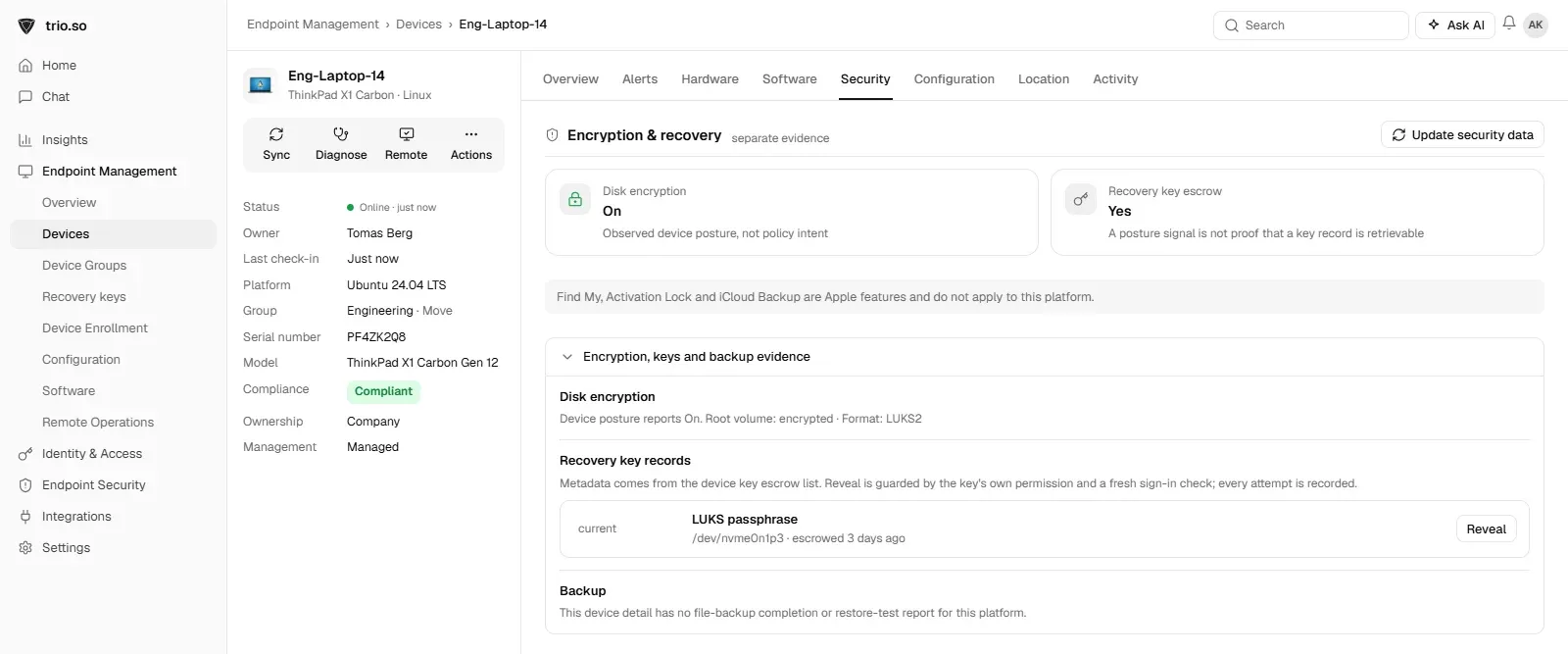
Encrypting one laptop at install is easy; proving that fifty are encrypted, and finding the recovery passphrase for one that will not boot, is the work. trio.so shows the disk encryption status of enrolled Linux devices, its Linux policy includes LUKS disk encryption, and the LUKS passphrase for a device is escrowed in the console, where revealing it needs a fresh sign-in check. See Linux device management.
Related reading: Linux user management best practices and what full disk encryption is.
trio.so shows disk encryption status for enrolled Linux devices and keeps their recovery keys.
trio.so brings device management, patching and security policies for Windows, macOS, Linux, iOS/iPadOS and Android into one console. Enroll a device and see it in the console within minutes.
trio.so brings device management, patching and security policies for Windows, macOS, Linux, iOS/iPadOS and Android into one console. Enroll a device and see it in the console within minutes.





Have questions? We've got answers. This section covers some of the most commonly asked questions related to this topic.
cryptsetup reencrypt, but converting the root file system in place is risky. The safer route is to back up, reinstall with encryption, and restore your data.cryptsetup benchmark to compare encryption speed with your disk speed.Related
The related industry news, interviews, technologies, and resources.
Turn on BitLocker with Group Policy: policy path, TPM and PIN, recovery key backup to AD, and the fix for "require that a recovery password be specified".
Endpoint encryption solutions are key for protecting data by converting it into an unreadable format that can only be decrypted by authorized individuals
Wondering about hardware vs software encryption? Learn the key differences to secure your business's sensitive data.
What full disk encryption is, how it works on Windows, Mac, Linux, iPhone and Android, how it differs from file encryption, and how to roll it out.
Sichere Geräteverschlüsselung: Erfahren Sie, wie MDM Datenpannen verhindert und Ihre Compliance einfach aufrechterhält.
Turn off or suspend BitLocker on Windows 10 and 11, check if it is on, and handle a fleet without losing recovery keys or failing compliance.
BitLocker vs VeraCrypt: Which is best for enterprise encryption? Compare features, security, and management to choose the right fit.
What BitLocker drive encryption is, how TPM, PIN and recovery keys work, Windows 11 Home vs Pro, and how IT turns it on and keeps keys safe at scale.
14-day free trial. No credit card required.
trio.so for MSPs: one console, separate clients