


How-Tos
How to Run a PowerShell Script on Multiple Computers
To run powershell script on multiple computers reliably, you need to know which method breaks on offline machines, workgroups, and Mac endpoints.
Sichere Geräteverschlüsselung: Erfahren Sie, wie MDM Datenpannen verhindert und Ihre Compliance einfach aufrechterhält.
Device encryption is a fundamental security measure that converts data into unreadable code to prevent unauthorized access. In an era where data breaches and cyber threats are increasing, ensuring the security of personal and sensitive information stored on electronic devices is important. From laptops and desktops to smartphones and tablets, device encryption plays a crucial role in protecting data across all platforms. This blog dives into the various aspects of device encryption, including types of encryptions, how to enable it on different devices, and the essential role Mobile Device Management (MDM) systems play in managing and securing encrypted devices.
Device encryption is the process of converting data into a code to prevent unauthorized access. This security measure is essential for protecting personal and sensitive information stored on electronic devices. By encrypting data, users ensure that their information is protected from unauthorized access, even if the device is lost or stolen.
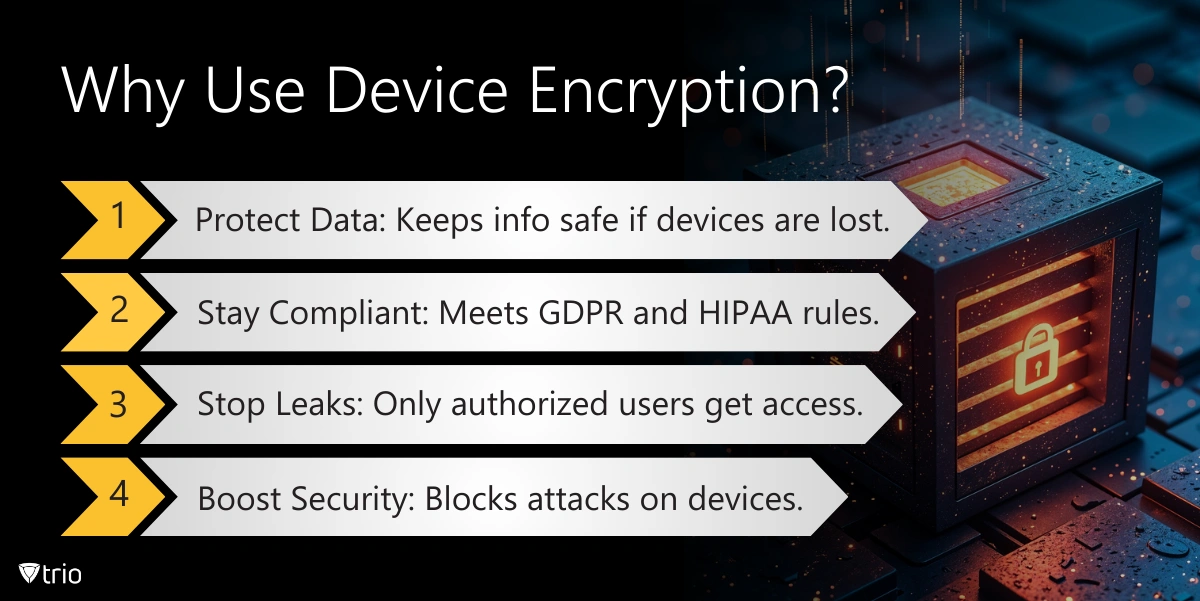
The primary purpose of device encryption is to protect data from unauthorized access. This is especially crucial if a device is lost or stolen. When data is encrypted, only individuals with the correct decryption key can access the information. This ensures that personal and sensitive data remains secure, providing peace of mind for users who rely on their devices for storing important information. Encryption is a vital component of broader IT risk management strategies aimed at mitigating the impacts of company data breaches and ensuring robust data loss prevention measures.
Different operating systems offer unique encryption methods to secure data. Here’s a look at the various types:
Computer encryption involves securing the data on your PC or laptop. Both Windows and macOS provide built-in encryption tools to help users protect their data.
Mobile devices such as smartphones and tablets also support encryption to protect user data and enhance security.
By understanding and utilizing these encryption tools, users can significantly enhance the security of their devices and the data stored on them. 
Encrypting your device can be straightforward if you follow the right steps. Here’s a brief overview of how to enable encryption on different platforms:
Understanding how to manage and adjust encryption settings is crucial for maintaining the security of your devices. Properly configured encryption settings can protect your data from unauthorized access and ensure that sensitive information remains confidential.
Adjusting your device's encryption settings can significantly enhance security. It's important to regularly review and update these settings to ensure they provide the best possible protection.
For iPhones, built-in encryption is enabled by default when you set up a passcode. However, you can add more security with specialized apps:
Android devices support comprehensive encryption settings to safeguard your data. Here's how you can manage them effectively:
Regularly reviewing and adjusting your device encryption settings ensures that your data remains secure against evolving threats and attacks. By leveraging built-in encryption features and supplementary apps, you can enhance the protection of sensitive information on your devices.
Mobile Device Management (MDM) systems play a crucial role in managing and securing device encryption across multiple devices. These solutions are essential for organizations and educational institutions relying on numerous devices. MDM helps manage and secure devices by enabling remote monitoring, updating software, and configuring settings to ensure compliance with security policies.
Implementing device encryption is essential for protecting sensitive data across all types of devices, from computers to mobile phones. It provides a robust defense against unauthorized access, ensuring that personal and organizational data remain secure even if devices are lost or stolen. MDM solutions further enhance this security by enabling remote management, enforcing security policies, and ensuring compliance with regulatory standards. By integrating MDM with device encryption, organizations can achieve a comprehensive security strategy that protects data and enhances operational efficiency. For organizations looking to implement or improve their device encryption and management strategies, Trio offers a comprehensive MDM solution that provides enhanced security, simplified device management, and improved compliance. Try Trio’s free demo today to see how it can enhance your data security strategy and protect against various cyber threats such as smishing attacks.
Every organization today needs a solution to automate time-consuming tasks and strengthen security. Without the right tools, manual processes drain resources and leave gaps in protection. Trio MDM is designed to solve this problem, automating key tasks, boosting security, and ensuring compliance with ease.
Every organization today needs a solution to automate time-consuming tasks and strengthen security. Without the right tools, manual processes drain resources and leave gaps in protection. Trio MDM is designed to solve this problem, automating key tasks, boosting security, and ensuring compliance with ease.





Have questions? We've got answers. This section covers some of the most commonly asked questions related to this topic.
Related
The related industry news, interviews, technologies, and resources.
To run powershell script on multiple computers reliably, you need to know which method breaks on offline machines, workgroups, and Mac endpoints.
You can stop employees from installing software on Windows using GPO, AppLocker, or MDM. Here's how each method works and which fits your setup.
If you want to know how to block websites on iPhone, this guide covers Screen Time, DNS filtering, and MDM — including where each method breaks down.
If you're learning how to block an app on iPhone for a managed fleet, start here: supervised enrollment is the gate to real MDM enforcement.
Learn how to choose the right MDM solution with 9 essential criteria. Complete guide for evaluating features, security, and vendor capabilities.
Learn how to execute scripts remotely with security in mind. Methods, best practices, and scaling strategies for IT operations.
Complete guide to pushing Android remote updates with MDM. Learn methods for app, system, and policy updates across managed devices.
Explore all methods to remotely lock Windows PCs - from built-in Windows features to MDM solutions and enterprise management tools.